There are many users who want to migrate MBOX files to Yahoo Mail account with attachments. If you are also looking to move your data, then this is the right blog. Here, in this comprehensive guide, we will share the most effective method to import MBOX to Yahoo Mail in easy way. By using professional MBOX Migrator you can transfer emails, attachments, contacts, calendars, and other mailbox data to your Yahoo account without losing anything.
Yahoo Mail is a web-based email service that provides users with a free email account. It has a number of features that set it apart from other email providers, including the ability to add attachments, create disposable emails, and send instant messages and emails simultaneously. Yahoo Mail also offers a variety of themes and designs to personalize your email account.
Opening the MBOX file is not possible directly through the Yahoo Mail account. This can be a frustrating feeling, especially when you have so much to access your files and no way to do it – but don’t worry! There are multiple approaches one can take to deal with this issue and we’d like to share one of the best methods with you today.
How to Import MBOX File to Yahoo with Attachments?
Yota Email Migration Tool is an advanced solution that allows you to quickly import your files with attachments. It uses the latest technology to convert all of your emails along with sender’s name, subject line, attachments, and more into different format.
The software offers straightforward solution to transfer the MBOX files. It also lets you to import MBOX to Gmail, iCloud, Outlook, Rackspace, Opera Mail, Rediffmail, etc. It works successfully with all MBOX files created from Thunderbird, Mac Mail, Entourage, SeaMonkey, Eudora, Postbox, etc.
You can download the software on any version of Windows OS to start the import process.
Steps to Migrate MBOX to Yahoo Mail are as follows:
- Install and Run the tool on your Windows PC. Click on Open>> Email Data Files>> MBOX Files.

- Add the files into the panel by selecting Choose Files or Choose Folder options.

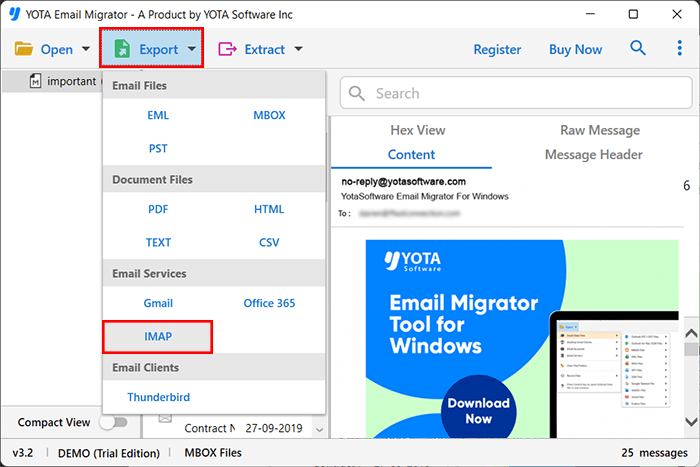
- Now, go to the Export tab and choose the IMAP option.
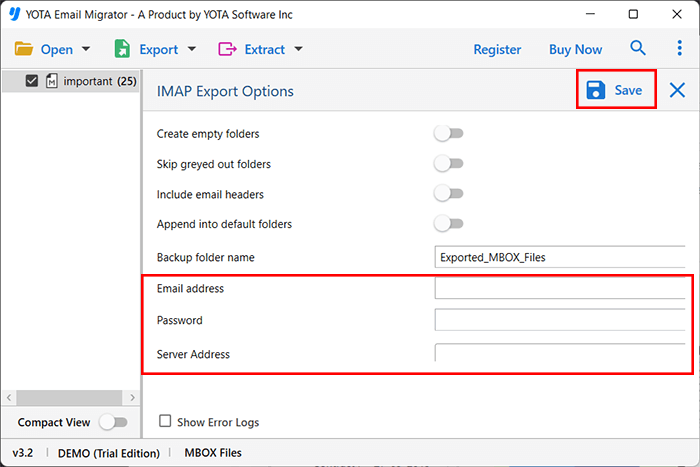
- Finally, enter the login credentials of the Yahoo account and hit the Save button.
Check out the video below and know the full step by step process to import MBOX to Yahoo Mail account.
What are the Benefits of Automated Tool?
Export Unlimited Files: This is a fast, reliable, and accurate tool that enables users to transfer large-size MBOX files to their Yahoo webmail account. The software is especially useful for individuals who need to move an unlimited amount of data from their mailbox folder to Yahoo mailboxes with full accuracy.
Move MBOX to Webmail: It is an automated tool that allows users to access their MBOX files in other webmail accounts. You can also move MBOX files to Office 365, Google Workspace, Yandex, Zoho Mail, Hotmail, etc. This allows them to access all of their email messages, folders, and contacts from any device.
Keep Data Integrity Intact: The software preserves the email hierarchy during the process. Apart from that, it also preserves the folder and sub-folder structure. The software keeps the meta data intact without making changes in its original components such as Inbox, Drafts, Sent Items, etc.
Windows Compatible: The program is the perfect solution for anyone looking to migrate email data from the mailbox folder. The software is easy-to-use and compatible with the latest versions of Windows including Win 11, 10, 8, 7, etc.
Simple and Independent tool: It is powerful software that swiftly transfer mailbox data from MBOX file to Yahoo Mail. It is the fastest solution due to its high-speed algorithms. It is completely standalone to accomplish the task hence no need to install any other software or plugin in your system.
Download Free MBOX to Yahoo Migration Tool
This is a powerful application that makes the migration process very easy. It is simple to use and is helpful for both technical and non-technical users to import MBOX to Yahoo Mail. The free version of this application can be used to migrate only a few emails. For complete mailbox migration, you need to purchase a license edition of the software.
FAQ’s
Are there any limitations for this tool?
Nope! This tool can handle hundreds and thousands of MBOX files. You can try it out with a few in the demo version, but if you get the license version, you’ll have no limits at all!
Can I transfer a bulk MBOX files to Yahoo account utilizing this software?
Yes, definitely! This is a powerful tool for migrating as many MBOX files to the number of email clients as you need.
Do I need to download another program to use this tool?
Not at all! It’s completely a standalone software. You won’t have to install or set up anything extra while using this tool.


