This article shows you proven methods to import PST to Yahoo Mail, including attachments. If you’re also looking for a solution to this problem, this article will help you. We’ll show you the two best ways – a manual and an automated to perform this migration.
Before proceeding with the methods, we understand the reasons behind the PST file migration.
Why Transfer Outlook PST File to Yahoo Mail?
Here are some benefits of migrating PST emails to Yahoo Mail.
- You can access your emails anytime from any device.
- No need to install the Outlook application to access your files.
- Store emails safely with Yahoo’s cloud-based platform.
- Yahoo Mail is a simple, clean, and easy-to-use email service.
Now, let us discuss the solutions.
How to Import PST to Yahoo Mail Free?
You can manually open PST file in Yahoo Mail account using MS Outlook. Follow these steps for this:
- Launch Microsoft Outlook on your Computer.
- Next, go to the File>> Info>> Add Account.
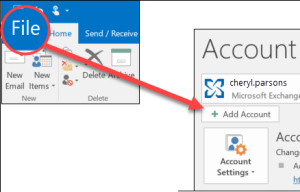
- Enter your Yahoo Mail email address and click Connect.

- Enter the IMAP setting details of your Yahoo Mail to complete the setup process.
- After configuration, navigate to File >> Open & Export >> Import/Export.
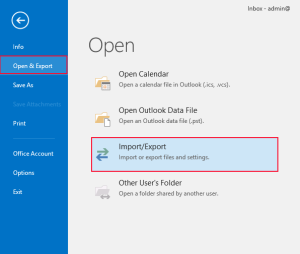
- Choose Import from another program or File and click Next.

- Select the Outlook Data File (.pst) and press Next to proceed.

- Browse and select the PST file that you want to import.
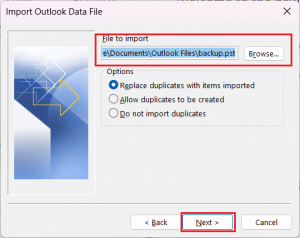
- Select the Yahoo mailbox as the destination and click Finish.

The process is complete!
Why Manual Method not suggested?
- This method allows you to move only messages, not any included attachments.
- It relies on Outlook, so it must be installed on your device.
- There are some complicated steps, which can cause difficulty for non-technical users.
- No filter option to import selected data items from a PST file.
- There is the risk of data loss with this method.
How to Import PST File into Yahoo Mail Automatically?
Try the Yota PST File Converter to open PST file in Yahoo Mail in a few simple clicks. The software can directly import PST to Yahoo Mail without Outlook. With this utility, you can import multiple .pst files at once. This tool allows you to choose specific folders for migrating. It preserves all email attributes and folder structure during the process.
With this software, it is easy to migrate both ANSI and UNICODE PST files. Also, it helps you repair a damaged PST file and transfer it to a Yahoo Mail account. You can download the trial version to verify its performance.
Steps to Import PST to Yahoo Mail Without Outlook are;
- Launch the email conversion software on your Windows computer.

- Click on Open>> Email Data Files>> Outlook PST Files.

- Now, click on Export and select IMAP as the target location.

- Enter your Yahoo Mail login credentials and hit the Save button.

That’s it! Now, you can open PST file in Yahoo Mail account with ease.
Watch: How to Import PST to Yahoo With Attachments
Advantages of PST to Yahoo Import Tool
- Keeps email properties intact while migration, including attachments and hyperlinks.
- Supports bulk migration of PST files to Yahoo Mail while saving time and effort when handling large numbers of files.
- Maintains original folder structure, so your emails appear in Yahoo Mail just like they were in the PST file.
- User-friendly interface designed for beginners, making it simple to import PST to Yahoo Mail without needing any technical help.
- Exports all mailbox items, including emails, contacts, calendars, and tasks, with a preview option before importing into Yahoo Mail.
- 24/7 live chat support is available to help users instantly resolve any issues while migrating PST files to Yahoo Mail.
Conclusion
Importing PST file into Yahoo Mail is a simple task if you use the right approach. In this post, we have explained two simple and reliable techniques to open PST file in Yahoo Mail account. You can choose any method that is most suitable for you. However, the manual method is free, but it is a lengthy and time-consuming process. Also, it requires an Outlook installation on the system. If you want to import PST to Yahoo Mail without Outlook and in bulk, using the professional solution is the best choice.
FAQs
Q 1. How to import PST file in Yahoo without Outlook?
Ans. You can use the PST Converter Tool to directly import PST to Yahoo Mail without Outlook installation.
Q 2. How can I import a few selective emails from PST file to Yahoo mailbox?
Ans. The software allows you to import selective emails from the Outlook PST file via advanced filters.
Q 3. Can I test the software before purchasing the license key?
Ans. Yes, you can download the free demo version of the tool that lets you export 10 emails per folder. You don’t have to pay anything for downloading the trial version.
Q 4. Can I download this utility on my Windows 11 PC?
Ans. Yes, the tool has been designed for all Windows users supporting all the latest Windows OS, including Windows 11.