When your Outlook Mailbox still full even after deleting data, then it is frustrating for the user. A full mailbox can prevent you from sending or receiving new messages. It is causing unnecessary disruptions. That’s why it is important to find effective ways to solve the issue that why Outlook Mailbox still full even after deleting data. Deleting emails does not always immediately reduce the PST file size. That is because Outlook moves deleted items to the Deleted items or Trash Folder. Which is counted towards the total storage. Additionally, when you empty these folders does not instantly shrink the PST folders. The file size remains the same until it is compacted manually.
If you want to free up the space and fix the “Outlook Mailbox full” error. Users need to perform the additional steps such as the empty deleted folders, archiving old emails and compacting the PST file. In this informative guide, we will explore the common reasons behind this issue and also know the best possible solutions of this Outlook mailbox still full even after deleting data. So, let’s read this article.
Why Does Outlook Mailbox Still Full Even After Deleting Data? – Common reasons
If your Outlook tells you that your mailbox is full even after you have deleted emails. Then, there are several reasons behind this issue. Here we explain the common reasons of Outlook Mailbox still full even after deleting data are as follows-
- Deleted Items Still Take Space: When you delete the emails, then the emails move to the deleted items. This folder is still using the storage space until you completely empty this folder.
- Old or Outdated Outlook Version: When you are using the outdated Outlook version then it causes bugs and storage issues. So, you will make sure to update Outlook regularly to avoid problems.
- Third-Party Add-ins or Plug-ins: Some of the faulty and unnecessary add-ins can interfere with the Outlook. Then it may cause storage errors. You will try to disable or remove unused add-ins.
- Syncing Issues with Exchange or IMAP Accounts: If you are using the Exchange or IMAP account. It will create the syncing problem and make your mailbox like it’s full when it is not refreshed. So, you should refresh or re-sync your account to fix it.
- Outlook Data File Not Compacting Automatically: Even when you delete the data the PST will not shrink automatically. So, you need to manually compact the file to free up the space.
Manual way to fix Outlook Mailbox Still Full Even After Deleting Data Problem
When you have seen the Outlook mailbox full even when you are deleting emails. Then, you should try these manual solutions that we discuss below to fix this issue. Here is the step-by-step solution to resolve the issue are as follows-
1. Empty the Deleted Items Folder: When you delete the emails, they are moved in the deleted items folder which still needs storage space. To permanently solve this issue, follow these steps-
- Open Outlook on your computer.
- In the left-side panel, right-click on the Deleted Items folder.
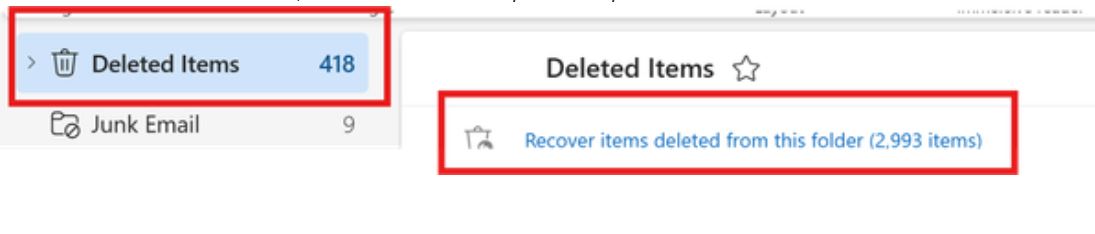
- Select “Empty Folder” to delete all items permanently.
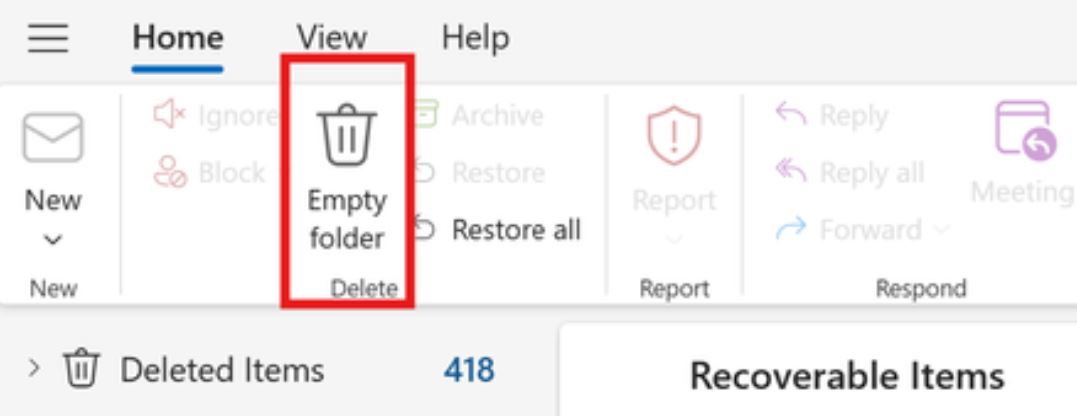
This clears temporary storage, but if your Outlook mailbox still full even after deleting data issue, then you will proceed to the next solution.
2. Compact PST or OST Files: Even after deleting the items Outlook data file like PST or OST does not shrink automatically. You need to follow these steps to compact it manually-
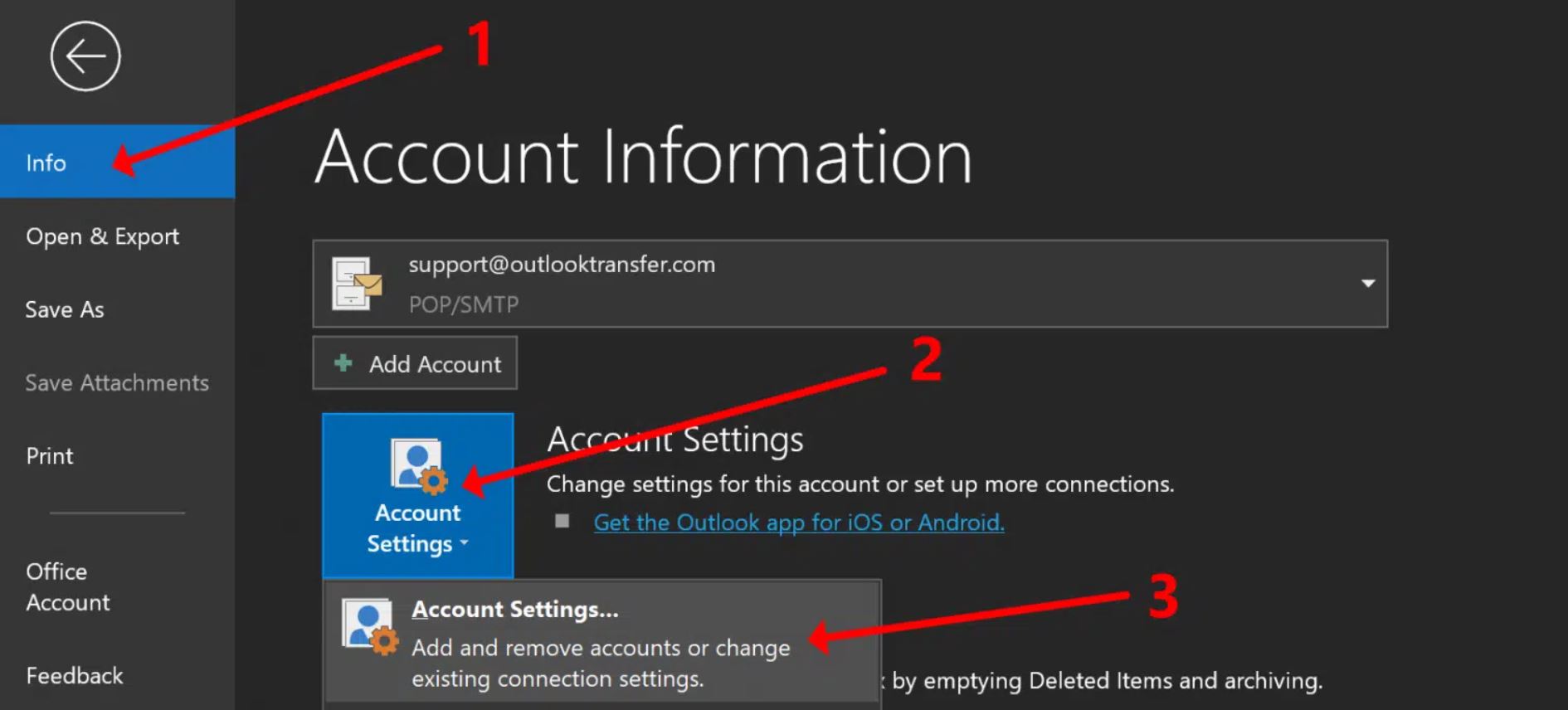
- Click on the File tab > Account Settings > again Account Settings.
- Go to the Data Files tab.
- Select your file and click Settings.
- Click “Compact Now”.
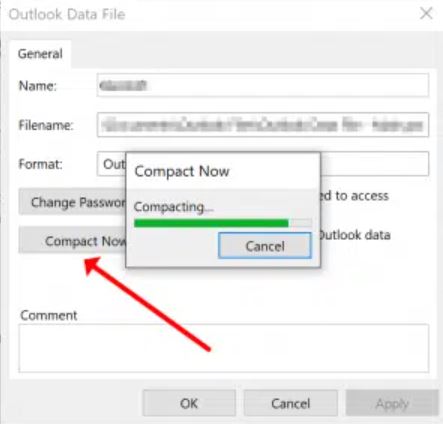
This will help you to reduce the physical size of the data file and frees up storage.
3. Remove Cache from Cached Exchange Mode: The cache exchange mode folder saves the local copy of your mailbox, which sometimes becomes outdated and corrupted.
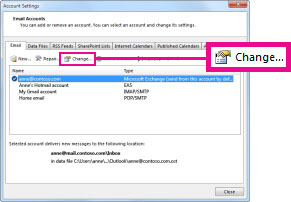
- Go to File > Account Settings > Account Settings.
- Select your Outlook account, then click Change.
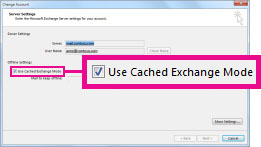
- Ensure Use Cached Exchange Mode is checked.
- Close and restart Outlook.
4. Archive Old Outlook Emails: Archiving old emails moves them to a separate PST file, reducing the active mailbox size.
- Click on File > Tools > Clean Up Old Items.
- Choose the folder you want to archive.
- Set a date to archive items older than that date.
- Browse and select a location to save the archive PST file.
- Click OK to start archiving.
5. Use the Mailbox Cleanup Tool: Outlook includes a built-in utility to help manage mailbox size based on item age, size, and location.
- Go to File > Tools > Mailbox Cleanup.
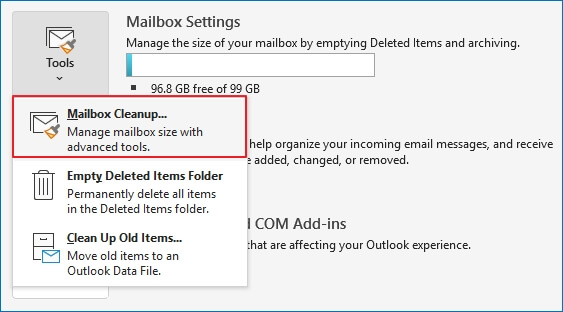
- Choose from various options such as: View mailbox size, find large items and empty deleted and conflict folders.
To prevent the future Outlook mailbox full errors, you can regularly delete and empty the unnecessary emails, archive old emails, compact your PST file monthly and keep the Outlook updated. These steps will help maintain a clean, efficiently reduce mailbox size and prevent disruptions in sending or receiving emails.
Solution to Outlook Mailbox Full Issue – Expert Tool
There is always a chance the “Outlook mailbox is full” issue can happen again. To avoid data loss and any further Outlook mailbox still full even after deleting data issue. So, it is the best choice to backup outlook emails on a regular basis. You can use the Yota Outlook Backup Tool to make this process simple and efficient. It allows you to export Outlook emails, contacts, calendars, and tasks to your local storage in various formats like PST, EML, PDF, and more.
Additionally, this tool ensures that all your important data is saved safely. It supports bulk backup emails, works on all Windows versions. It does not require any additional software. With its easy-to-use interface, even non-technical users can create reliable backups without hassle.
Summing Up
In this above section, we have discussed the reasons behind the Outlook mailbox full even after deleting emails. we also explore the best possible solutions to resolve this issue. Additionally, we will recommend using an expert solution like the Yota Outlook Backup Tool. While we done the manual method to solve the Outlook Mailbox Still Full Even After Deleting Data issue, but the issue arises again and again. So, the professional help to avoid the future data loss and secure way to backup the data locally. You can also try the demo version of this software before making the full version.

