Seeing the “Gmail virus scanners are temporarily unavailable” message can be quite frustrating, especially when you’re waiting for important emails or attachments. While this issue doesn’t last long, it’s still helpful to know the causes and solutions. In this post, we’ll explain step-by-step what the messages mean and how to fix the “Gmail virus scanners are temporarily unavailable” error.
Understanding the Gmail Virus Scanner
This is a built-in security feature that protects you from malicious emails and attachments. When someone sends you an email, Gmail automatically scans for viruses before they reach your Gmail inbox. If Gmail detects a virus, it blocks the email or the unwanted websites. If a threat exists, Gmail warns you before clicking on it or blocks the content entirely. If an infected file is already in your inbox, Gmail won’t let you open or download it, protecting your device.
How to Fix the Gmail Virus Scanners Are Temporarily Unavailable Issue?
Here we discuss the manual methods to fix the Gmail virus scanners temporarily unavailable problem:
- Check your Internet Connection: A slow or unstable internet connection can cause Gmail to not work properly. Make sure you have a reliable network connection. If necessary, try restarting your modem or router.
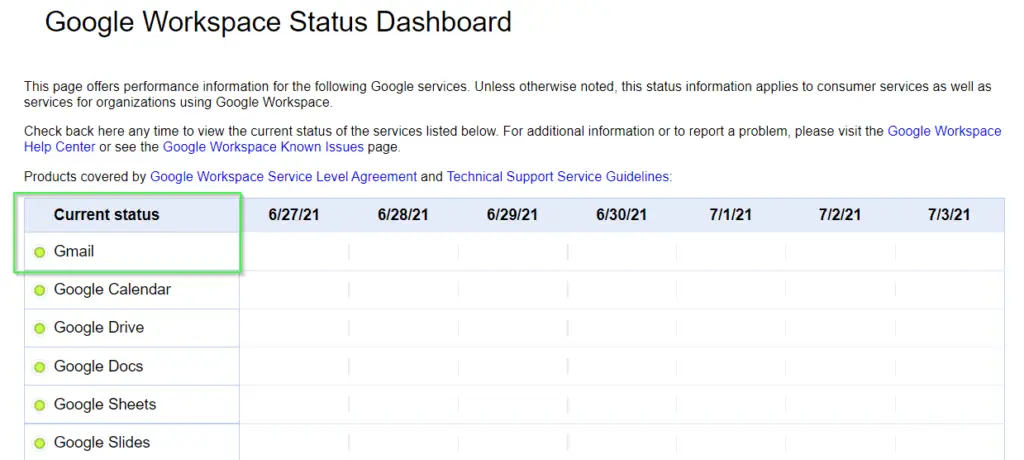
- Gmail Service Status: Sometimes the problem isn’t your fault. Visit the Google Workspace status dashboard to check for Gmail outages or technical issues affecting users worldwide.
- Clear your Browser Cache and Cookies: Clearing your browser cache and cookies can affect Gmail’s loading. Go to your browser’s settings > Clear browsing data. This method often resolves the temporary error that prevents Gmail from loading.

- Try a Different Web Browser: If Gmail isn’t working with your current browser, try using a different browser. Some errors are caused by specific browser bugs or outdated versions.
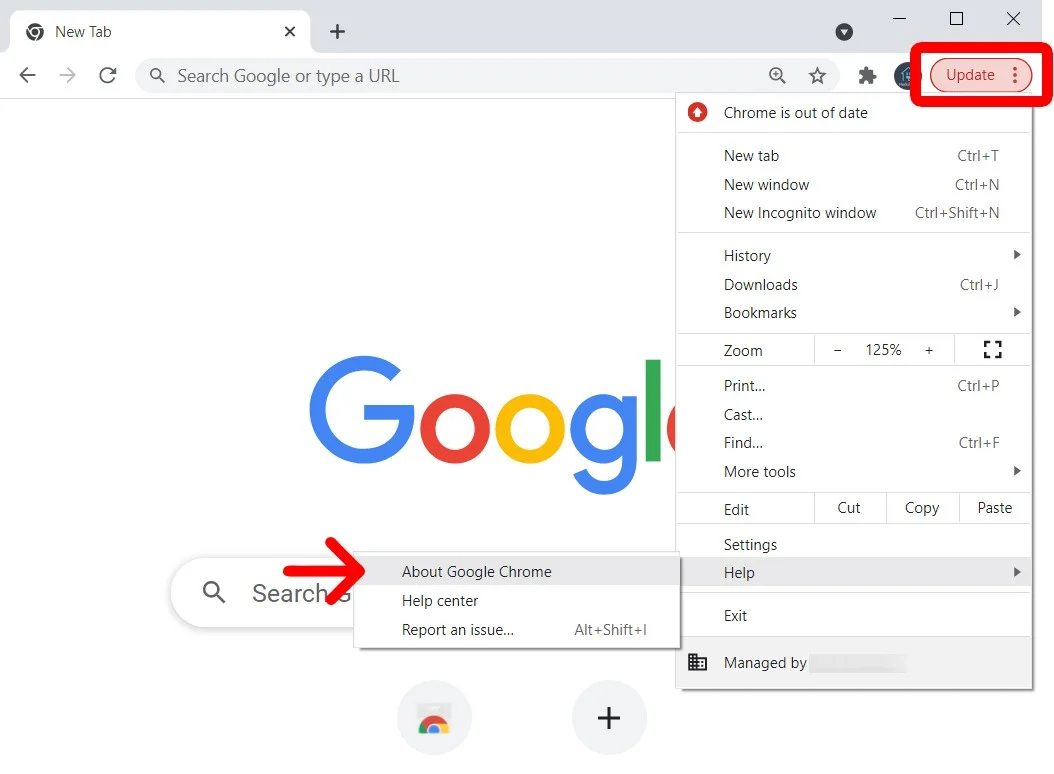
- Update your Browser. This will ensure your web browser is up to date. Older browser versions may not support new Gmail features, such as virus scanning.
- Contact Gmail Support. If the above methods don’t work, contact the Gmail support team. You can post your questions about similar issues in the support forums.
So, with these manual methods, you can try to fix the Gmail virus scanners are temporarily unavailable error. If the problem continues or you are still worried about your Gmail data security. Then, you can use the professional tool to save your entire Gmail data.
Prevent Gmail Errors With an Expert Tool
To prevent Gmail errors like “Gmail virus scanners are temporarily unavailable,” it is important to keep your account and system in good condition. If you are still unable to open attachments in Gmail, then you must use the professional tool. Yota Gmail Backup Tool is a smart and reliable solution that makes it easier to access important data offline.
It helps you download attachments along with Gmail emails to the computer. You can save your account emails locally at the desired location to multiple file formats. You can export Gmail to PST, PDF, MBOX, etc.
Therefore, it’s advisable to back up your Gmail data beforehand using an automated tool. This will prevent future problems and prevent data loss or your Gmail account from getting stuck. In the event of errors, such as Gmail virus scanners are temporarily unavailable, backing up your Gmail data will help and allow you to access your data, emails, and attachments offline at any time.
Conclusion
In the above post, we discussed the Gmail errors that users face many times while working with Gmail. The Gmail virus scanners are temporarily unavailable error is common, and many users face this error from time to time. So, you can fix this error by using the above-discussed manual methods. By checking the internet connection, updating the browser, and other ways. But if you want to secure your Gmail data permanently, then we recommend the professional tool to secure the data locally with this tool.
It is the smart choice to quickly download all your Gmail attachments. It will save the whole Gmail data if Gmail runs with some errors. Now it’s totally up to you to choose the way that best suits your needs to keep your Gmail data safe and secure.
