Are you looking for an easy way to migrate Lycos email to Gmail mailbox with attachments? If yes, then you have come to the right place. In this technical write-up, we will discuss the hassle-free and effective method to transfer emails to Google account. So, read on to find out how to make this process smooth and effortless.
How to Import Lycos to Gmail Manually?
- Sign in to your Gmail account.
- Click the Settings and choose See all settings.
- Open the Accounts and Import tab.
- Click Import mail and contacts.
- Enter your Lycos Mail email address.
- Provide Lycos Mail IMAP server details.
- Select the emails you want to import.
- Click Start Import and wait for the process to finish.
Note: If you’re planning to manually move your messages, you might face some difficulties. As there is no direct method to migrate your data. Plus, this method can be time-consuming and you might even lose your data, so it’s not recommended for all users.
How to Migrate Lycos Emails to Gmail Directly?
Yota Lycos Backup Tool is a great option for those who are looking to export emails from Lycos to Google Mail account with ease. It provides safe results without any modification.
The software has been designed with a simple GUI interface that lets you to transfer the specific emails from your mailbox without spending extra time. It provides different filter options for a specific migration that makes it easy to migrate selective items from Lycos account to Gmail. The application works with all the latest versions of Windows OS including Win 11, 10, 8, 7, etc.
Steps to Move Lycos Emails to Gmail are as follows:
- Download and Install the software on your PC.
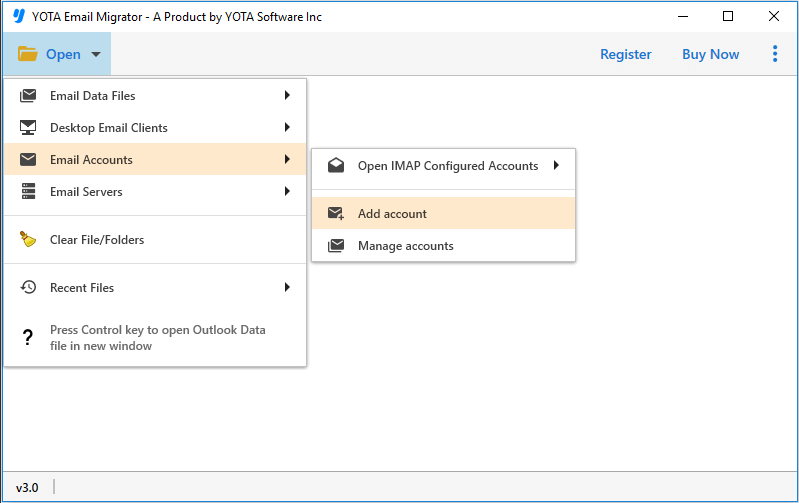
- Next, click on Open and choose Email Accounts>> Add account.
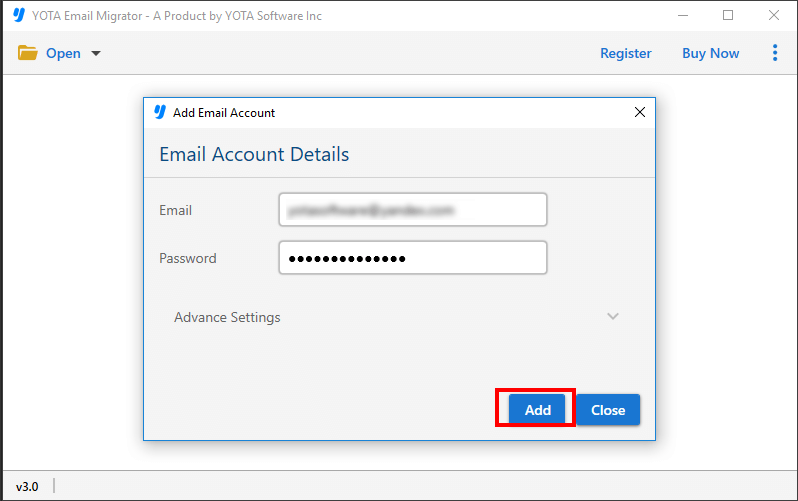
- Here, you have to enter the login details of Lycos account and upload the files into the panel.
- Click on the Export tab and select Gmail directly as your saving option.

- Finally, provide the correct login credentials of your Gmail account and hit the Save button.

Features of Lycos to Gmail Migration Tool
- Straightforward Tool: With this user-friendly tool, you can easily migrate mailbox with attachments. It is designed with self-navigational panel that makes the entire migration process easy and quick. The software provides step-by-step instructions that guide you throughout.
- Bulk Lycos Mail to Gmail Migration: If you are having lots of emails in your Lycos account and you want to transfer all of them in one go, then you can use its batch mode option. Simply select the folders that you want to export and add them into the software interface. Provide the correct loin details and rest, the tool will take care.
- Retains Meta Data: When you move your emails it’s important to retain the original email properties to maintain the integrity of emails. It ensures that all you emails are migrated with same meta data, without any loss. The software is also capable in retaining the folder hierarchy of the emails and keep them organized.
- Free trial Version: If you want to test the tool and its working then you can download the free demo version. It lets you export a limited number of emails into your desired location and gives you an an opportunity to test the software and see how it performs in terms of speed, accuracy, and ease of use.
Conclusion
We hope that now you know how to migrate Lycos email to Gmail account directly. Here, we have outlined the step-by-step instructions to transfer emails and contacts to your Google account. As there is no direct manual method available to export your data, we recommend using professional tool, a safe and reliable automated solution.
If you have any further questions or need assistance with the migration process, please contact our technical team for support. They will help with all your queries regarding the tool and the process.