Sometimes Outlook Mailbox is heavier due the sending and receiving emails. So, we need to reduce Outlook Mailbox size to avoid any data loss and mismanagement in future. In this blog, we discover how to reduce email file size in Outlook.
As you use Outlook daily, your Mailbox becomes full of old emails, large attachments, and unmanaged messages. This will slow down the performance and prevent the new emails from being sent or received. This will exceed your storage limit. So, it is important to know the methods to reduce Outlook Mailbox size. Let’s read this article to know the benefits of reducing the size of Outlook Mailbox. And also, to explore practical methods to clean up an Outlook account. This will free up the space and keep your inbox running smoothly.
So let’s start with step by step.
Why Reduce the Size of Outlook Mailbox?
There are various reasons to reduce Outlook mailbox size. Some of them are:
- Increase Outlook Speed: A smaller mailbox runs more smoothly. It loads faster and reduces wait times. Overall, reducing the size of your Outlook mailbox increases the speed.
- Faster Email Search: With fewer emails to search through, the Outlook search function becomes significantly faster. It delivers more precise search results and helps you find what you need without frustration.
- Avoid Storage Limits: Most mailboxes have a size limit. Reducing the size of your Outlook mailbox helps you stay within these limits and avoid frustrations when receiving and sending emails.
- Save Storage Space on your Local Server and Server: Large mailboxes can hide important data on your device. Reducing the size frees up storage space and ensures smooth system operation.
- Secure Maintenance and Easier Backup: Smaller mailboxes are easier to back up, organize, and manage. This ensures data security, reduces the risk of data loss, and enables safer maintenance.
Methods to Reduce Outlook Mailbox Size
Here we explain some methods that help you reduce the Outlook Mailbox size:
Method 1: Use the Mailbox Cleanup Tool
Using mailbox cleanup tools, you can reduce the size of your Outlook mailbox without deleting important data. Let’s take a look at the steps:
- Launch Outlook and click File > Info > Tools.
- After that, click on the Mailbox Cleanup Tool option to proceed.
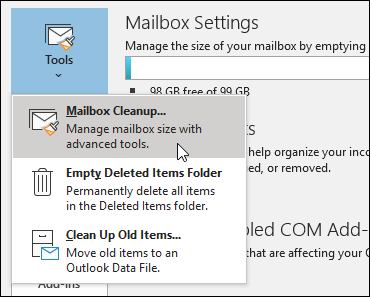
- Click View Mailbox Size… to see the size of each folder.
- Use options: Find items older than x days, Empty, deleted items folder, and view or empty conflict folder.
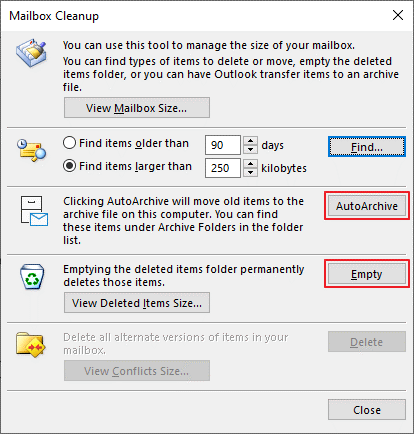
- These actions help reduce Outlook mailbox size.
Method 2: Use the “Compact Now” Option
This method compresses the data files to save space without deleting any data. Steps to follow-
- Right-click “Deleted Items” in the navigation panel and select “Empty Folder.”
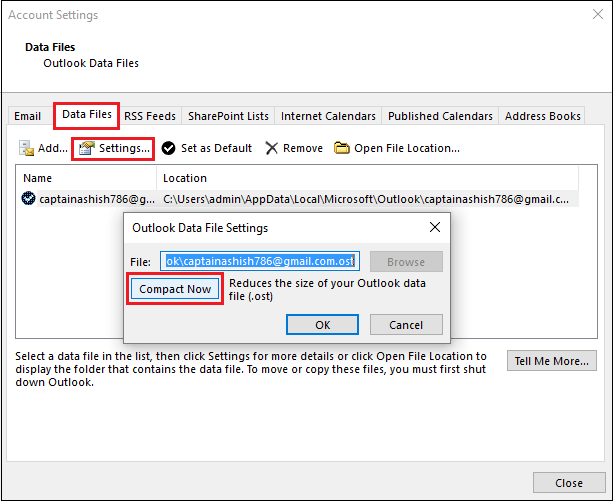
- Go to “File” > “Account Settings” > “Account Settings.”
- Under the Data Files tab, select your PST file and click Settings.
- Click Compact Now to reduce Outlook mailbox size.
Method 3: Archive Old Messages
Move the older emails to the separate archive folder to free up the space in your main Mailbox. Here are the steps to archive old emails are as follows-
- Go to File > Info > Cleanup Tools > Archive.
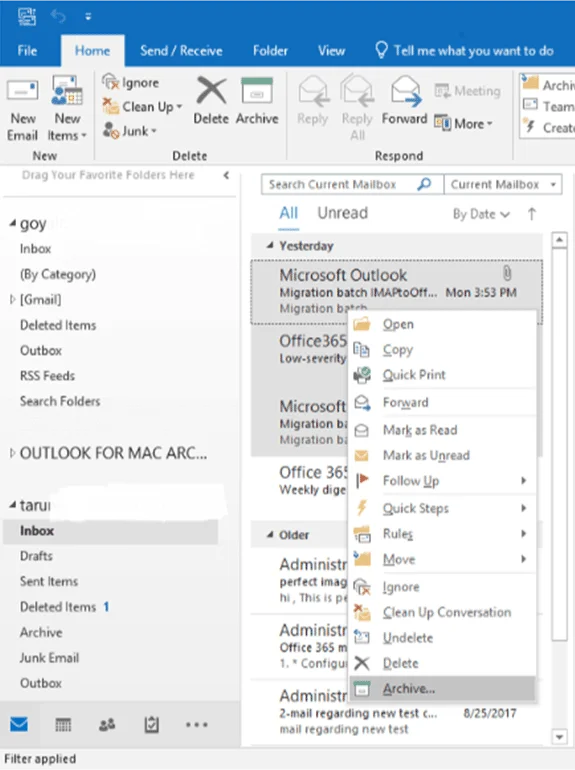
- After that, select the “Archive this folder and all subfolders” option.
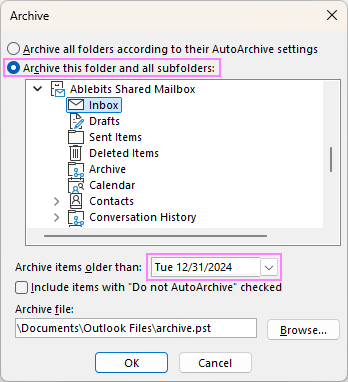
- Pick the folder you want to archive (e.g., Inbox).
- Select a date to archive emails older than that date.
- Optionally include items marked “Do not Auto Archive”.
- Click OK to start archiving.
Professional Method to Reduce Outlook Mailbox Size
Using the Yota PST Converter Tool is an instant and effective way to reduce the size of your Outlook mailbox. It lets you save your emails locally to your computer or external hard drive. The software provides you with an option to export your PST file to PST, EML, PDF, and other file formats.
This will also migrate directly to cloud accounts like PST to Gmail or IMAP. It also supports contact conversion to VCF and calendars to ICS, keeping your data organized and accessible. With features like file repair, password-free access to Outlook data files, and the ability to work without Outlook installed, this tool is best suited for users.
The Bottom Lines
We have now reached the end of this article on how to reduce Outlook mailbox size. He explained various effective methods, including manual solutions and the suggestion of a professional tool. You can choose the solution according to your needs. Each approach serves different purposes, whether you are looking for a quick cleanup or long-term mailbox management. We hope you find this blog information useful and can confidently choose the method that works for you, keeping your mailbox managed for better performance and a hassle-free Outlook experience.