If you are also searching for a solution to backup USA.com emails to computer, then here is the complete solution. This blog will describe the one-stop solution to download emails to local PC. So let’s get started.
USA.com is a free cloud-based email service provided by Mail.com. For this email address, users use the domain @usa.com. Although there are various strict rules and anti-spam measures that impose penalties for users who do not comply with these regulations, they do not adequately protect your data from additional risks.
As we all know, there is always a risk when working with the cloud. User accounts can be hacked at any time by hackers as they are smarter these days. Also, accidental data deletion is a common problem with cloud-based email accounts. So, to secure their emails from hackers and accidental deletion, users want to save USA.com emails to PC or hard drive.
To save USA.com emails to computer, you need to add the following server details.
Email Settings for Usa.com
Incoming Server – IMAP
- Server: imap.mail.com
- Port: 993
- Security: SSL/TLS
- Username: Your full email address
- Password: Your email password
Outgoing Server – SMTP
- Server: smtp.mail.com
- Port: 465
- Security: SSL/TLS
- Username: Your full email address
- Password: Your password
How to Save USA.com Emails to PC Automatically?
You can effortlessly download USA.com emails to computer using the best Email Backup Wizard from Yota Software. It is a 100% secure tool that provides you with accurate results every time. The tool is programmed with an advanced algorithm and has multiple great features. Users can export emails from mailbox account including all attachments.
Additionally, the software can create a backup of multiple emails in a single attempt. One can also select a folder from which he or she wants to export emails. It is a powerful enough tool that lets you save emails from all folders at once without losing the original folder hierarchy.
With this USA.com Mail backup tool, it is possible to download emails only from the selected folders. The software also allows you to save emails to 5+ file formats at the desired location on your system. Plus, it can be easily accessed by any normal computer user without having technical knowledge.
One can also save all emails from your mailbox without installing any additional programs on the system. Along with this, it can be easily installed on any version of Windows PC. You can also use this wizard to move emails from the USA.com account to many more email accounts in a direct manner.
Steps to Backup USA.com Emails to Computer are:
- Download, Install, and Run the tool on your PC.Free Download Buy Now
- After that, go to the Open tab and click on Email Accounts > Add Account.
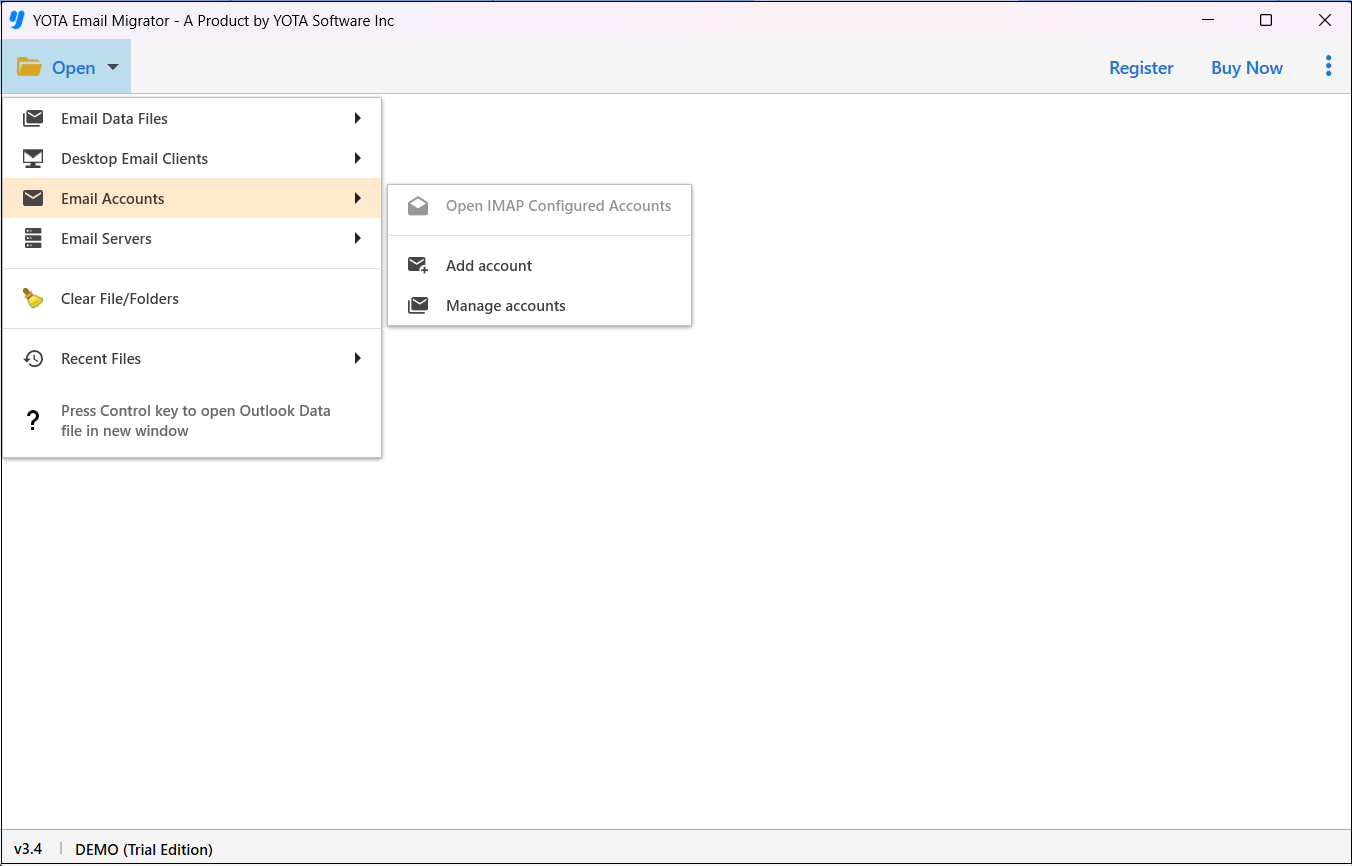
- Enter the correct login credentials of your USA.com account to sign in.

- Then hit the Export option and choose a desired file saving option like PDF.
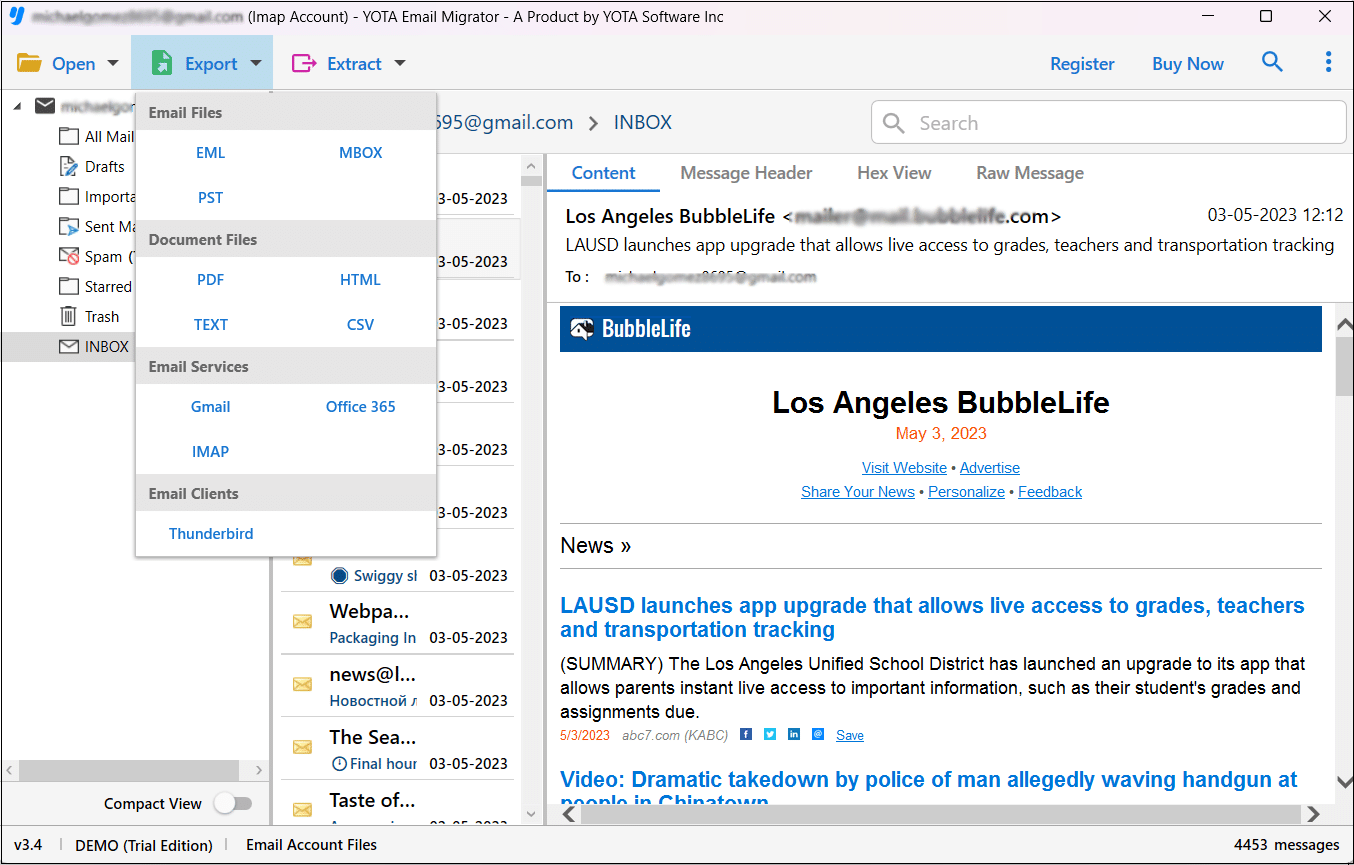
- Lastly, browse a location where you want to store the emails and click Save.

That’s it!
This is how you can successfully download emails from USA.com account to PC or hard drive with the help of this amazing software.
What’s More Provided by the USA.com Mail Backup Solution?
This offers so many useful features that make this a more powerful solution to export USA.com emails to computer. Some of the highlighted features are mentioned here:
-
-
- It offers a simplified user interface by which any kind of user can easily operate it.
- Option to export all email folders in a single attempt with zero loss of data.
- Provides support to create USA.com Mail backup to PC without installing any external applications.
- Freedom to save USA.com emails to computer at the desired location or folder for easy access.
- Download emails from USA.com account to PDF, PST, EML, MBOX, CSV, HTML, and Text file formats.
- Transfer emails from USA.com account to Gmail, Microsoft 365, Zoho Mail, AOL Mail, Roundcube, Rackspace, Amazon WorkMail, and many more.
- Try the demo version to save the first 10 items per folder for free.
-
Questions? We Have Answers
How do I backup emails from USA.com account?
The software helps you to quickly export emails from USA.com account to computer.
Can I download emails from the inbox folder?
The tool lets you export emails from the inbox folder without disturbing the folder structure.
Is it possible to save multiple USA.com accounts?
Yes, it is powerful enough to export emails from multiple USA.com accounts one by one without data loss.
Final Thoughts
Here, we have discussed the professional solution to backup USA.com emails to computer. The highly suggested tool permits you to effortlessly archive emails from your account to a local PC or hard drive. So download the software and start migrating your mailbox to your computer.