Are you facing issue to repair corrupt Thunderbird profile. Then, you should fix this issue by using the reliable solutions. So, in this upcoming guide, we are going through the smart solutions to recover damaged Thunderbird profile. You can restore your corrupt Thunderbird profile and access your data again. Thunderbird is a famous open-source emails client that is well known for its flexibility and features. But there are sometime errors occur in Thunderbird like corrupt Thunderbird profile this will make this application unstable.
When important data is at risk, these issues can be stressful. But don’t worry, we’ve got you covered with tried and tested methods to repair Thunderbird profile. Before diving into the solutions, let’s first look at some of the common causes of a corrupt Thunderbird profile, so you can apply the most suitable solution print emails from Thunderbird.
Common Signs of Corrupt Thunderbird Profile-
A corrupted Thunderbird profile can lead to several unusual behaviors in your email application. Here are some of the most common issues users face:
- Deleted emails still appear in folders even after removal.
- Inbox fails to display emails properly or shows as empty.
- Emails disappear randomly or messages are not visible at all.
- Duplicate messages may show up multiple times.
- Deleted emails can reappear even after you have completely deleted the data.
If you have searched the issues, it is strong indication that you need to repair corrupt Thunderbird profile fast to avoid any issue and data loss. It is important to regularly backup to your contact and emails, especially for business account. To avoid the data loss if there is a system crash. If you are Thunderbird users, you can backup manually to your local emails by copying them by Thunderbird to safe location. In this way, if something goes wrong then you can easily restore your emails by copying them.
In this upcoming section, we explore the 2 simple methods to repair corrupt Thunderbird profile. This simple backup methods helps ensure that your important data is always safe and easily recoverable. Let’s get started!
Manual Method to Repair Corrupt Thunderbird Profile
If you want safe your emails and contacts, it is good practice to regularly backup your Thunderbird profile. Here is the step of instructions are as follows-
Method 1: Backup Your Thunderbird Profile:
- Close Thunderbird completely.
- Go to this folder on your computer:
C:\Users\username\AppData\Roaming\Thunderbird\Profiles\ProfileName - Copy the folders to a safe location.
Method 2: Create a New Profile and Restore Corrupt Thunderbird Profile
- Press Windows + R to open the Run box.
- Type Thunderbird.exe -p and click OK.
- The Profile Manager will open.
- Click Create Profile and then click Next.
- Enter a name for the new profile.
- Select a folder for the profile and click Finish.
- Copy the data from the old profile to the new one.
- Restart Thunderbird and use the new profile.
Method 3: Expert Tool to Repair Corrupt Thunderbird Profile
If the manual method doesn’t work especially due to Thunderbird profile corruption issues, then try Yota Thunderbird Migrator Tool. It offers a reliable and efficient solution to to repair corrupt or inaccessible Thunderbird profiles. This tool is designed to detect Thunderbird profiles automatically, even if they are damaged. With just a few simple clicks, it allows users to backup entire profile, including emails, contacts, and attachments, without any technical guidance.
The tool not only backup emails from Thunderbird but also provides the option to export data to multiple formats like PST, MBOX, PDF, and more. Its user-friendly interface makes the entire process smooth, reliable and quick. This tool is ideal for both beginners and advanced users.
Steps to Save emails from Thunderbird Account:
- Download & Install the recommended tool on your system.
- Click on Open>> Desktop Email Clients>> Thunderbird Accounts.

- It will auto-detect your Thunderbird profile or manually add the folder containing your emails.

- Go to Export and select the desired format to save the data.
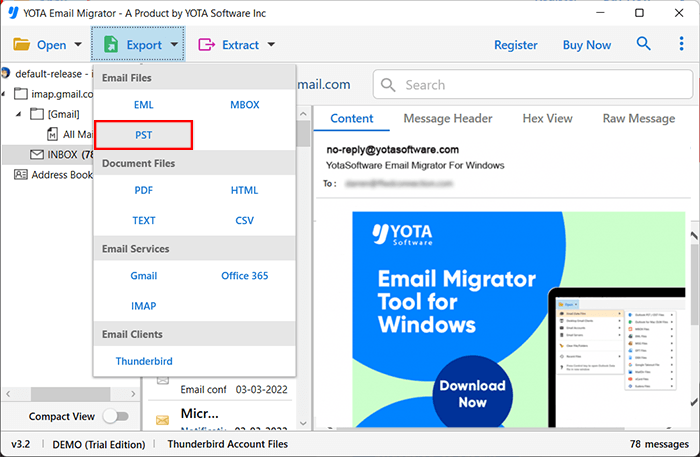
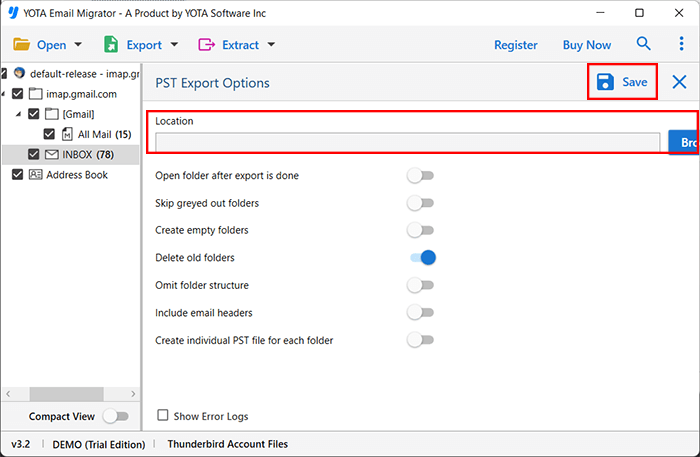
- Browse the location to save the emails and hit the Save button.
Conclusion
In the above write-up, we’ve done our best to provide you with the most effective solutions. The process of repair corrupt Thunderbird profile becomes straightforward when you’re equipped with the right methods. To help you fix this issue, we have discussed you to several tried and tested techniques.
Although, manual methods are free but they have few limitations. Like, you cannot move emails in bulk. Also, it required some technical knowledge to complete the task. And to avoid all the hassle, you can go with the expert recommended solution i.e. Thunderbird Migration Tool. In spite of that, you can make your own decision to go with the methods that suits you best to restore corrupt Thunderbird profile.