Introduction: Do you want to migrate BT email to Gmail account without losing any data? Don’t worry, you are not alone! Many users want to transfer their mailbox to access all their emails in one place for convenience. In this write-up, I will explain all the steps and necessary tools to transfer the data.
Why Users Want to Migrate BT Email to Gmail?
There are various reasons to transfer emails from BT to Gmail or G Suite account. A few of them are:
- If you are importing emails from BTinternet to Gmail then you can easily access your data from anywhere with an internet connection, making it more convenient and accessible than BT Mail.
- Gmail offers better spam filtering option that any other email client. Due to this you will get fewer unwanted or unsolicited emails in your inbox.
- It is also offering 15 GB storage space in comparison to BT Mail so that you can receive and save more emails, attachments, and other files without worrying about running out of space.
- Gmail also provides better integration with other Google services like Google Drive, Google Docs, and Google Calendar. This will help streamline your workflow and save time by allowing you to perform multiple tasks within the same platform.
Let’s look at the common queries that people are asking to migrate BT email to Gmail mailbox:
How to Transfer Emails from BT to Gmail Account Automatically?
Download the Yota IMAP Migration Tool to transfer BT email to Gmail account. The software has been designed with a straightforward panel to migrate all BT account data, including emails, contacts, calendars, tasks, etc., into other platforms. It also lets you import BT emails to Office 365, Thunderbird, Yahoo, Yandex, and 200+ cloud servers. Also, you can create an email backup in multiple file formats, such as PST, which lets you transfer BTinternet email to Outlook, EML, MBOX, PDF, HTML, etc.
One of the notable features of this software is that it preserves the email properties and metadata during the migrate BT email to Gmail process. Also, it maintains the folder hierarchy of the mailbox throughout. Users can download the free demo version of the tool to evaluate its functionality. One can also backup BT emails to the computer at the desired destination.
Steps to Migrate BT Email to Gmail are as follows:
- Install and Launch the tool.
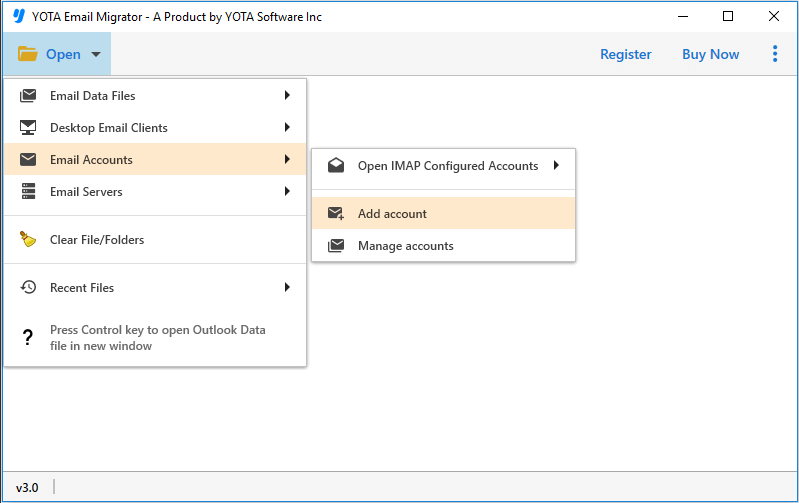
- Then, click on the Open tab and Email Accounts.
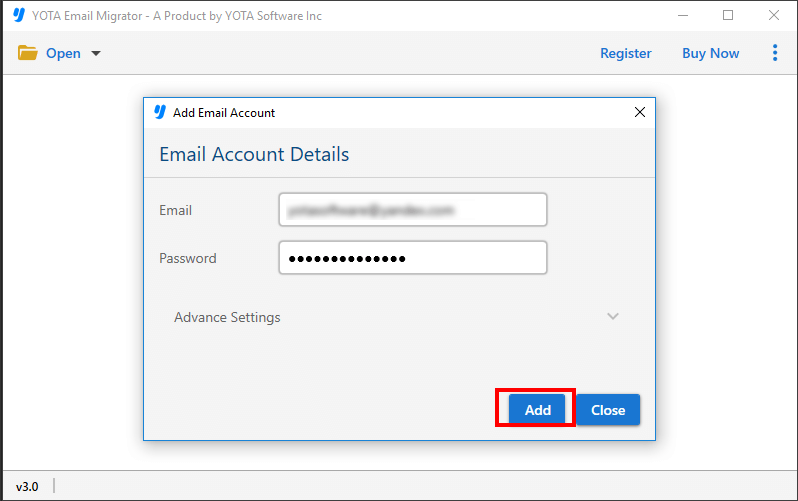
- After that, enter the BT mail account credentials.
- Next, click on the Export option and select Gmail directly.

- Then, enter Gmail account credentials and hit the Save button.

All done!
Check the complete video to migrate BT email to Gmail Account:
That’s it! You can transfer emails from BT to Gmail account using the above few steps very easily.
Benefits of Automated Tool
- Preview Before Migration: This software offers a detailed preview of emails before exporting them to different clients. This will let you easily check or uncheck specific emails for importing into a new Gmail account. This provides full control and transparency that allows you to know exactly which files are being transferred.
- Fully Secured: The tool is an efficient solution that allows you to directly transfer emails with full security. All you need to provide the correct login details for both accounts. And the best part is that it does not save your credentials or any other data in its database.
- Windows Supportive Tool: This tool supports both the latest and previous versions of Windows Operating Systems, such as Windows 11, 10, 8, and 7. It also supports various Windows Server versions like Windows Server 2022, 2019, 2016, and 2012.
- No File Size Limitations: One of the key advantages of this tool is that there is no file size limitations. Users can migrate emails to Gmail without any limitations, and that too with full accuracy.
- Bulk Migration: It allows you to transfer multiple emails from your account. It does not have any limitations while importing emails. Users can migrate hundreds of emails in bulk.
Conclusion
In the above comprehensive post, we have discussed the safe and efficient way to migrate BT email to Gmail or Google Workspace account. To transfer your mailbox items without any hassle, we will advise you to download a trustworthy tool. It comes with a free trial version that allows you to import 10 emails from the source to your target account. So that you will be able to test its functionality before investing in the full version.
If you follow the steps given in the above section, you will not get any errors. But still, if you face any problem during the email migration process, you can contact our support team any time you want.
Frequently Asked Questions
Can I transfer my BT email to Gmail?
Yes, you can transfer emails to Gmail account directly using the Yota Email Migration Tool.
Is the tool compatible with Windows OS?
Yes this tool is compatible with all the latest Windows OS that includes Windows 11, 10, 8.1, 8, 7, etc.
Can I transfer unlimited BT emails using this tool?
Yes, if you are using the pro version of the tool, there are no limitations on the number of emails that you can transfer.
Is there any risk of data loss during the migration process?
This tool is built with data integrity in mind. The tool takes every precaution to prevent data loss, ensuring that your emails are migrated with high precision and security.