As technology evolves, businesses may need to upgrade their email systems to take advantage of new features, improved security, and better performance. That is why migrating emails from one platform to another is very important. These days we are getting a frequent query on how to migrate Yandex Mail to Gmail account.
Do you know how you can transfer Yandex to Gmail?
You can move your mailbox data to Google Mail using
- Gmail Import feature
- Automated Yota Email Migrator
In the below section, we are going to discuss manual approach using Gmail inbuilt Import option. Also, we will use an automated tool for faster and accurate results.
How to Import Yandex Emails to Gmail Manually?
There is a manual method available to transfer Yandex mailbox using Gmail import/export feature. However, if you have large volume of data to transfer, you should go for the automated tool. But first, let us understand the manual steps to move your data.
Step-by-Step Guide to Migrate Yandex Mail to Gmail:
- Open your Gmail account and click on the gear icon in the top-right corner of the screen.
- From the dropdown menu, select Settings.

- In the Settings menu, click on the Accounts and Import tab.

- In the Accounts and Import tab, click Import mail and contacts.

- A new window will open—enter your Yandex email address and click Continue.

- Enter your email password.
- Choose what you want to import:
- Contacts
- Old emails
- New mail for the next 30 days
- Click Start Import.

Limitations of Manual Method
- This manual method is a very time-consuming process, especially, if a user has a large number of emails to import to a Gmail account.
- Using this method, you cannot import contacts, calendars, or other folders to Gmail. You will have to set up these features manually.
- During the manual process, you might lose your valuable data. This could be due to errors or interruptions during the migration process.
- Also, it requires some technical knowledge, including knowledge of server settings, ports, and other parameters. If you are not familiar with these settings, you may find it difficult to complete the process.
How to Transfer All Emails from Yandex to Gmail?
Yota Yandex Backup Tool is a unique and very efficient tool to migrate Yandex to Gmail account. It supports all the popular mail services such as Yahoo Mail, Gmail, Outlook, and many other similar servers. The key feature of this tool is that it performs accurate migration of your emails, contacts, and other details. Also, it does not require any technical skills to operate it; just follow a few simple steps and you will be able to migrate Yandex mailbox to Gmail with attachments.
Additionally. it supports multiple file formats like PST, MBOX, EML, and PDF, so you can access emails on different platforms such as Outlook, Thunderbird, Office 365 and more. It has the built-in feature of preview before migration that lets you analyze the files before migrating emails to Google Mail.
Steps to Transfer Yandex mailbox to Gmail Automatically:
- Download and Run the tool on your Windows PC.
- Go to Open and click on the Email Accounts option.
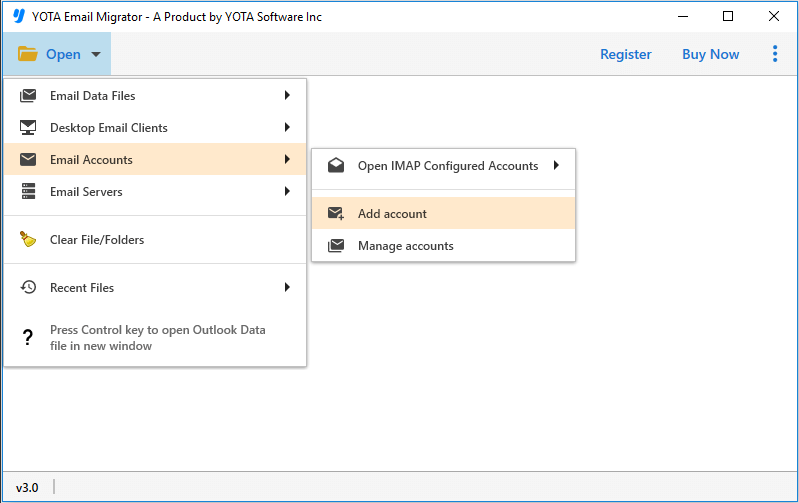
- Enter the login details of your Yandex Mail account and login.

- Next, go to Export and select Gmail as a target location.

- Now, enter the Gmail account credentials and hit the Save button.

Advanced Features of Professional Software
- Batch Mode: This is one of the best utilities to move Yandex emails to Gmail account in bulk. You have the flexibility to import as many as several files from your mailbox without facing any trouble. There is no file size limitation during the migration process.
- Complete Mailbox Migration: You can easily export all the mailbox items like emails, attachments, contacts, calendars, tasks, notes, etc. The utility is designed with advanced technology that does not alter or modify your data from the original files.
- Save Yandex Emails with Attachments: It is the most convenient solution to transfer emails with attachments. It is capable of exporting all your emails to your desired email client without modifying the mailbox items. You can even use this tool to extract attachments from inbox and save them on your PC.
- Maintains Folder Structure: This software is capable of importing your mailbox items to Gmail accounts with maintained data integrity. All the folder and sub-folder hierarchies will be preserved throughout the conversion process.
- Standalone Utility: It is a standalone utility that does not require any other application to export emails from Yandex mailbox. The tool is free from ads and viruses so your data is safe with us. Thousands of professional users trust this tool for its accurate and reliable results.
Frequently Asked Questions
How do I migrate Yandex Mail to Gmail with attachments?
Follow the below steps to move emails to Gmail:
- Download and Install the tool.
- Click on Open>> Email Accounts>> Add Accounts.
- Next, enter the Yandex login credentials and upload the files.
- Now, click the Export tab and choose Gmail as a saving option.
- Enter the Gmail login details and hit the Save button.
Is there a risk of losing email data during the migration process?
No, this tool is a highly secure and reliable solution to import Yandex to Gmail mailbox. The software can move all email elements and metadata to your new account without losing any single data. So, you can fully trust this software.
Can I import specific emails using this mail migration software?
Yes, this tool allows users to select specific emails or folders and export to Gmail. This feature is especially useful for users who want to transfer only specific emails instead of the entire mailbox.
Can I install this utility on Windows 10 PC?
Yes, this software is designed for all Windows OS including Win 11, 10, 8, 7, etc.
Do I need to install any external software for the migration?
No, you don not need to install any other software or plugin to transfer Yandex emails to Gmail. It is a standalone utility.
Conclusion
It is not a hard task to migrate Yandex emails to Gmail with attachments if you have the right tool. In the above article, we have covered a professional method to move all your emails and attachments. It doesn’t require any special skills and configuration. The only thing you need to do is install and set up your account by providing login credentials, then follow the few simple steps provided by us. A free demo of the tool is also being offered so that you can check the working process of the utility without any cost.