If you are looking to import Earthlink emails to Gmail account with attachments, then here is the solution. There are so many users who want to move mailbox data in easy way. EarthLink is an American internet service provider that offers various internet services such as dial-up, and fiber internet, as well as email services.
In this blog, we will discuss the two best methods to transfer emails from Earthlink account. Here, both manual and automated tool have been discussed to export emails to Google account effortlessly. So let’s understand the complete process.
Why to Import EarthLink to Google Mail?
EarthLink is known for its high-speed internet and email services and its user-friendly interface. But, still users are looking to import Earthlink emails to Gmail due to various reasons:
- Gmail offers better security, spam filtering, and more features than EarthLink.
- You can manage multiple accounts in one place.
- Gmail provides generous storage and integrates with Google apps.
Method 1: How to Transfer EarthLink Emails to Gmail Using IMAP?
- Open a web browser and go to Gmail.com. Log in to your Gmail account.
- Click on the gear icon and select “Settings” from the dropdown menu.

- In the Settings menu, click on the “Accounts” tab.
- Scroll down to the “Check mail from other accounts” section and click on “Add a mail account.”

- A new window will pop up. Enter your Earthlink email address and click on “Next.”
- In the next window, select “Import emails from my other account (POP3)” and click “Next.”
- Enter your Earthlink email address in the “Username” field. In the “Password” field, enter your Earthlink email password.

- In the “POP Server” field, enter “pop.earthlink.net.” Leave the “Port” field set to 995. Check the “Always use a secure connection (SSL) when retrieving mail” box.

- Click on “Add Account.” Gmail will then attempt to connect to your Earthlink email account.
- Gmail will then begin importing your Earthlink emails. This may take some time, depending on how many emails you have.
Limitations of Manual Method
- The manual process takes a lot of time, especially with many emails.
- You may lose data if you make a mistake during the import.
- It might not transfer contacts or calendar events.
- Non-technical users may find it difficult to follow the steps.
How to Migrate Emails from EarthLink to Gmail Automatically?
Download Yota EarthLink Backup Wizard for a reliable and efficient way to transfer EarthLink emails to Gmail account. It enables you to migrate all your data including, emails, attachments, contacts, calendars, etc. to your Gmail account directly. It provides some advanced features and filters that make the migration process quick and easy.
Users don’t have to perform any complex procedures to import the emails, as the tool handles everything for you. Additionally, the software comes with a free demo version. With this demo version, you can export 10 emails per folder and see how the software works you. And you can make an informed decision before purchasing the full version of the tool. Now, we will see the step-by-step process for email migration.
Steps to Import EarthLink Emails to Gmail are:
- Install and Run the tool in your PC.
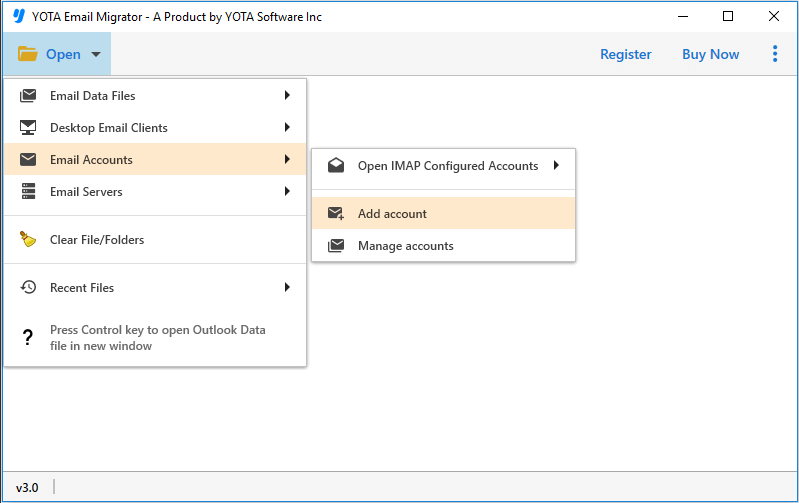
- Click on Open >> Email Accounts >> Add Account.
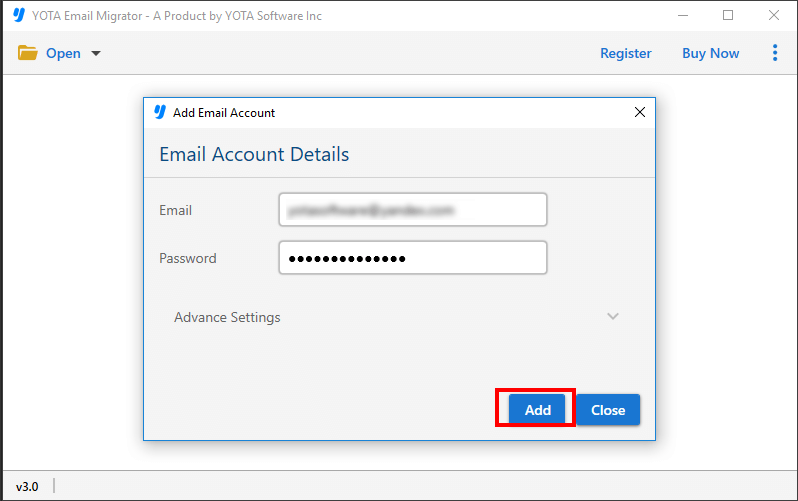
- Now, add the EarthLink account credentials and upload the files into the panel.
- Click on the Export tab and select Gmail as the saving target location.

- Enter your Gmail Email ID and App Password then hit the Save button.

Congrats! Your EarthLink emails have been successfully imported to Google Mail.
Check this video tutorial for migrating emails to Gmail mailbox:
Prime Features of Automated Tool
- Direct and secure way to import Earthlink emails to Gmail account that guarantees the protection of your data.
- Capable to maintain data integrity and original structure during the migration process. It maintains the file names, timestamps, and folder structures, etc.
- The software allows you to choose specific files and folders to transfer instead of the entire mailbox.
- Designed with user-friendly interface that makes it easy to navigate and use, even for those with no or little technical expertise.
- The tool is straightforward and does not require any complex setup.
- It enables to transfer large amounts of data quickly and efficiently, saving you time and effort.
- The tool comes with 24×7 customer support and is available to help with any questions or concerns you may have during the process.
Conclusion
Moving emails from one account to other should not be difficult. If you have few files to transfer, then you can go for manual method, but it is limited and slow. You cannot export bulk emails to Gmail. But if you want a safer, faster, and feature-full method, then you must go with an automated solution EarthLink Backup Tool. It will help you to import emails from Earthlink to Gmail with 100% accuracy. Go and download the free demo of the tool and after getting the results buy the tool for unlimited migrations.
FAQs
How Can I import Earthlink emails to Gmail directly?
Follow these steps to move the Earthlink mailbox:
- Run the tool.
- Click Open > Email Accounts > Add Account.
- Enter Earthlink Account Login Credentials.
- Then click Export and select Gmail.
- Now, enter Gmail credentials and click Save.
Can I migrate emails from Earthlink in bulk?
The software lets you transfer multiple emails to your Gmail inbox at once.
What are the email settings for Earthlink?
- Incoming Server – IMAP
- Server: imap.earthlink.net
- Port: 143
- Security: none
- Username: Your full email address
- Password: Your password


