Are you experiencing “Thunderbird freezes when receiving emails” issue? It’s a common issue encountered by so many users. This is really frustrating when Thunderbird suddenly becomes unresponsive, and you have to access your Thunderbird account for some important emails. In this guide, we will discuss why this is happening and what we can do to fix this error.
Like any other application, Mozilla Thunderbird is also slow down due to some technical glitches. And due to this it may interrupt your workflow and prevent you to access some important emails. To avoid disruptions, it’s essential to identify why Thunderbird freezes when receiving emails and the exact cause of the issue. So that, you can apply the right methods and restore Thunderbird’s smooth performance.
Why Thunderbird Freezes While Receiving Emails?
If Thunderbird keeps freezing while fetching new emails, several factors might be responsible.
- Antivirus software that scans incoming mail can freezes Thunderbird new email fetching.
- Damaged or corrupt folders, especially the inbox, can freeze the Thunderbird.
- Themes and extensions that are out of date might clash with Thunderbird.
- The server gets overloaded due to multiple folders and large attachments.
- Poor internet connection makes Thunderbird appear frozen during sync.
- With limited RAM or CPU power, Thunderbird hangs when processing emails.
How to Fix Thunderbird Freezes When Receiving Emails Issue?
Run Thunderbird in Safe Mode: Thunderbird includes its own Safe Mode, which temporarily disables extensions, themes, and custom settings. This mode can help diagnose whether an add-on is causing Thunderbird to freeze or slow down. To enter Safe Mode: Help > Troubleshoot Mode > Restart with Add-ons Disabled
Antivirus Interference: Some antivirus programs scan emails, and may block or slow down Thunderbird’s performance. Temporarily disable your antivirus and see if performance improves.
Update Thunderbird: Install the latest version of Thunderbird on your PC. Installing updated version of Thunderbird can improve the overall performance. Also, if you are using any browser to access Thunderbird, update that browser also.
Corrupt Profile: At times, a profile may become corrupted and causes freezing problems. This is often caused when system abruptly shutdowns or power outages. Create a new profile in Thunderbird, and import your emails and settings into it.
Switch to a Different Email Client: You might consider shifting to MS Outlook if Thunderbird is showing error continuously. To transfer Thunderbird to Outlook, you should go for the reliable third-party tool.
So, these are several methods to fix the error Thunderbird keep freezing when receiving emails.
Instant Way to Backup Thunderbird Emails
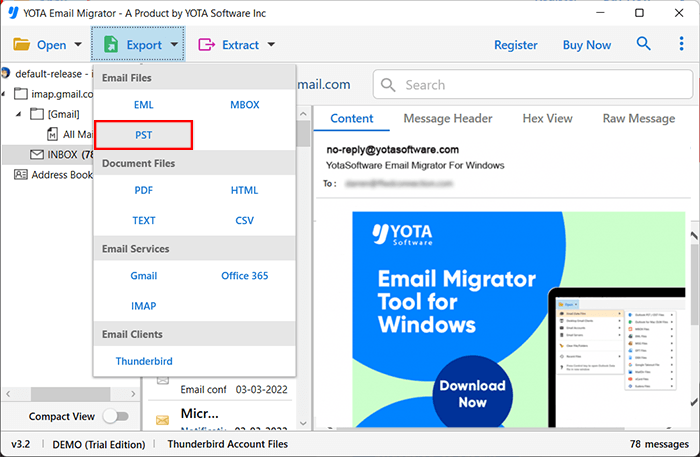
Before Thunderbird freezes and you lose access to your emails, it is a good idea to download Thunderbird emails to your PC. Yota Email Backup Tool helps you to export Thunderbird emails to different formats like PST or PDF. The tool is also able to migrate Thunderbird emails to Gmail, Office 365, Zoho Mail, Yahoo Mail, etc.
With this tool, you can backup multiple Thunderbird emails in a single process without any extra efforts. It also keeps the original folder structure intact during the process. The software comes with advanced filter options so you can back up only selected emails by date, subject, or sender. It also automatically detects your Thunderbird profile and make the process quick and simple. You can download the free trial version, which lets you export first 10 items per folder.
Conclusion
Sometimes users might face the issue Thunderbird freezes when receiving emails. And after trying different methods to fix the error, users may still find it difficult to access Thunderbird emails. In such situations, manual methods may help to resolve the error, but they comes with few limitations. They could be little bit complex for a new user. Also, there is a risk of data loss if something goes wrong.
To avoid such situation, expert recommended tool i.e. Thunderbird Backup Tool is the safest solution. It can quickly help you to save Thunderbird emails to your desired location in few easy steps. And you can continue to work without any interruption.