, If you are looking to transfer Frontier email to Gmail mailbox then this is the right place. In this comprehensive article, we will discuss the reliable and secured methods to import your data with attachments. Here, we have described some simple steps that you need to follow. Now, without any delay, let’s move on to the best solution to move Frontier mailbox to Google account.
Frontier Mail is an email service in various parts of the United States. It is designed to provide users with a reliable and secure platform for sending, receiving, and managing their emails. However many users are facing some issues with Frontier Mail and wanted to switch to Google Mail.
Why User Want to Import Frontier Email to Gmail?
Users often choose to transfer their emails to Gmail for several reasons.
- Gmail boasts robust security features such as phishing protection, safe browsing, and confidential mode, ensuring a secure email experience.
- Gmail offers a professional working suite, Google Workspace, facilitating seamless team collaboration—an advantage not available with Frontier Mail.
- The user-friendly interface of Gmail is particularly appealing, making it accessible even for email beginners.
How to Migrate Frontier Mailbox to Gmail Manually?
- Sign in to your Gmail account.
- Click on the Settings and pick See all settings.
- Open the Accounts and Import tab and click on Import mail and contacts.
- Enter your Frontier email address and click Continue.
- Enter your Frontier email password and allow access.
- Select Emails and click Start Import.
This is how you can move your emails manually.
Drawbacks of Manual Method
- Does not support bulk email migration.
- Not able to export large attachments.
- Folder hierarchy may disturbed.
- Time taking and complex process.
How to Transfer Frontier Email to Gmail Account Professionally?
Yota Email Migrator is an effective and convenient solution to import Frontier emails with attachments. It is a powerful software to migrate multiple emails to your desired account without any data loss. The tool has been designed with advanced features that makes the entire process hassle free. The utility connects to Frontier Mail using IMAP settings. It only accesses data during migration and does not save your login details in its database.
The graphical user interface of the tool is also very simple and intuitive that provides direct option to transfer your mailbox items within few clicks. You can download the FREE Trial version to check all the working features of the tool from the below download button. This trial version lets you export only 10 items from each folder.
Steps to Export Frontier Email to Gmail are as follows:
- Download the tool on your Windows computer
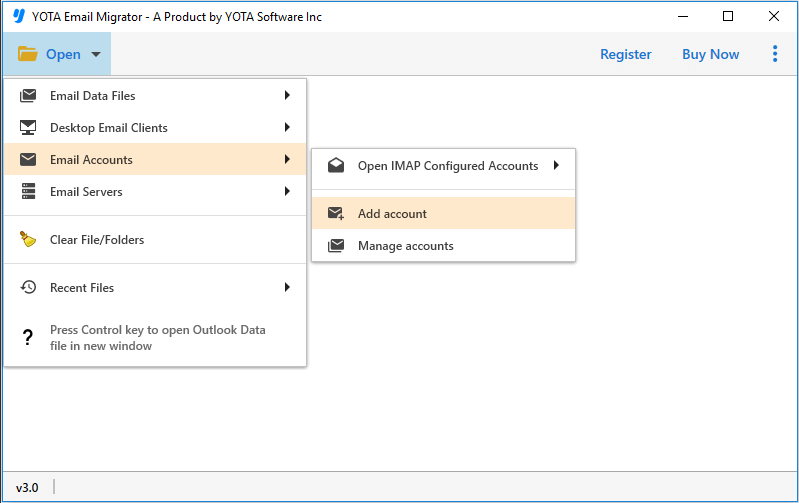
- Click the Open menu then Email Accounts option and select Add Account.
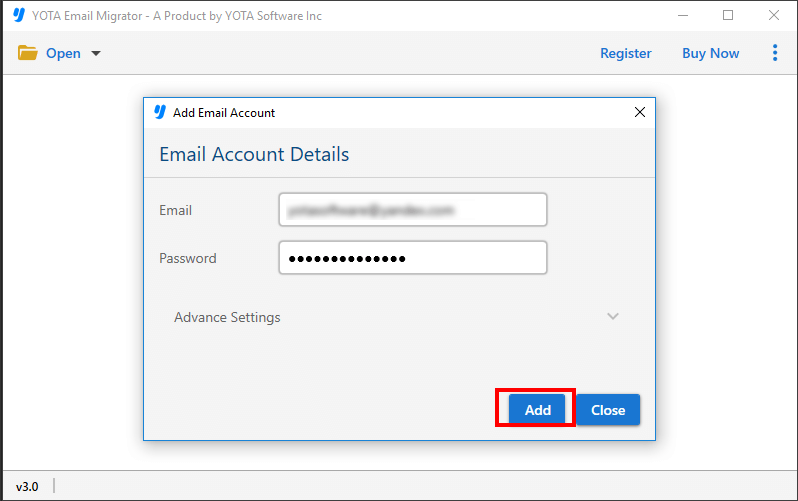
- Enter your Frontier Mail account credentials and click the Add button.
- Click the Export button and select Gmail as your saving option.

- Provide login details of Gmail account and hit the Save button.

So this is it! You jus have to follow the few simple steps to transfer Frontier webmail efficiently.
Amazing Features of Professional Tool
Bulk Migration: This tool allows you to effortlessly export an unlimited number of emails from your account to Gmail. You can seamlessly transfer multiple emails directly.
Retains Folder Structure: The software excels in preserving the original folder structure, ensuring that all folders and subfolders maintain their original hierarchy throughout the migration process.
No Limitations: There are no limitations exist for users to move your emails. Easily export large mailboxes without encountering any restrictions. The process is straightforward and hassle-free.
Download Free Demo: You can evaluate the tool with our free trial edition, which unlocks all advanced features. Experience seamless migration with the free edition, that allows you to export up to 10 items from each folder.
All time Customer Support: Get round-the-clock technical support. Our experts are available 24×7 via email or live chat to promptly resolve any issues you encounter. Your problems are our priority.
Conclusion
In this blog, we have described a simple solution to move emails from Frontier Mail account with attachments. It is recommended to use the dedicated tool for moving crucial and large mailbox items without getting any error.
So, click the download button now to start the migration process. Try the tool’s trial version to test its efficiency. For any queries, reach out to our responsive technical support team.
Real User Experience
I am a small business owner and I wanted to transfer my Frontier emails to Google account. I tried the manual method but it was slow and did not move all my folders correctly. ThenI used Yota Email Migrator and found it very easy to set up. It transferred my emails with attachments and kept the folder structure intact. I am now using this software very often. Thanks a lot! – Eva, England
Frequently Asked Questions
Does Frontier Mail support IMAP migration?
Yes, it supports IMAP, which allows emails to be migrated to Gmail mailbox.
Can I transfer Frontier emails with attachments?
Yes, you can easily export emails along with the attachments using the automated tool.
Is it safe to migrate Frontier emails to Gmail using the software?
Yes, the tool uses secure authentication and does not store any user login credentials or important data in its database.


