In this comprehensive article, we will discuss how to transfer GoDaddy emails to Zimbra with attachments directly. If you are also looking fort he same and stuck with the solution, then this is for you. Here, I’ll be sharing the step-by-step instructions to export emails from GoDaddy to Zimbra account.
GoDaddy is one of the leading companies that provide web hosting and domain registration services. It also offers email services along with that to access emails across all devices. The only downside of GoDaddy is storage and collaboration tools limitation.
Zimbra is the open source email and collaboration platform that offers powerful email management tools. Besides them, shared calendars, shared contacts, tasks, and advanced security settings are also provided. It’s the main reason why most user want to transfer GoDaddy emails to Zimbra account.
Reasons to Transfer GoDaddy Emails to Zimbra
- Zimbra provides built-in calendar, task management, and contact-sharing features which are lacking in GoDaddy.
- Zimbra is open source and hence supports greater customization and connection to other third-party applications.
- Better security features, spam filtering, and advanced email encryption are also offered by Zimbra.
- The operating cost is much lower for Zimbra in comparison to the paid email services of GoDaddy.
- Zimbra is compatible with a variety of operating systems and devices. It works on various OS systems like Windows, Mac, and Linux.
Automated Solution to Migrate Emails from GoDaddy to Zimbra
To add GoDaddy emails to Zimbra account, Yota Email Migration Tool is an excellent software. It is highly reliable and effective solution to import emails from GoDaddy to Zimbra without missing anything. It preserves all email components, including attachments, folders as well as metadata, during and after the transfer. Its user-friendly interface lets anyone who has non-technical knowledge to transfer GoDaddy emails to Zimbra without getting into technicalities.
One of the great feature it offers is moving emails from GoDaddy to Zimbra in batch. This allows users to import multiple emails altogether at the same time, saving a lot of time and effort. Also, it has an option to preview the emails so that users will be able to check some of their emails before starting the migration.
Steps to Transfer GoDaddy emails to Zimbra are as follows:
- Download and Run Yota GoDaddy Email Migrator on your PC.
- Click on Open >> Email Accounts>> Add Account option.

- Next, enter the login details of GoDaddy account and choose the emails to export.

- Then go to Export and select IMAP from the saving list.
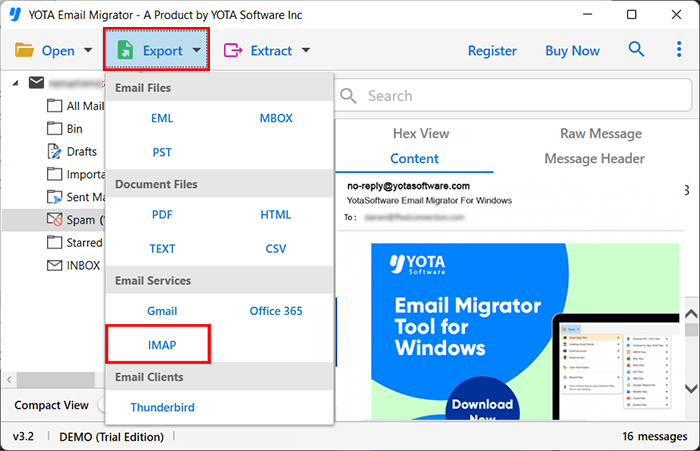
- Finally, enter the account credentials for Zimbra and hit the Save button.

You are done! This is how you can transfer GoDaddy emails to Zimbra Mail.
Prominent Features of Yota GoDaddy to Zimbra Migration tool
Bulk Migration: The tool allows users to migrate multiple GoDaddy emails together in bulk and hence minimizing the time and effort required for manual transfer. This feature is very important for businesses and professionals where they want bulk migration of large number of emails without losing any data.
Retain Folder Hierarchy: During the migration process, the software keeps the folder structure of all emails intact. As a result, there will be no data loss or confusion after migration, where users will easily find their emails in Zimbra. It kept all subfolders and labels as they were in the GoDaddy mailbox.
Email Filters: It also allows for advanced filtering options so that users can filter and migrate only the selected emails based on parameters such as date range, sender, recipient, specific keyword, attachments or subject etc. This makes sure that unwanted emails are skipped, thus saving a late of space and only important emails are exported during the process of GoDaddy to Zimbra migration.
Compatible with Windows OS: This IMAP Migration tool is flexible and can work on all Windows OS, including Windows 11, 10, 8, 7, etc. User can transfer GoDaddy emails to Zimbra on all Windows PC with no compatibility issues.
Also Read: How to Migrate GoDaddy Email to Gmail Directly?
Frequently Asked Questions
Can I migrate selected emails only from GoDaddy to Zimbra?
Yes, with the above professional tool you can select individual emails from GoDaddy account and export to Zimbra Mail.
How long it takes to move emails from GoDaddy to Zimbra?
It depends on the quantity of emails and the speed of the internet. However, Yota GoDaddy Backup tool has the advanced algorithm that can transfer GoDaddy emails to Zimbra with lightning speed.
Conclusion
Yota GoDaddy Backup Tool provides 100% safe process to transfer GoDaddy emails to Zimbra account with attachments. This software is compatible with all latest and older versions of the Windows operating system. It is advisable to try the DEMO version first before purchasing the software to understand the overall structure and working of this tool.