Overview: Here, we will discuss the possible solution to transfer Hotmail to Yahoo Mail. This informative guide gives you two simple and best ways to migrate Hotmail emails to Yahoo. If you are a beginner and do not know much about technology, and also want an instant solution, read the blog to the end and get the best solutions.
A lot of users are migrating from Hotmail to Yahoo Mail these days. There are various reasons behind this. It is because Yahoo Mail is easy to use and has a user-friendly interface. It gives you a lot of space for email storage. Yahoo Mail keeps your account safe with better security, and it blocks unwanted spam to maintain your emails better.
Yahoo Mail also works well on both phones and computers. So, you can check your emails anytime, anywhere. If you’re tired of using Hotmail or just want something more reliable. Then transferring Hotmail to Yahoo Mail account is the wise choice.
In the section below, we are going to explain the methods that will help you migrate Hotmail emails to Yahoo. Just follow the step-by-step process.
How to Transfer Hotmail to Yahoo Manually (Free)?
If you want to transfer Hotmail emails to Yahoo Mail by using the manual method. Then you can do this by your Yahoo Mail account. Follow the steps below to do this:
- Firstly, log in to the Yahoo Mail account and go to the Settings icon.

- Click on More Settings and then click Mailboxes.
- After that, click on the Add Mailbox option.

- From the list of email providers, choose Outlook.com.

- Then enter the Hotmail email address and click the Next option.

- Enter your Hotmail Password and click Yes to permit Yahoo to access your emails.

Once you have connected your Hotmail account, Yahoo Mail will start copying all your emails and folders into your Yahoo inbox. This process is a time-consuming task. It can take some days, depending on how many emails you have on your Hotmail account. After the transfer Hotmail to Yahoo is done, you will see your old Hotmail inside your Yahoo Mail account.
But this manual method comes with certain limitations. So, experts recommended the professional solution to import Hotmail emails to Yahoo instantly with just a few clicks. In the next section, we explore some loopholes of the method.
Loopholes of the Manual Method
- The manual method can take 2 to 3 days or sometimes longer. So, it is a time-consuming task if you have a large number of emails.
- There is no guarantee of a full backup; some emails, attachments, or folders are not transferred properly.
- No control over what to transfer; you can’t choose what to transfer specifically.
- If there is a login error or security setting in your Hotmail account, the connection might fail. You need to adjust your settings to make it work.
- There are no email filtering options. You need to organize, label, or filter them during the transfer Hotmail to Yahoo.
- It may not work for all Microsoft accounts. So, Yahoo might not be able to connect sometimes due to security restrictions.
The manual method to migrate Hotmail to Yahoo is okay for casual users with a small number of emails. But if you have a large inbox or need a reliable, full backup. Then you have to use the professional tool.
How to Migrate Hotmail Emails to Yahoo Mail Instantly?
You can use the Yota Hotmail Backup Wizard to quickly transfer Hotmail to Yahoo Mail account. This is a good option to easily import multiple Hotmail emails directly to the Yahoo Mail account in a single attempt. It is a standalone tool that doesn’t require any extra software. It also provides pause and resume, advanced search filters, and the ability to preview emails before importing Hotmail folders to Yahoo.
Additionally, it also maintains the folder hierarchy and email formatting. It even supports the direct migration between cloud-based services, like transfer Hotmail to Gmail, Office 365, etc. You can also try the free version of this software before making the full purchase.
Steps to Transfer Hotmail to Yahoo Mail are as follows:
- Download and install the software on your computer.
- Now, go to the Open>> Email Accounts >> Add Account.
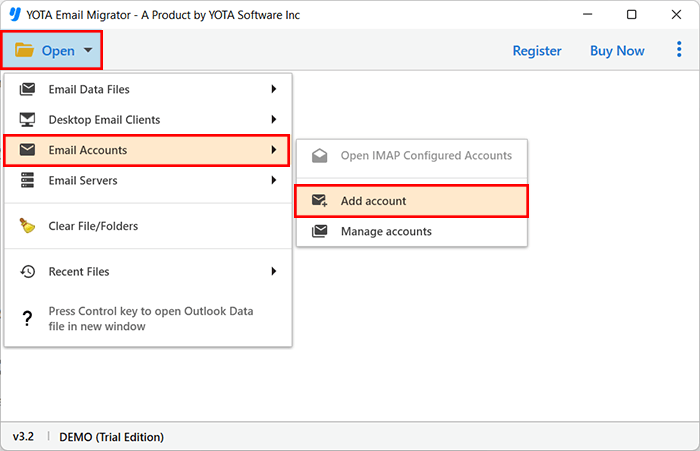
- Enter your Hotmail email and password to load emails.

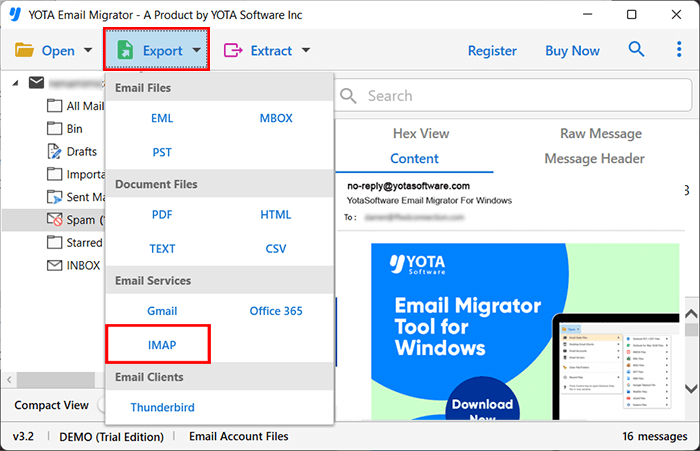
- Click the Export button and choose the IMAP option.
- Enter your Yahoo Mail credentials and click Save to start the transfer.
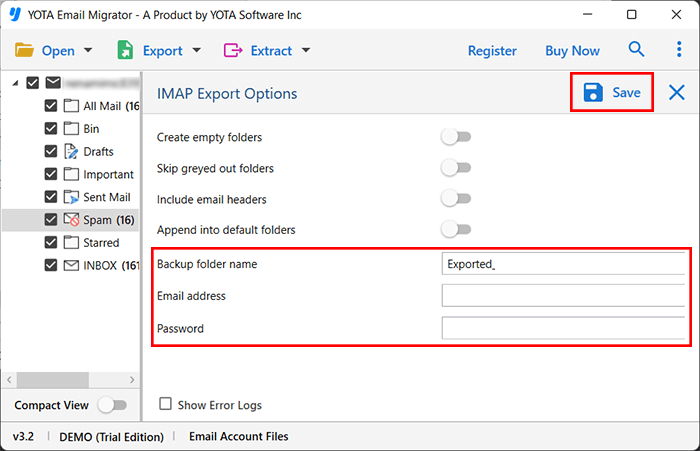
That’s it! You can effortlessly migrate Hotmail emails to Yahoo Mail account with just a few clicks.
Smart Features of Hotmail Email Backup Tool
Here in the section below, we will explore some additional features of this software-
- You can save your files anywhere you want; choose any desired destination to save your migrated files.
- Migrate only the selected folders or emails like Inbox, Sent, etc., instead of the entire mailbox.
- It provides the preview mode option to choose the emails or folders that you need.
- It supports multiple file formats which including PST, MBOX , OLM, OST , EML, DBX, and many more.
- No need for the extra software, it works as a standalone tool.
- It supports IMAP for transferring emails from one account to another.
- It provides the smart search filters option, such as date, time, or specific emails.
- Our customer support team provides 24/7 support, it is available anytime via chat to help you.
- This tool is fully compatible with Windows 11, 10, 8.1, 8, 7, and all server versions (32-bit & 64-bit).
The Bottom Lines
In the above blog, we explained step-by-step instructions to transfer Hotmail to Yahoo Mail account using two methods. The manual way is free but comes with certain limitations. So, it is the wise choice to choose the expert tool to instantly migrate Hotmail emails to Yahoo Mail. It is easy and secure to migrate emails from Hotmail to a Yahoo Mail account.
