Summary: In this article, we examine the error message “Something is wrong with one of your data files and Outlook needs to close.” This will restrict the users from accessing the account. Many users face this issue and are finding an easy solution for this type of error. This is the Outlook error that prevents users from sending and receiving new emails. We are here with easy and reliable solutions. In this guide, we explore the cause of the Outlook error Something is wrong with your data files and the solutions to resolve this issue.
Microsoft Outlook is a very popular email program that allows companies to send and receive emails. This email program manages all the contacts, calendars, tasks, and more. It helps users to work easily and manage all emails. Microsoft Outlook helps to stay organized. But Some time there was error occurs when you try to open Outlook or check emails. There is an error message saying, “Something is wrong with one of your data files and Outlook needs to close”.
Something is wrong with your data files Outlook error usually happens because of the files that Outlook uses to store the emails and other information, like OST and PST files get damaged. There are so many reasons for this something went wrong Outlook error, but file corruption is the main reason.
Now, in the next section, we will learn about the causes of this issue and the best ways to fix the Outlook data file error.
Reasons for Outlook Error Something is Wrong with Your Data Files
There is sometimes an error that happens in Outlook when you are sending and receiving emails: “Something is wrong with one of your data files and Outlook needs to close”. There are so many causes of this error that we discussed below-
- Corrupted Outlook Files: Outlook works on the OST or PST file formats, and sometimes the files get damaged. When the Outlook files are damaged, Outlook cannot open them properly, so the error can pop up.
- Forcing Outlook to Close: If Outlook shuts down suddenly, it can harm the Outlook data files. This causes the Outlook data file error.
- Very Large Data Files: If your files are too big, then this also causes problems and slows down Outlook’s working.
- Virus or Malware Infection: A virus on your computer can corrupt or damage Outlook files. When a virus attacks, it can break important parts of the files that Outlook needs to work properly. This can make Outlook cause the error “something is wrong with one of your data files and Outlook needs to close” at the time of sending or receiving emails.
Problem with Hard Drive: If your computer’s hard drive has bad spots (bad sectors), it can damage the Outlook files, which may cause this “something is wrong with one of your data files and Outlook needs to close” issue. - Faulty Add-ins: Some other extra tools add-ins in Outlook will also cause Outlook data file errors. It slows down Outlook and causes issues.
How to Fix Something is Wrong With One of Your Data Files and Outlook Needs to Close?
Without facing any unnecessary problems, try to fix Outlook error Something is wrong with your data files. We discussed some solutions to resolve this problem. Here are some of the easy ways to fix the Outlook data file errors. Follow the steps given below-
1. Fix Microsoft Registry Keys
Sometimes, there is a wrong setting in the Microsoft register key can cause the errors. then you need to delete the two register keys to fix the error LastCorruptStore and Prompt Repair. But changing the register key is always risky so you can make the backup register before changing the register key.
Steps to fix the register key-
- Open the Run Window to open. Press the Windows key + R.
- Type ‘regedit’ and press the Enter button.
- In the left pane, go to Computer and then open the path- HKEY_CURRENT_USER\SOFTWARE\Microsoft\Office\16.0\Outlook\PST.
- Find the Registry Keys- LastCorruptStore and PromptRepair, and delete both of them.
- And then restart Outlook.
Now, open Outlook and check whether the error “something is wrong with one of your data files and Outlook needs to close” is showing or not. If the error is still popping up, don’t worry, you will try another method.
2. Run Outlook in Safe Mode
Safe Mode helps find if any extra add-ins are causing problems and helps fix Outlook error something is wrong with your data files.
Steps to run Outlook in Safe Mode are as follows:
- Firstly, close Outlook if it is open.
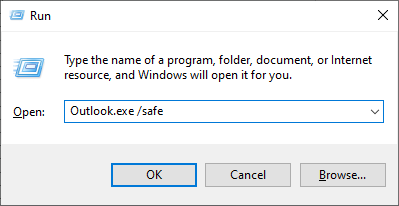
- Press Windows + R and type Outlook.exe/safe, then press the Enter button.
- Choose your desired Outlook profile and click OK.
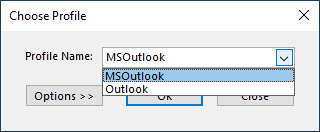
If Outlook shows the error in safe mode, then go to the next method.
3. Create a New Outlook Profile
Making a new profile will create a new PST file and might fix the problem of an error that occurs: “Something is wrong with one of your data files and Outlook needs to close”.
Steps to create a new Outlook profile:
- Open Control Panel.
- Click on Mail.
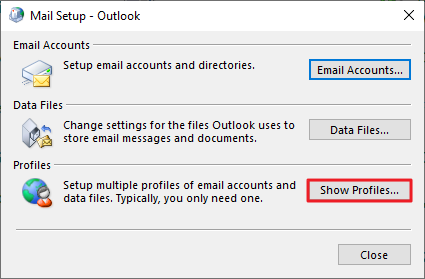
- In the Mail Setup window, click Show Profiles.
- Click Add and type a new profile name.
- Enter your email account details.
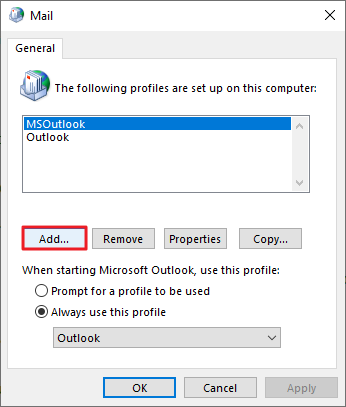
- Choose Always to use this profile and select your new profile.
- Click Apply and OK.
- Open Outlook using the new profile.
4. Repair Corrupted Outlook Data File
The Inbox Repair Tool (SCANPST) is useful for fixing minor corruption and inconsistencies in damaged PST files. Follow these simple steps:
- Open File Explorer and browse to this folder: C: \Program Files(X86) \Microsoft Office\root\Office16
- In the folder, press Ctrl + F to search and double-click on SCANPST.EXE.
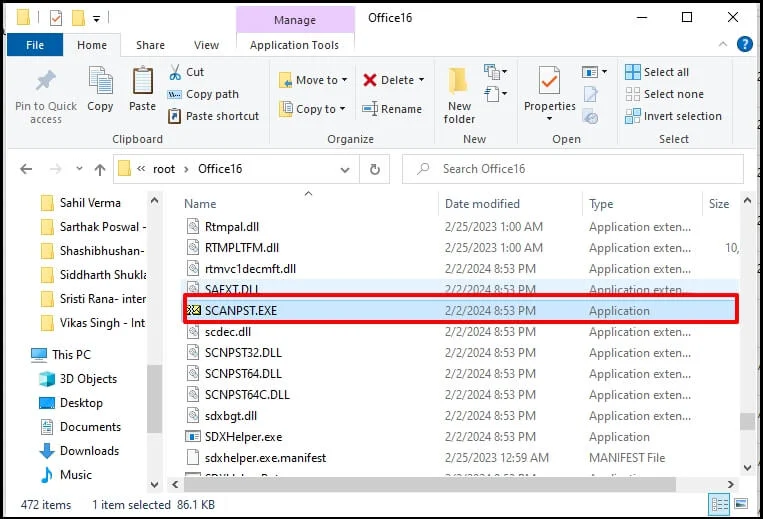
- Select the damaged PST file by clicking on Browse and locating it.
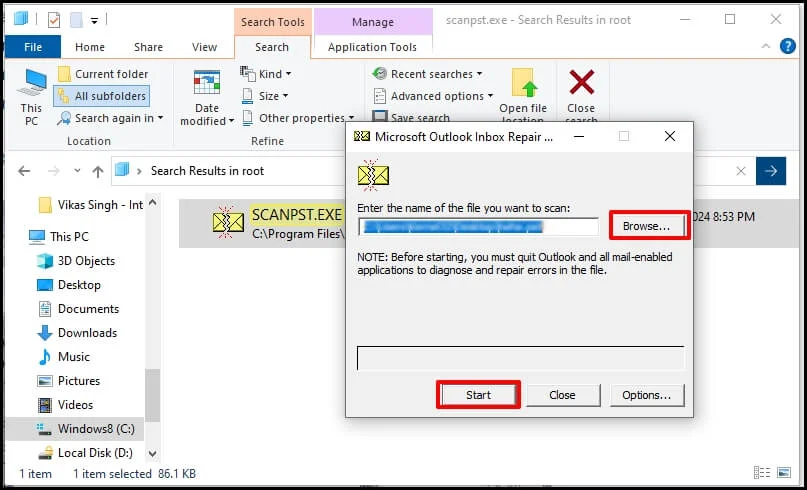
- Click Start to begin the scanning process.
- Once the scan is complete, click Repair to fix the file.

- After the repair is done, open Outlook and check if the error is gone.
Always backup your Outlook data before using these methods, as they can take time and may not always fix the problem completely. The process of fixing the “Something is wrong with one of your data files and Outlook needs to close” can be time-consuming and complicated. For a quicker and more reliable solution, we recommend using a professional tool to resolve the problem.
Instant Method to Fix Corruption of Outlook Data Files
Yota PST Converter Tool is a fast and efficient solution for fixing corruption in PST files. The tool works with all Outlook versions, like 2021, 2019, 2016, 2013, and 2010. It also keeps your data safe and unchanged during the process. The software helps you repair PST file without scanpst or the Inbox Repair tool in just a few simple clicks.
It also allows you to convert PST to EML, PST to MBOX, PDF, and other formats at the desired path or folder. Along with this, you can import PST to Thunderbird profile, PST to Gmail, Microsoft 365, Yahoo Mail, and many more IMAP-based services.
You can also download a trial version of the tool to test its features and see how it works before purchasing the full edition.
Additional Features of the Tool-
- Helps move your Outlook data, emails, contacts, or calendars easily.
- Choose which folders you want to move; there is no need to transfer everything.
- Supports 210+ email services, including G Suite, O365, Yahoo Mail, and more.
- Works with or without Outlook installed on your PC.
- Keeps all your data, like email content, sender, and dates, safe during the migration process.
- Works with Outlook 2021, 2019, 2016, 2013, and more.
- Compatible with Windows 11, 10, 8, and later versions.
Conclusion
In this guide, we explain the cause of the “Something is wrong with one of your data files and Outlook needs to close” error that can happen when sending or receiving emails in Outlook. We’ll cover both manual methods and the use of an automated tool to fix Outlook data file error. You can choose the best method depending on your needs.


