In today’s world, choosing a reliable email service is very important for smooth communication in a business environment. If you are using Sky Mail and looking to import emails to a more advanced email platform then, Office 365 could be the best choice. In this article, we will discuss the reliable solution to export Sky Mail to Office 365 using a trustworthy solution.
We will also discover the benefits of switching the account. Let’s read this article to know how to effortlessly migrate Sky Mail emails to Office 365.
Sky Mail vs Office 365
Sky Mail is an email service provided by a British telecommunications company. This email service is designed for individuals and small businesses with the simple and basic features.
On the other hand, Office 365 is the comprehensive cloud-based email service provider developed by Microsoft. It includes the most widely used applications such as Outlook, Word, Excel, PowerPoint, and Teams. With regular updates and strong security features, Office 365 provides both productivity and data protection at the enterprise level. So, it is the wise choice to export Sky Mail to Office 365.
Why Do Users Need to Export Sky Mail to Office 365?
There are various reasons behind the Sky Mail to Office 365 migration. Some of the common reasons are discussed below-
- Office 365 offers Outlook, Word, Excel, PowerPoint, and more for seamless work.
- Collaborate in real-time using Teams, SharePoint, and OneDrive for easy sharing.
- Office 365 provides encryption, threat detection, and compliance tools to protect data.
- Access emails, edit files, or join meetings anytime from any device.
- Enjoy focused inbox, advanced search, and customizable layouts for better productivity.
Professional Solution to Export Sky Mail to Office 365
If you want to import emails from Sky Mail to Office 365 then you can download and install Yota IMAP Backup Tool. Unfortunately, there is no manual solution to transfer Sky Mail to Office 365. It is the most reliable and secure tool that transfers your data smoothly without any data loss. It supports over 100+ cloud-based email platforms. This tool allows you to convert Sky Mail emails in multiple formats including PST, PDF, MBOX, EML, and CSV.
Additionally, this tool can transfers emails from Sky Mail to other email accounts such as Outlook, Thunderbird etc. It will give you the option to export only the necessary emails to Office 365.
Steps to Export Sky Mail to Office 365 are as follows-
- Download the Yota IMAP Backup Wizard.
- Go to Open >> Email Accounts > >Add Account.
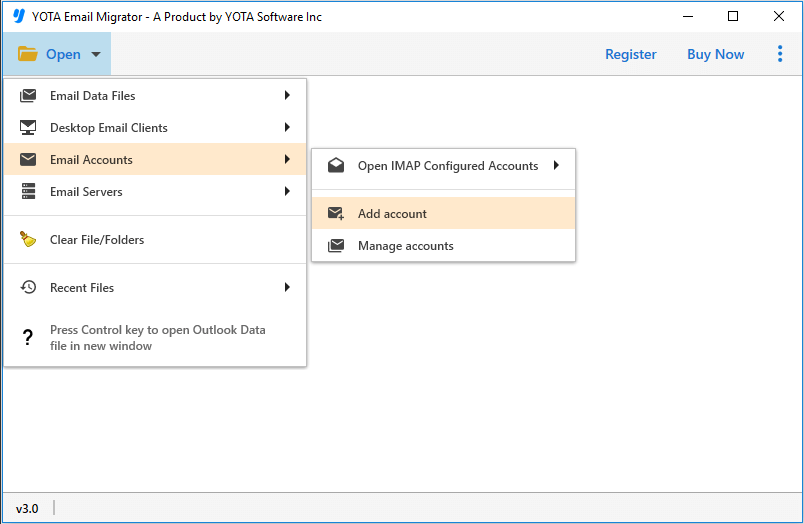
- Enter your Sky Mail email address and password to connect your account.

- Preview your emails, then click the Export Button and select Office 365 as the export format.
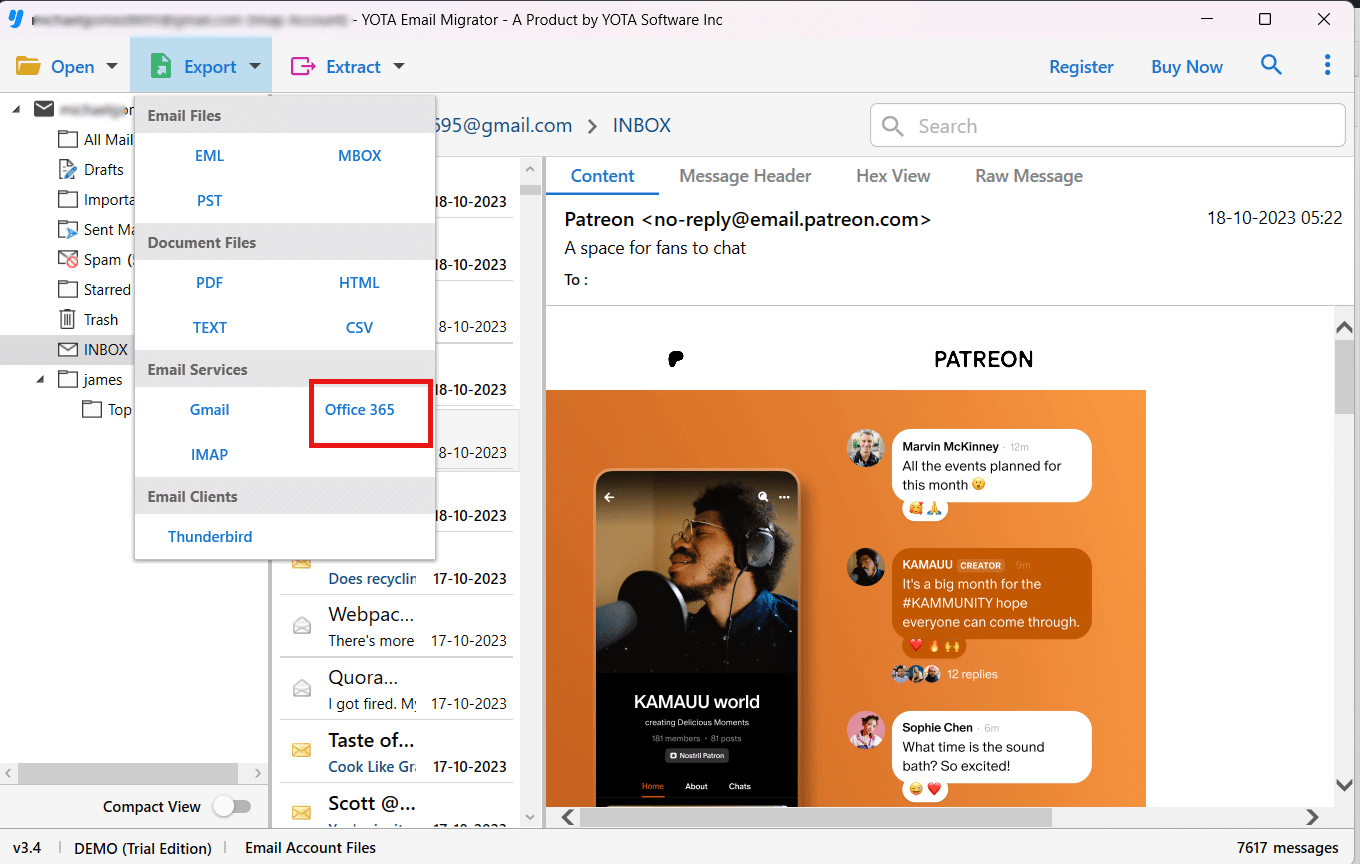
- Enter Office 365 login credentials and hit the Save button.

That’s it! with the use of these simple methods, you can easily export Sky Mail to Office 365 without any data loss.
Enhanced Feature of Sky Mail to Office 365 Migrator
Here are some highlighted features of this software are discussed below:
- Backup Your Entire Mailbox- Download all your emails, contacts, and calendars from any IMAP email account to the computer. It saves all emails in multiple formats like PDF, PST, MBOX, EML, HTML, and TXT.
- Move Emails to Another Account- Switching the email accounts to one IMAP account to another by this tool. You can simply enter your login details, and the tool can handle the rest.
- Preview Before You Backup- You can see all the emails before backup and view the attachments header and messages details.
- Choose What You Want to Save- It allows you to export only the specific emails to Office 365. You can search by keyword, sender, data, and even with the attachments.
- Works on Any Windows Computer- This tool is fully compatible with the Windows 11, 10, 8, and older versions.
- Other Handy Features- It is easy to use with no technical skill required to export Sky Mail to Office 365. There are no size limits and provide 100% data security.
Wrap Up
Migrating from Sky Mail to Office 365 can be a great choice to enhance your email experience and boost business productivity. Using the above recommended IMAP Backup Tool, the email migration becomes easy, fast, and safe. You can even try the free demo version to see how it works before committing. This demo version allows you to export 10 emails per folder. After getting the satisfactory results, you can buy the full upgraded version of the tool.

