AOL Mail is a free web-based email service that offers a simple interface that allows users to personalize their inbox with various themes and colors. Although it offers many useful features it does not provide the integration with other services as that of Gmail. That is why, users are looking to Import AOL Mail to Gmail account with attachments.
Why Import AOL Mail to Google Mail?
- Gmail offers a more modern and intuitive user interface, which many users may find more enjoyable to use than AOL Mail.
- It has advanced spam filtering capabilities, which can help prevent unwanted emails from cluttering up your inbox.
- If you use other Google services, such as Google Drive or Google Calendar, then using Gmail can be more convenient since it is already integrated with these services.
In this blog, we will share the two best ways to move your mailbox data.
Method 1. Using Gmail Import Settings
Method 2. Using Professional Tool
#1 How to Transfer AOL Emails to Gmail Manually?
- Login to your Gmail account.
- Click on the gear icon and go to See All Settings.

- Open the Accounts and Import tab.

- Under Import mail and contacts, click Import mail and contacts.

- Enter your AOL email address and click Continue.

- Enter your AOL account password and allow access.
- Choose data to import (emails, contacts) and click Start Import.

Limitations of Manual Method
- Import process is very slow for large mailboxes.
- No option to import only selected folders.
- Attachments may take longer to sync.
- No filter for specific date-range emails.
How to Migrate AOL Mailbox to Gmail Account Professionally?
If you are looking to transfer emails to your Google account along with attachments, then Yota IMAP Migration Tool is one of the best solution you can opt for. It is a powerful tool that offers many advanced features that make it stand out from the competition.
This tool has a simple yet user-friendly interface so that anyone can easily navigate the migration process without any hassle. Additionally, the tool is capable of moving multiple AOL emails to Gmail accounts in bulk. Furthermore, the software is compatible with all versions of Windows including all the latest OS like Win 11, 10, 8, 7, and below. When it comes to the security of your email data, this tool ensures that your AOL messages are transferred to your Gmail account securely without any modification or alteration of data.
How to Import AOL to Gmail Account Directly?
- Download and Install the tool on your PC.
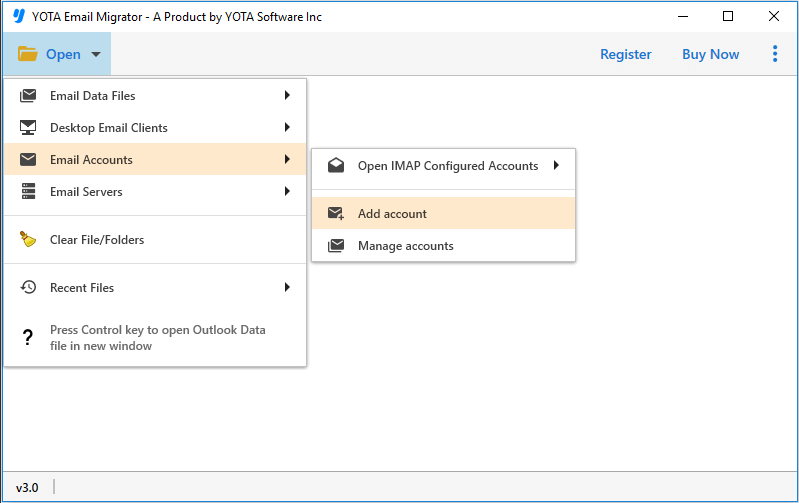
- Click on the Open tab >> Email Accounts >> Add Accounts from the list.
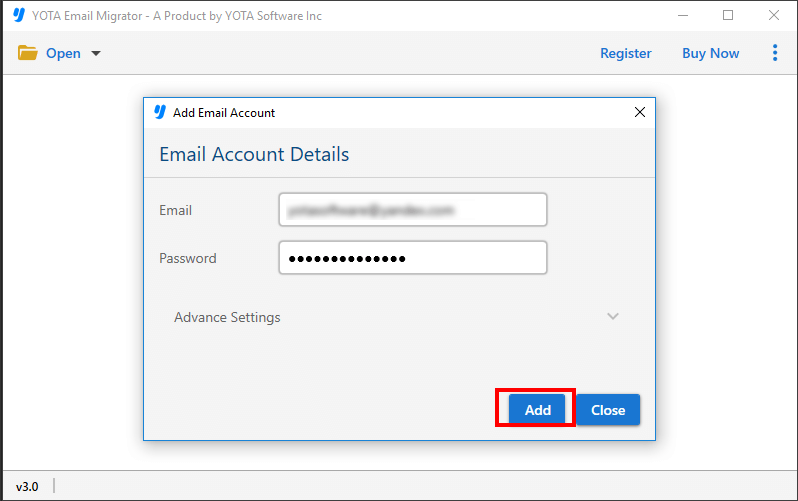
- Enter the login details of your AOL account and preview the files once uploaded.
- Next, click on the Export option and choose Gmail from the given list.

- To finalize the process, enter the Gmail account credentials and hit the Save button.

Here is the Video Tutorial to import AOL Mail to Gmail:
Why Choose this Automated Tool?
- Fast Migration: The software is optimized with an advanced algorithm that allows it to transfer large amounts of data in just a few moments without any delay. So even if you want to import mailbox data in bulk, the process will still be completed in a short time.
- Import AOL to Gmail Directly: The utility uses a direct transfer method for migrating your emails. This means that you don’t need to install any other software or plugin to start the process. You just have to provide your login credentials for both accounts to transfer your emails, without the need for any other application.
- Maintain Folder Hierarchy: One of the best features that most professionals like about it can preserve the same folder structure while transferring emails from AOL to Gmail. The tool is capable of saving the migrated data into its original folder or sub-folder and keeps the folder structure intact.
- Backup Emails in Different Formats: This is the best tool that provides the ability to save AOL emails in various formats like PST, EML, MBOX, PDF, etc. The software is also compatible with the other cloud servers so that you can import AOL to IMAP, Yahoo, and more.
Conclusion
In the above blog, we have discussed the importance of migration. Then we looked at how the professional tool can help you to import AOL Mail to Gmail account. This is a versatile solution that users can download on any Windows OS, irrespective of the version they are using. Now we hope that our comprehensive guide has helped you with the best method to transfer your emails and attachments.
Download the tool today and take the first step toward a seamless and effortless migration process.
Frequently Asked Questions
Can I use this utility on a Mac computer?
No, this tool can be installed on Windows OS, as of now.
How much time does this tool take to transfer emails?
Moving AOL mail to Gmail generally takes only a few minutes when done in bulk. However, the duration can vary based on the file size.
Does the tool keep email attachments during the email migration?
Yes, the tool keep all attachments along with emails during the process.


