Summary: Do you want to import EML to Yahoo Mail account? If so, this blog is for you, as it provides a comprehensive guide on how to import EML files to Yahoo Mail with attachments.
Email is one of the most widely used communication platforms in the world, and Yahoo Mail is an excellent platform for email. Importing EML emails to Yahoo is not a significant issue for users. It becomes easy when you follow some simple steps. There are several tools available on the internet that can help you transfer multiple EML files to your desired location. But if you don’t want to lose your data during the migration process, you should try the following method.
Quick Solution to Open EML File in Yahoo Mail
Download the Yota EML File Converter Tool on your system, which helps users to import EML to Yahoo Mail account. The software comes with amazing features that make the migration process easy and error-free. It also provides support to import multiple EML files to Yahoo account in a single attempt.
This tool is easy to use and flawlessly convert EMLto PST file, EML to PDF, MBOX, and others. It has all the necessary options that enable you to convert your large number of emails from the EML folder in a single process.
- Effectively import EML files to Yahoo with preserved hierarchy
- Directly import EML to Office 365 account
- Different Preview modes are available to view the files
- Import EML to Gmail or G Suite, EML to Zoho Mail, and all IMAP providers
- A free demo is also provided for a better understanding of the tool
Steps to Import EML to Yahoo Mail are as follows:
- Start by downloading the Yota EML Conversion tool on your Windows PC.
- Click on Open>> Email Data Files>> EML Files.
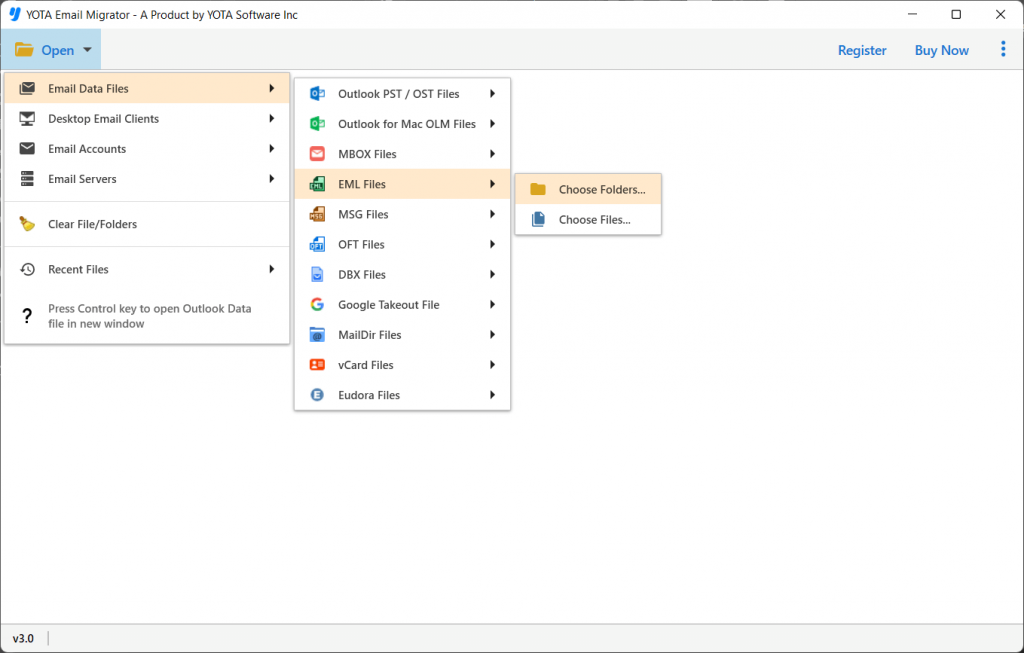
- Now, go to the Export tab and pick the IMAP option.

- Enter the login credentials of your Yahoo account and hit the Save button.

That is it!
This is how you can easily import EML to Yahoo Mail. Now you can easily access your data in your Yahoo account with ease.
Why Choose Yota EML to Yahoo Converter?
- Standalone tool: This is a powerful software that provides the best solution for users to open EML file in Yahoo Mail with attachments. The software is standalone and can be used without any errors. It converts all the data from one file to another with complete accuracy and precision.
- Transfer EML Folders with Complete Details: It has a user-friendly interface that allows the user to import EML to Yahoo Mail account with attachments. This tool supports the conversion of Inbox, Drafts, Sent Items, Deleted Items, and Journals. It is capable of migrating emails & other items without any problem. The software also has an option to extract phone numbers from EML files accurately.
- Maintains Data Fidelity: The software ensures the integrity of EML email metadata properties such as To, From, CC, BCC, sending, and receiving data. The import EML files to Yahoo process preserves labels for messages in the mailbox folder hierarchy. The messages are also converted with attachments intact, so users can access them without any problem.
- Simplified User Interface: The interface of the software is user-friendly, and it does not require any technical knowledge or skills to use it. Its self-navigational panel will guide you throughout the process, even if you are a new user who is not familiar with its features and how to use it.
- Windows Compatible: It’s a good choice for you to open EML file in Yahoo Mail account if you are looking for a resourceful yet affordable solution. It supports all versions and editions of Microsoft Windows, including Win 11, Win 10, Win 8.1, Win 8, Win 7, Win XP, Win Vista in both x86 and x64 platforms.
Conclusion
Importing your old emails from EML file to Yahoo Mail account can be easy if you use the right tool. Luckily, our email migration software allows you to bulk import EML to Yahoo mail account at once and not have to worry about importing one folder at a time. It also supports various other email services like Gmail, Hotmail, etc. Additionally, you can also access other tools, such as EML Attachment Extractor to extract attachments in a separate folder.
Download the software today to get started! The free trial version allows importing 10 items per folder from EML to Yahoo mail account.


