Want to know how you can import GoDaddy emails to DreamHost account? If yes, then you landed on the right solution. The article will help you with the process migrate emails from GoDaddy to DreamHost account safely. So, let’s get started.
About GoDaddy and DreamHost
GoDaddy and DreamHost are popular web hosting and email service providers for businesses and individuals both. GoDaddy is widely known for its domain registration, web hosting, and email hosting solutions, hence preferred by startups and larger corporations.
DreamHost, on the other hand, is known for its good web hosting and email services, which more developers and small businesses prefer for open-source and flexible hosting solutions offered. While both offer premium email hosting services, there are various reasons people might want to import GoDaddy emails to DreamHost.
Best Solution to Import GoDaddy Emails to DreamHost
While we have searched for few manual solutions, we could not find a reliable method to accomplish the task without getting error. Also, manual method requires lots of technical skills, thus not suitable for beginner or non-technical users. Even for a skilled professional, it is still a very complex and time-consuming task.
That is why we are suggesting to try Yota GoDaddy Backup Tool. It allows bulk email migration without any hassle. It is easy to use, and anyone without technical knowledge can operate it. It works on all versions of Windows and offers a complete migration without data loss or any risk to security.
Steps to Import GoDaddy Emails to DreamHost Account are as follows:
- Install and Run Yota GoDaddy Backup Tool on your PC.
- Click on Open>> Email Accounts>> Add Account option.

- Enter GoDaddy login credentials and select the emails to export.

- Click on Export tab and select IMAP as saving option.
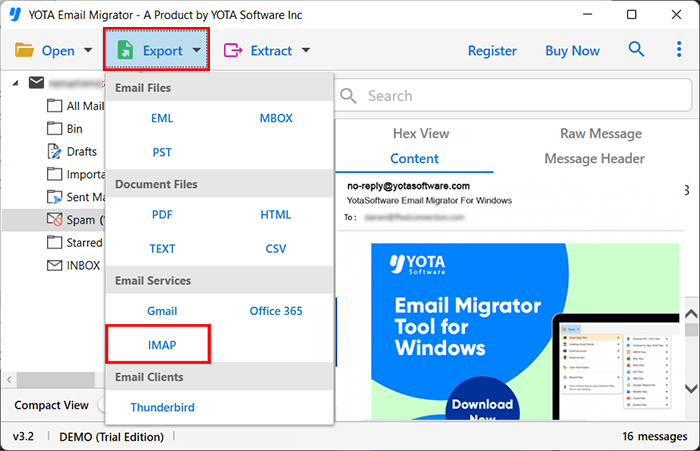
- Lastly, enter the login details of DreamHost account and hit the Save button.
This is it! This is how one can import GoDaddy emails to DreamHost in few clicks.
Features of Yota GoDaddy Migration tool
Preserves Metadata and Attachments: The tool is capable to migrate GoDaddy emails to DreamHost while preserving their original formatting, folder hierarchy, metadata such sender and recipient, time stamps, and embedded attachments, images, signature, hyperlinks, etc.
Supports Bulk Migration: With this email migration tool, user can simultaneously migrate large volumes of emails rather than transferring emails one at a time. Because of bulk migration, time and effort are considerably saved in businesses or individuals who are working with large volume of email data.
No Manual IMAP Configuration Needed: This tool has been designed with advanced algorithms just to make your experience hassle-free. You need not have technical skills to import GoDaddy emails to DreamHost; thus, it guarantees the smooth migration.
Previewing Before Migration: Before starting the transfer process, users can preview the emails and check their accuracy. This ensures that emails, attachments, and metadata are all accurately exported from GoDaddy webmail to DreamHost.
Compatible with all Windows OS: Due to its compatibility, the tool is widely used all over the world. Users can install this tool on all the latest and older version of Windows OS and thus increase usability of users with different OS. User can migrate GoDaddy to DreamHost either on the latest Windows 11 or older versions like Windows 7.
Conclusion
Migration from one webmail to another is not an easy task especially if you don’t know the right steps. The blog includes detailed process regarding email migration with correct approach and stepwise instructions . Unfortunately, there are no manual solutions; the only possible way left is through a professional approach. It is the fastest and most reliable method because it saves time and transfers everything without hassle.
If you want your data to import GoDaddy emails to DreamHost easily without any data loss, then check out the free demo version of Yota IMAP Migration tool now.