Are you among those users who also want to migrate Dotster email to Outlook? Then you are lucky as you have landed on the right page. Here you will get to learn about the 2 effective methods that help you migrate emails from Dotster to Outlook application. So read on…
Dotster is a web hosting company that offers hosting, domain registration, and a variety of tools to help small businesses promote themselves online and improve their online brand management. It also provides users with a webmail service so they can easily send or receive emails from any browser with an internet connection.
Migrate Dotster Email to Outlook Using Manual Method
You can manually add Dotster email in Outlook using the built-in Add Account option. Follow the below steps to achieve this:
- Open Microsoft Outlook and click File > Add Account.
- Enter your Dotster Webmail email address.
- Then, select “Let me set up my account manually” and click Connect.
- Select IMAP as an account type.
- Enter your Dotster server information:
Incoming mail server (IMAP): imap.dotster.com
Port: 993 (for SSL/TLS) or 143 (for non-SSL/TLS)
Encryption: SSL/TLS
Outgoing mail server (SMTP): smtp.dotster.com
Port: 587 (for TLS) or 465 (for SSL)
Encryption: TLS
Username: Your full Dotster email address
Password: Your Dotster email account password - Click Next and follow the instructions to complete the setup.
- Outlook will attempt to connect to your Dotster account and verify your settings.
- Once connected, your Dotster email will be available in Outlook.
So, this way you can set up Dotster email in Outlook for free. However, this process is very time-consuming and lengthy too. Also, users must have technical knowledge to execute all these steps properly to avoid losing any data.
In the next section, we are going to introduce an automated solution to effortlessly migrate Dotster email to Outlook.
Migrate Emails from Dotster to Outlook Using Automated Tool
You can take the help of a professional Email Backup Wizard to migrate all your emails from Dotster webmail. This software is 100% secure and lets users finish this task in just a few simple steps. It allows you to migrate Dotster email to Outlook without any technical expertise. The simple interface helps any beginner easily accomplish this email migration task without any interruption.
It provides you a facility to backup Dotster emails to the computer so that you can easily access your important emails offline. With this, you can export Dotster emails to PST file format and later the exported file can be easily imported in any version of MS Outlook.
The software comes up with tons of features that make this task easy for the users according to their requirements. It has an option to export multiple emails from Dotster to PST file format at a time. You can also select multiple folders and the tool will export emails from all folders in one attempt. Plus, you can export emails from only selected folders like inbox without disturbing the folder hierarchy.
One can migrate emails from Dotster to Outlook including all attachments without worrying about the file size and file type. The software is capable and powerful enough to transfer unlimited emails without losing a single piece of information.
Steps to Migrate Dotster Email to Outlook are as follows:
- Download and install the Dotster to PST Export Tool.
- Click Open >> Email Accounts >> Add Account.
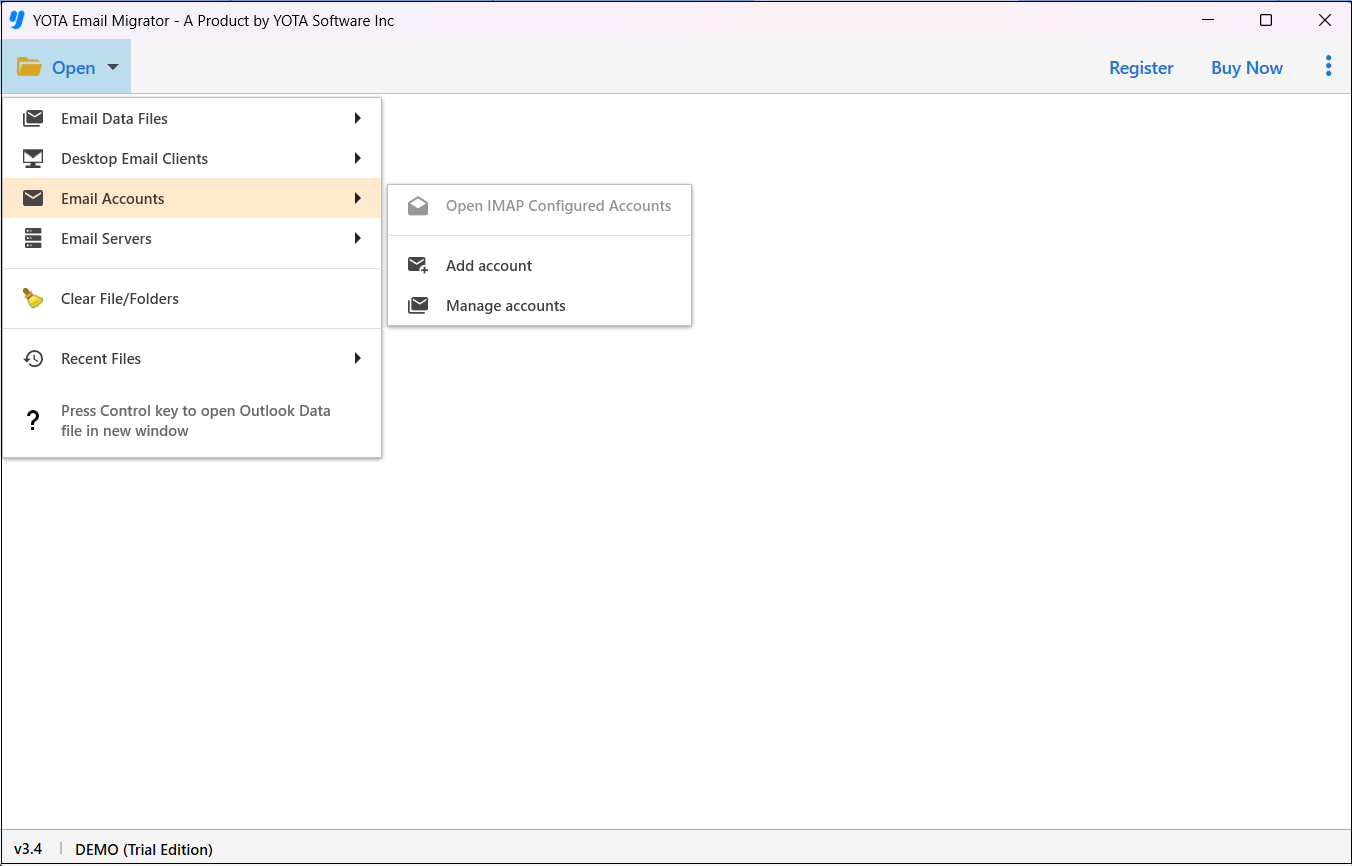
- Enter the Email ID and App Password of Dotster Webmail.

- Click Export and select PST from the multiple saving options.
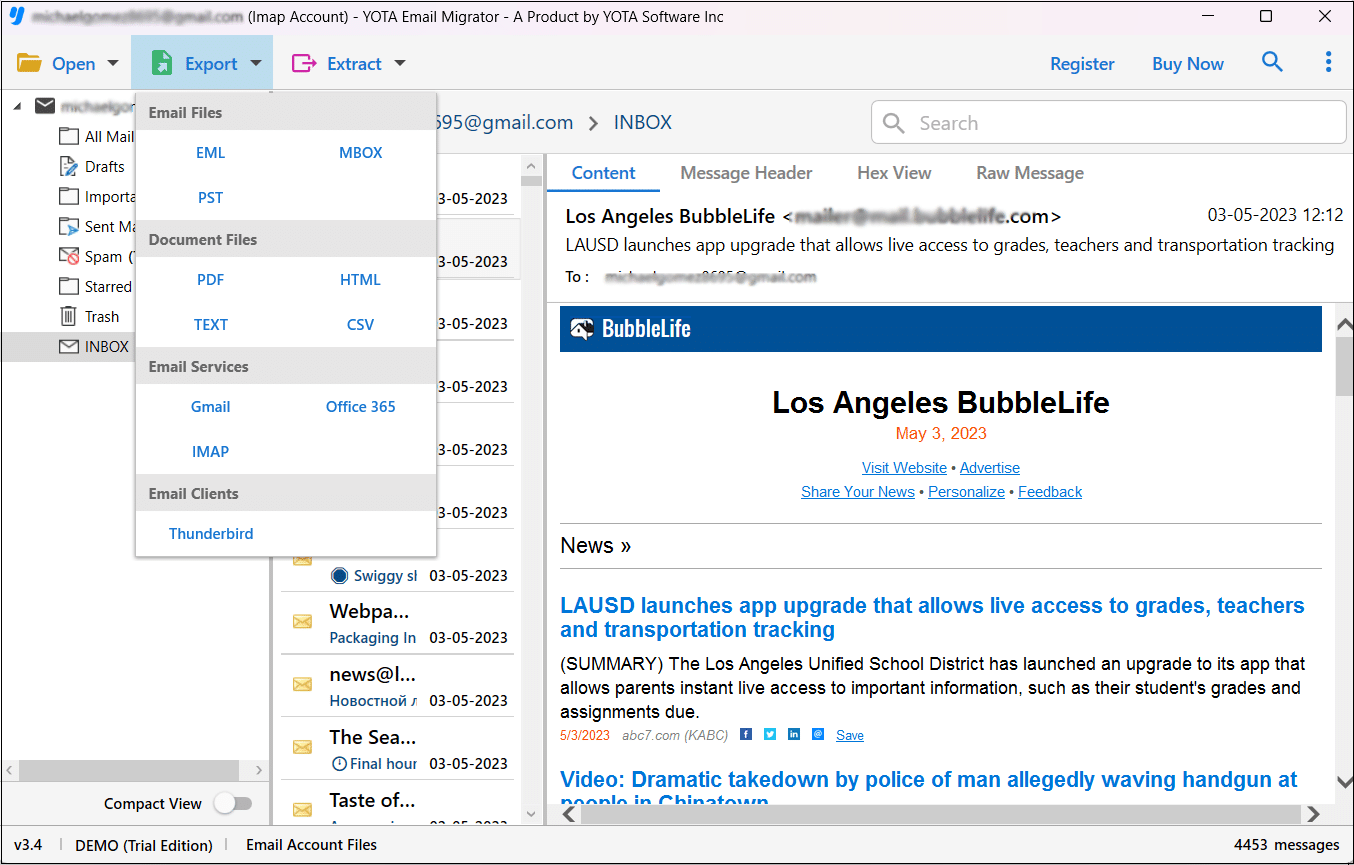
- 4Hit on the Save button to export Dotster emails to PST.
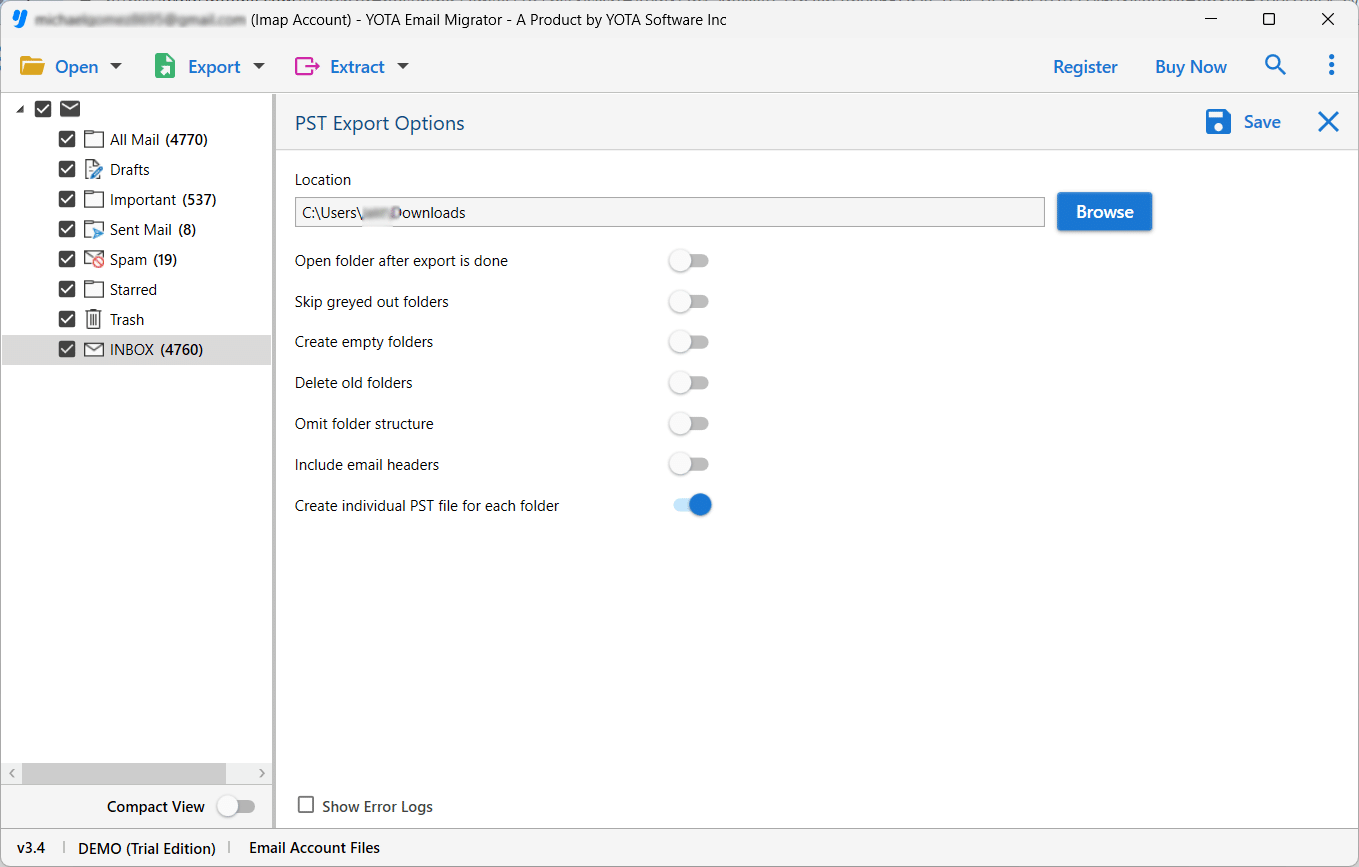
Done!
After your emails are exported in a PST file, you can import it to the Outlook application. So, this is how you can migrate Dotster email to Outlook in just 5 simple steps.
Benefits of the Automated Tool
- Easy Access: With this software, any novice can effortlessly migrate emails from Dotster to Outlook application. The simple user interface enables any kind of user to easily accomplish this task without taking help from tech experts.
- Save Bulk Emails: It allows you to export multiple emails from Dotster to PST at the same time. You can also export multiple folders with this tool.
- Preserve Data Integrity: The software maintains all your email properties such as subject, date, time, links, etc. Also, it preserves the hierarchy of folders throughout the procedure.
- Support Multiple Email Services: It also provides an option to transfer Dotster emails to 200 plus email services that support IMAP. You can directly import Dotster emails to Gmail, Yahoo Mail, Office 365, Outlook.com, and more.
Final Thoughts
In this blog post, we have discussed how to migrate Dotster email to Outlook manually and automatically. You can choose any method to migrate emails from Dotster to Outlook application. However, if you are a beginner and want a quick result, then it is advisable to go with the automated tool. It lets you export Dotster emails to PST file formats and then you can import the exported file in Outlook 2021, 2019, 2016, and later versions.