Want to know how to migrate GoDaddy emails to Zoho Mail with attachments? Do you have emails, contacts, and attachments in your GoDaddy account that you want to transfer to Zoho account? If yes, then stop here! In this article, we are going to give you the complete process to import GoDaddy to Zoho Mail.
Reasons to Migrate GoDaddy Emails to Zoho Mail
Email migration becomes very crucial to individuals and companies looking for better security, features, and experience. GoDaddy is being used by many businesses, but with the advancement of technology, people are looking for other options also. Zoho Mail is an improved version with better security, integration options, and no ads. Moving your emails from GoDaddy to Zoho will thus have better organization, communication, and advanced productivity tools.
Zoho Mail provides 25 free email accounts under its domain for personal and commercial use. That is why many users want to know the hassle-free way to migrate GoDaddy emails to Zoho account. However, moving emails manually will take a lot of time and efforts, so it’s not recommended solution, especially for those with large number of emails. Automated tool is the best choice to transfers emails from GoDaddy to Zoho Mail without any technical complications.
Professional Tool to Import GoDaddy Emails to Zoho
Yota Email Migration tool is the best and smart solution for GoDaddy to Zoho migration. This tool provides a reliable way to migrate GoDaddy emails to Zoho Mail without data loss. It supports multiple email formats like you can import GoDaddy to PST, MBOX, PDF, and even GoDaddy to Gmail, Thunderbird, Zimbra, and so on to backup GoDaddy emails. It keeps all metadata and folder structure intact while moving emails with attachments. The interface of this tool is user-friendly, ensuring that even users with no technical knowledge can perform the migration effortlessly.
This software also has advanced filter options that allow to migrate few selective emails based on various parameters, including date, subject, or sender, etc. It works as a standalone solution, with no dependence on any additional software.
Steps to Migrate GoDaddy emails to Zoho Account are as follows:
- Download and install Yota GoDaddy Backup tool on your system.
- Click the Open tab and select Email Accounts>>

- Enter GoDaddy email credentials to upload the data and select the folders to export.

- Go to Export and select IMAP under saving options.
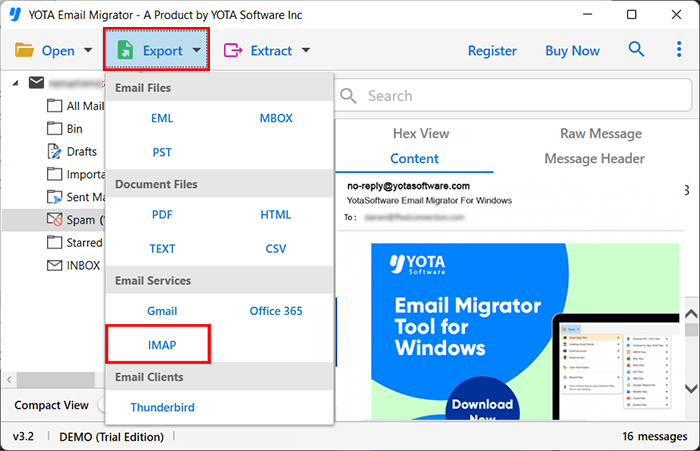
- Provide your Zoho Mail login information and hit the Save button.

Finished! This is how you can migrate GoDaddy emails to Zoho Mail.
Key Features of the GoDaddy to Zoho Migration Tool
Bulk Migration: It offers batch migration feature which is used for migrating multiple GoDaddy emails to Zoho Mail in one process. It allows you to export multiple folders in a single click and saves a lot of time. This is very helpful for businesses or organizations who need to migrate multiple emails without any data integrity issues.
Advanced Filters: This tool provides advanced filtering options that let users transfer specific emails based on different criteria like date range, subject, keywords, file size, to, cc, bcc and so on. This way, only relevant emails are imported and preventing unnecessary data transfers.
Folder Structure Intact: It is capable to preserve metadata during migration. It also keeps the folder structure and email formatting intact so that there are no confusions while accessing the emails even after complete migration.
Highly Secured: It prioritize the data security during the process. The tool to migrate GoDaddy emails to Zoho account in 100% secured and does not save any of your credentials. Hence, you can migrate your emails with full confidence without risking any of your sensitive information.
Standalone Software: This software works independently without the need for any additional third-party software or plugins. The users are able to import GoDaddy email to Zoho without the need for any external dependency of plugins or software.
Compatible with Windows OS: It works on all versions of Windows OS without giving any error. Whether you are using Windows 10 or 11 or earlier versions, you can accomplish the task without worrying about compatibility issues.
Final Words
Migration from GoDaddy to Zoho Mail is very easy and efficient with the use of the right tool. Yota Email Migrator provide secure and reliable solutions to migrate GoDaddy emails to Zoho account with ease. No matter if you are moving to enjoy better security or productivity features; this software ensure a hassle-free migration experience.
You can try the free demo of the tool evaluate the working process. After that go for the upgraded version of the tool.