Are you looking to transfer cPanel emails to Google Workspace account? cPanel is a commonly use email services used by business owners for managing their email communication. However, users are moving to Google Workspace for advanced collaborations and better security. But moving from one platform to other is not a simple task. You might lose your data, if something goes wrong. In this blog, we have explained a detailed steps to migrate emails from cPanel to Google Workspace.
Reasons to Move from cPanel to Google Workspace
- cPanel accounts have limited storage capacity.
- Google Workspace offers tools like Gmail, Drive, Meet, etc.
- It also provides better security features to protect your data.
- Email management is better with Google Workspace.
How to Migrate cPanel Emails to Google Workspace Professionally?
To import your emails, try Yota Email Migration Tool. It is a professional solution to export your data completely without losing any data. Also, the tool supports bulk migration that lets you migrate hundreds of emails in a single process. It is capable to maintain the folder structure and metadata of emails throughout the process. Plus, the software is designed with easy-to-use interface, both novice and professional users can easily perform the migration without any extra hassle.
Steps to Transfer cPanel Emails to Google Workspace are:
- Download and Install Yota Email Migrator on your PC.
- Click on Open>> Email Accounts>> Add Account.

- Enter your cPanel email credentials and login.

- Choose the emails that you want to export.
- Now, go to Export and select IMAP from the saving list.
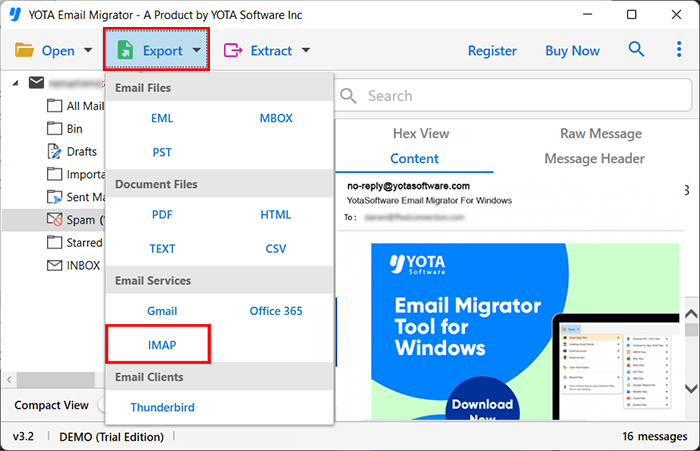
- Lastly, enter your Google Workspace login credentials and hit the Save button.

That’s it! This is how you can easily migrate emails from cPanel mailbox to Google Workspace.
Check this complete Video Tutorial here:
Why Choose this Automated Tool?
- You can transfer and backup cPanel emails to Google Workspace without an y loss.
- Supports 30+ file formats so you can convert cPanel to PST, EML, MBOX, PDF, etc.
- Migrate multiple emails from cPanel mailboxes with attachments.
- Advanced email filters are provided to export selective emails.
- Export emails from single or multiple cPanel mail folders as required.
- Retains folder hierarchy, attachments and metadata during the migration.
- Works seamlessly with all Windows operating system.
- Compatible with all cPanel-based email platforms.
Conclusion
Migrating emails from cPanel to Google Workspace is a smart decision for users who want better security, reliability, and advanced collaboration features. Google Workspace allows users to access emails anytime, from anywhere, across multiple devices. If you are someone who don’t want to lose data, it is highly recommended to use a professional cPanel to Google Workspace Migration Tool. You can utilize the tool to migrate unlimited emails with ease.
If you want to test the features of the tool, download the Demo version first. It lets you export 10 emails per folder and if you are satisfied with the working, you can buy the upgraded version anytime.
Frequently Asked Questions
Can I migrate selective folders from cPanel to Google Workspace?
Yes, you can migrate selective folders from cPanel to Google Workspace using this advance email migration tool.
Can I install this software on macOS?
No, this software can not be installed on macOS. However, you can easily install this utility on all latest and earlier Windows OS including Win 11, 10, 8, 7, etc.
Is this software compatible with all cPanel based-email accounts?
Yes, the tool supports all cPanel email clients and ensures a complete mailbox migration with full accuracy.
Can I preview the emails before cPanel to Google Workspace migration?
Yes, the tool lets you preview the emails before starting your migration so that you can verify your data beforehand.