Introduction: Do you also want to move email from Mimecast to Outlook application? If so, here you will the best solution to your request. In today’s blog, we will discuss the most effective solutions to transfer Mimecast email to Outlook client.
Mimecast is a cloud-based email management software with a comprehensive suite of services for email security, archiving, continuity, and productivity. It provides businesses with an integrated platform to manage and secure email communications across devices and platforms. Mimecast services help minimize risks from email-based threats such as phishing, malware, ransomware, and other cyber attacks.
Manually Move Email from Mimecast to Outlook Free
Mimecast offers an option to export emails locally in PST and EML file formats. Follow these steps to export Mimecast emails to PST:
- First, log in to the Admin Console to access your Mimecast dashboard.
- Then, select the “Admin Toolbar” option.
- Select “Archive | Saved Searches” from the menu.
- From the navigation menu, select “Saved Search Folders” to access all your saved searches.
- Right-click on the “Saved Searches” option and select the “Export Search” option.
- Next, enter a name for your search file.
- Select PST as an export file format.
- Finally, click on the “Save” button to export Mimecast emails to PST file format.
After that, you can import the PST file into your Outlook application using the import/export option.
So, this is how you can manually move email from Mimecast to Outlook email application.
Automated Method to Transfer Mimecast Email to Outlook
To instantly move email from Mimecast account to Outlook, you can take the help of the Yota Email Backup Tool right now. Its simple and graphical interface enables any kind of user to smoothly accomplish this task within a few minutes. The software provides an option to export Mimecast emails to PST file format on your PC. After that, this file can be easily imported into any version of the MS Outlook application via the import option.
Using this tool, it is easy to export multiple emails from Mimecast to PST file format at a time. It allows you to backup Mimecast emails to your PC in multiple formats. Along with PST, it supports exporting Mimecast emails to many other file formats like EML, PDF, MBOX, etc. If you are not interested in exporting all your emails from the Mimecast account, you can filter your emails and export only the required emails.
It also works as an email migration tool that allows you to transfer emails from Mimecast to all IMAP-supported email services. You can directly import Mimecast email to Gmail, Outlook.com, Office 365, RoadRunner Webmail, Stofa Mail, etc. For this, only account login credentials are required.
Steps to Move Email from Mimecast to Outlook are as follows:
- Download and install the Yota Email Converter Tool on your PC.
- Then click Open from the top > Email Accounts > Add Account.
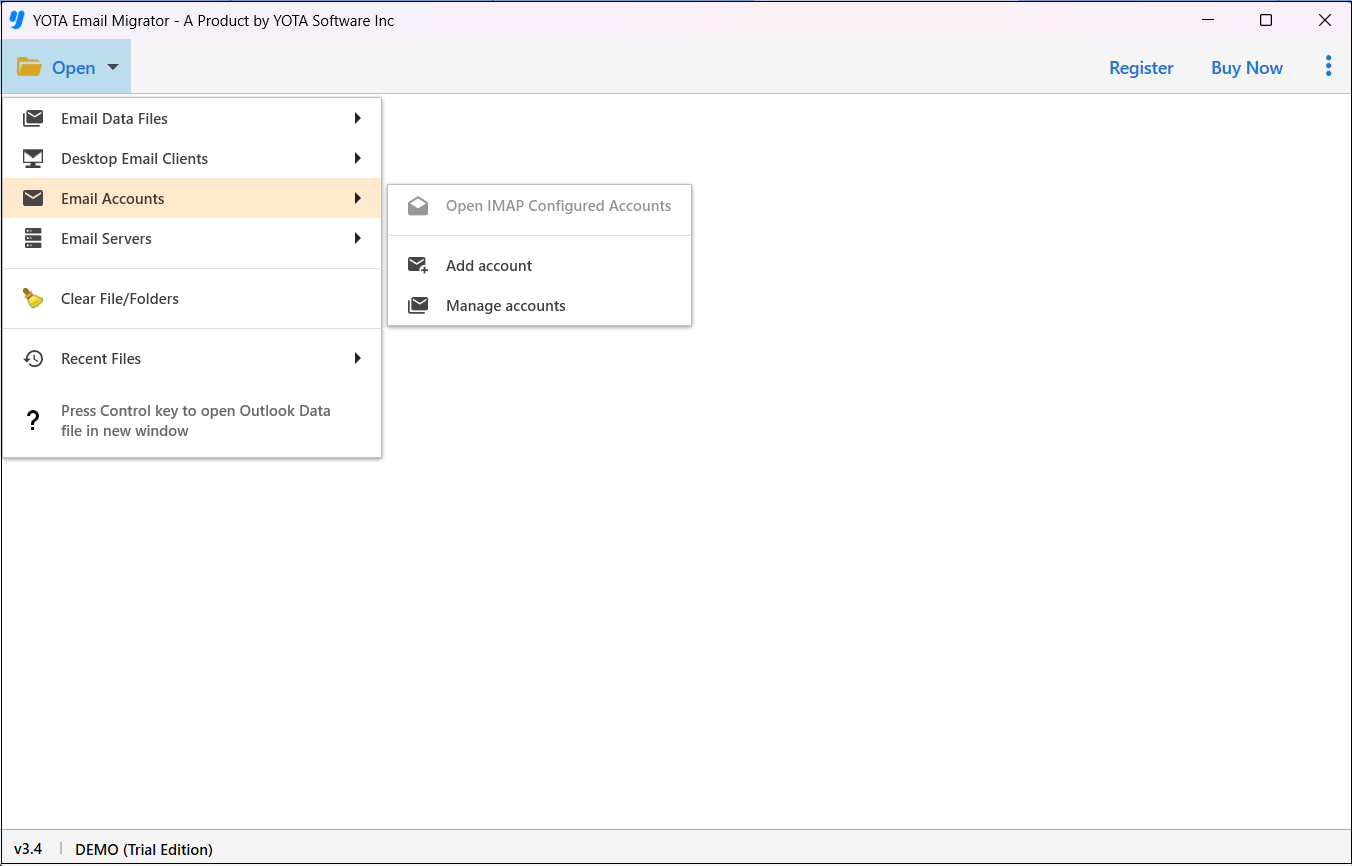
- Enter Email Address and App Passwors of Mimecast Account.

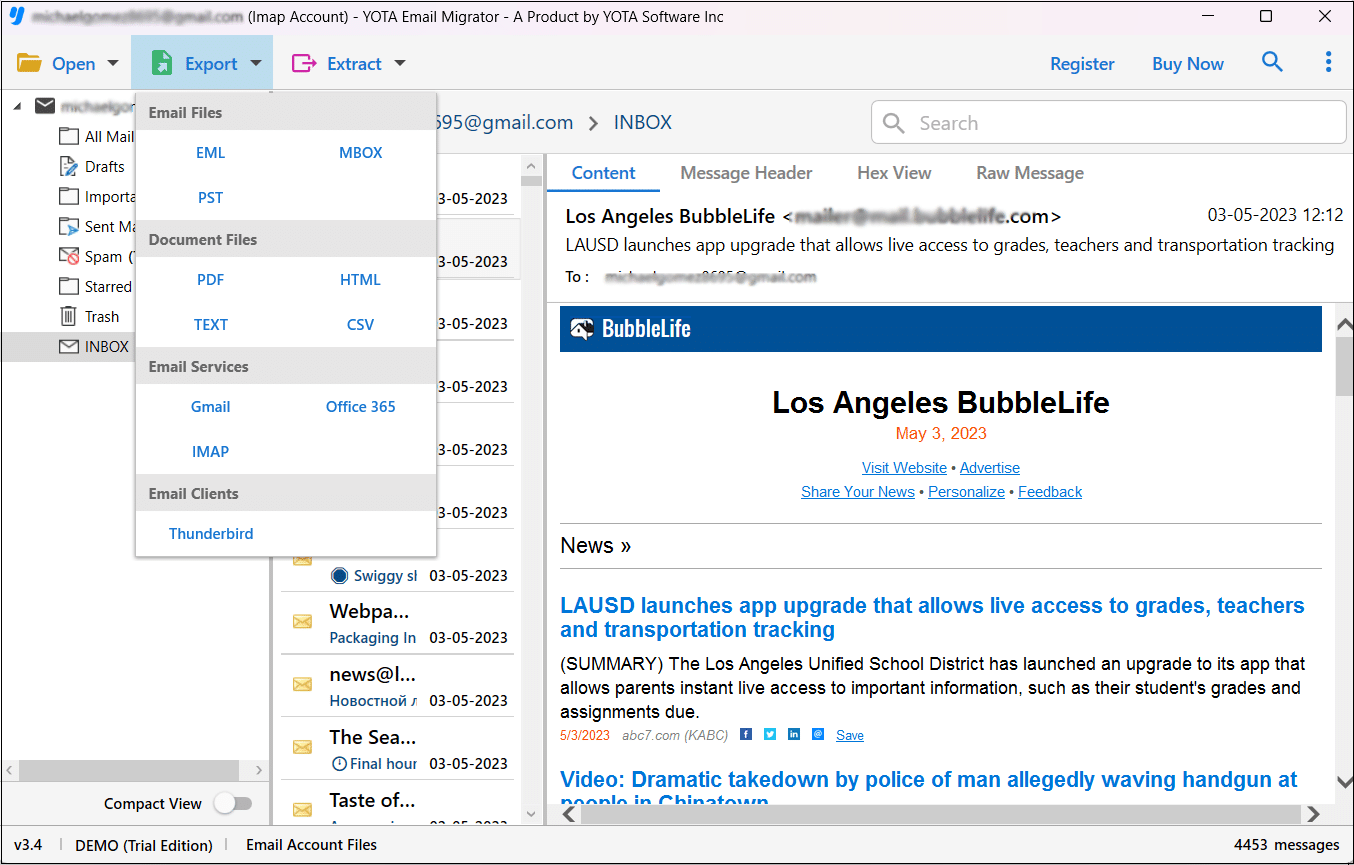
- Select email folders and hit the Export option then choose PST file format.
- Lastly, choose a path for storing output and hit the Save button.
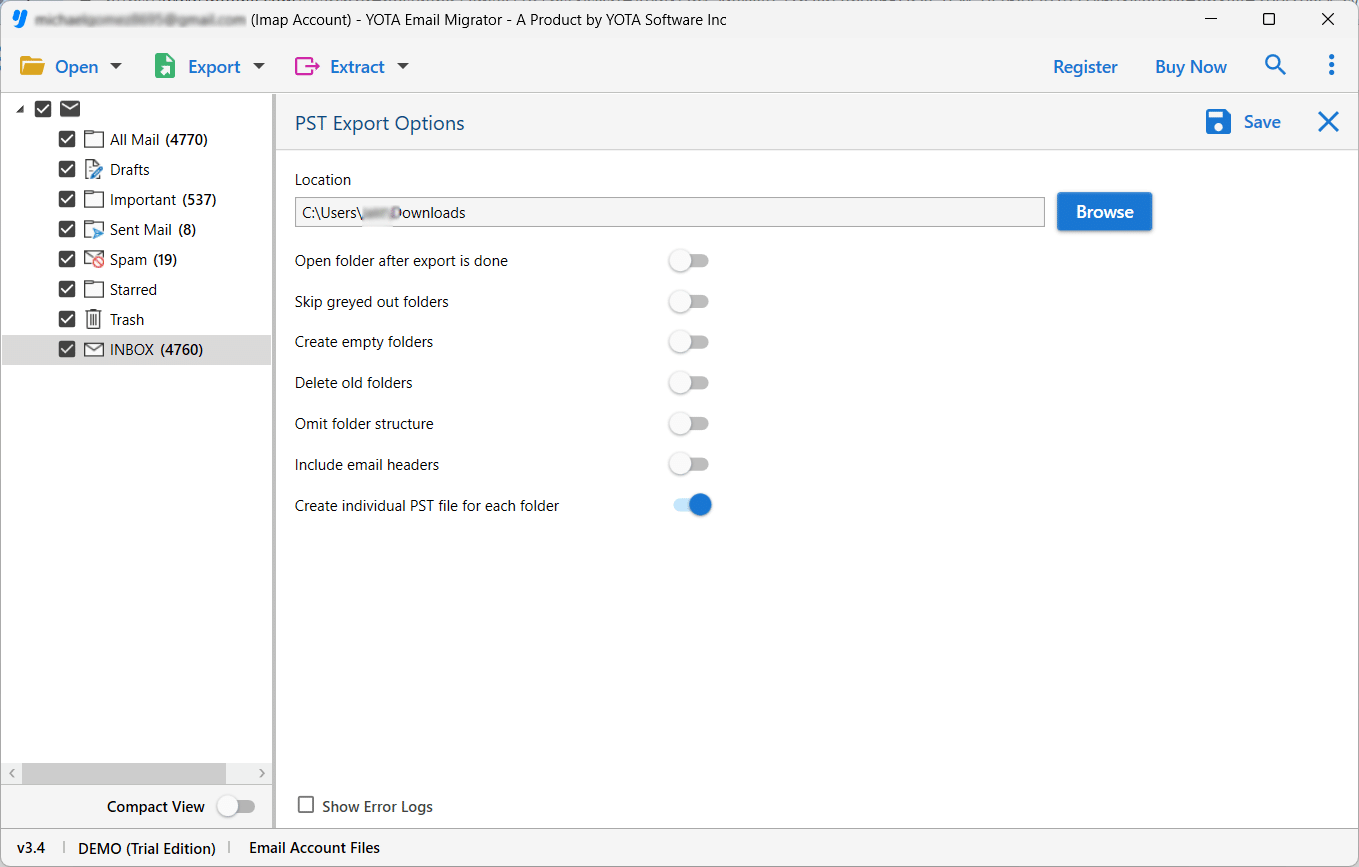
All done!
The software helps you export Mimecast emails to PST file format in a few minutes. Once the task is completed, you will get a notification on the screen. Then you need to import the exported PST file into the Outlook application using the inbuilt import/export feature.
So, this way you can move email from Mimecast to Outlook 2021, 2019, 2016, 2013, and later versions.
Why Choose Automated Mimecast to PST Export Tool?
- The software lets users export Mimecast emails to PST file format in a seamless manner without data loss.
- It provides the freedom to export multiple emails from Mimecast to PST in just one attempt and saves time.
- Using this tool, you can transfer Mimecast email to Outlook on any version of Windows including Win 11, 10, etc.
- The tool also gives you an option to choose a location on your system where you want to store the exported file.
- You can also view Mimecast emails along with all attached data like links, images, logos, and others before conversion.
- One can smoothly move email from Mimecast to Outlook via PST without having technical expertise. The simple user interface helps users to finish this task in a few clicks.
- There’s also a trial version that allows you to export the first 10 emails per folder. The goal of the demo version is to allow users to test the tool’s functionality before investing.
Final Words
In the above post, we have mentioned manual and automated methods to transfer Mimecast email to Outlook. You can pick any of the method to move email from Mimecast to Outlook via PST as per your needs. However, to seamlessly export Mimecast emails to PST file format without any limitations and data loss, you can go with an automated tool. This allows you to export emails from Mimecast to PST for Outlook with the original email formatting and folder hierarchy.