Migration of emails from one hosting provider to another needs quite a lot of effort, especially when switching from GoDaddy to HostGator. If you are also someone who is looking to export GoDaddy emails to HostGator then, here is the best solution provided. This guide is a step-by-step walk-through on GoDaddy to HostGator migration. By the end of this article, you will have enough understanding to accomplish the taks without any error. So, let’s get started!
Reasons to Export GoDaddy Emails to HostGator
GoDaddy is the popular name in the market and is known for its website builders, email hosting, and marketing services. It offers a wide array of hosting plans, ranging from shared hosting to VPS as well as dedicated hosting, for businesses and individuals alike.
HostGator is known mainly for hosting solutions: shared hosting, cloud hosting, WordPress hosting, VPS hosting, dedicated hosting, etc. It has an established reputation for dependability, support, and usability. Some users may want to export their email accounts from GoDaddy to HostGator for hosting performance enhancements, better email management, cost-saving opportunities, or that is why users are looking for the methods to import GoDaddy emails to HostGator account.
Direct Solution to Transfer GoDaddy Emails to HostGator
Yota Email Migration Tool is an efficient and trustworthy solution for those who want to transfer emails from GoDaddy to HostGator with attachments. This tool offers a very simple interface that requires no tech skills to export GoDaddy emails to HostGator account. Plus, it has so many advanced features that can keep folder hierarchy, attachments, and metadata intact. The utility supports multiple file formats to backup GoDaddy emails in local PC also. You can also migrate GoDaddy emails to Gmail, Thunderbird, office 365, Zimbra, Yahoo, Hotmail, etc.
In addition, the tool makes sure that there is no data loss and users will get 100% secure transfer. It provides an automated process whereby users do not need to configure anything manually. The advanced filters can be used to export selective emails by date range, sender, or subject so only necessary emails get migrated.
Steps to Export GoDaddy Emails to HostGator are as follows:
- Download and install Yota IMAP Migration Tool.
- Go to Open tab and select Email Accounts>> Add Account option.

- Enter GoDaddy email credentials and choose the files to migrate.

- Next, click on Export and select IMAP as saving option.
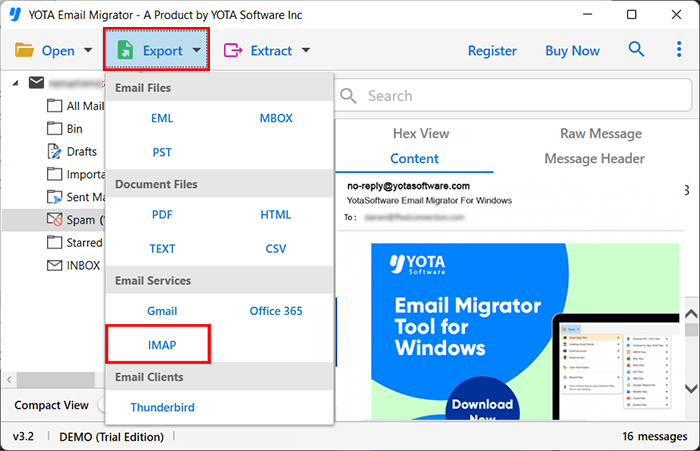
- Enter your HostGator email credentials and click the Save button to export GoDaddy emails to HostGator.

Remarkable Features of Yota GoDaddy Backup Tool
Allows to transfer multiple emails in one go while ensuring no data loss or error occurs. This bulk option is helpful for those who want to save time while exporting large number of emails.
Direct migration is supported between IMAP-enabled email services such as GoDaddy and HostGator. Also, it supports 200+ email clients like Gmail, Google Workspace, Zoho, Zimbra, etc.
Users can filter emails according to date, subject, certain senders, and attachments. This way, only the required emails will get migrated instead of complete mailbox.
The original folder structure of emails is retained during and after the migration. Hence, you will not get confused while accessing your emails in the new account even after complete migration.
The tool is designed with simple and intuitive UI that lets the new and professional users to export GoDaddy emails to HostGator without requiring any technical knowledge.
This email converter is compatible with all latest Windows OS like Win 11, 10, 8, and 7. So, there is no compatibility issue while moving emails from GoDaddy to HostGator account.
Conclusion
Now, we hope that the above article is helpful to export GoDaddy emails to HostGator account with attachments. Yota Email Backup Tool is the expert tool that will import emails from GoDaddy to HostGator without missing any single data. It has bulk migration features that allows you to migrate multiple emails in a single process.
You can also download the free DEMO of the tool to evaluate the working process. After getting satisfactory results, you can go for the upgraded version of the tool.