If you are searching for an easy way to import Hotmail emails to Zoho Mail, we have got you covered. Hotmail is a popular email service but many users want to transfer emails from Hotmail to Zoho Mail due to its more advanced features. It offers a clean and add free interface with encrypted email services.
In this article, we will explain how to migrate Hotmail emails to Zoho account using different methods. You can export emails to Zoho Mail by configuring Hotmail account to Zoho via IMAP or using a professional utility Yota Hotmail Backup Tool. It is the trusted software to transfer emails from Hotmail to Zoho Mail in bulk.
Why to Import Hotmail Emails to Zoho Mail?
- Zoho Mail is an ad-free and more professional email service.
- It comes with advanced security and end-to-end encryption for emails.
- Business users can integrate Zoho with CRM and other apps.
- It offers better spam filter and secure servers.
How to Migrate Hotmail Emails to Zoho Mail Manually?
You can add Hotmail emails to Zoho account by configuring account to Outlook using IMAP settings.
Step 1: Configure Hotmail in Outlook
- Open Outlook and go to File >> Add Account.
- Enter your Hotmail login credentials and sign in.
- Outlook will automatically detect and configure the Hotmail IMAP settings.
Step 2: Export Hotmail Emails from Outlook
- In Outlook, go to File >> Open & Export >> Import/Export.
- Choose Export to a file and click Next.
- Select Outlook Data File (.pst) and click Next.
- Choose the emails that you want to export.
- Select a location and click Finish.
Step 3: Add Zoho Mail to Outlook
- In Outlook, again go to File >> Add Account.
- Enter your Zoho Mail address.
- Choose IMAP and enter the following settings:
- Incoming Server (IMAP): imap.zoho.com
- Port: 993
- SSL: Yes
- Outgoing Server (SMTP): smtp.zoho.com
- Port: 465 (SSL) or 587 (TLS)
- Enter your Zoho Mail App Password Click on Finish.
Step 4: Import PST File into Zoho Mail
- In Outlook, go to File>> Open & Export>> Import/Export.
- Select Import from another program or file>> Next.
- Choose Outlook Data File (.pst)>> Next.
- Browse and select the PST file you exported earlier.
- Choose Import into Zoho Mail account. Click Finish.
Limitations of Manual Method
- Time-consuming process.
- You have to follow complex steps.
- Any wrong configuration can cause data loss.
- Not ideal for bulk migrations and businesses.
- Outlook may slow down or crash while handling large mailboxes.
Method 2: Transfer Emails from Hotmail to Zoho Mail Directly
Yota Email Migration Tool is a professional utility that can help you to perform Hotmail to Zoho Mail migration quickly and completely. This is a simple and reliable utility to import Hotmail emails to Zoho account without any issue. This software is designed with advanced algorithm that lets you migrate bulk data while keep the data integrity intact. This tool allows you to save Hotmail data in various file formats also.
It can be installed on all Windows OS and Servers. Plus, the tool comes with a free demo version so that users can check the efficiency of the tool.
Steps to Import Emails from Hotmail to Zoho Mail are:
- Download and install the tool on your PC.
- Click on Open, Email Accounts>> Add Account option.

- Enter Hotmail login credentials and sign in.

- Now, go to Export tab and select IMAP from saving option.
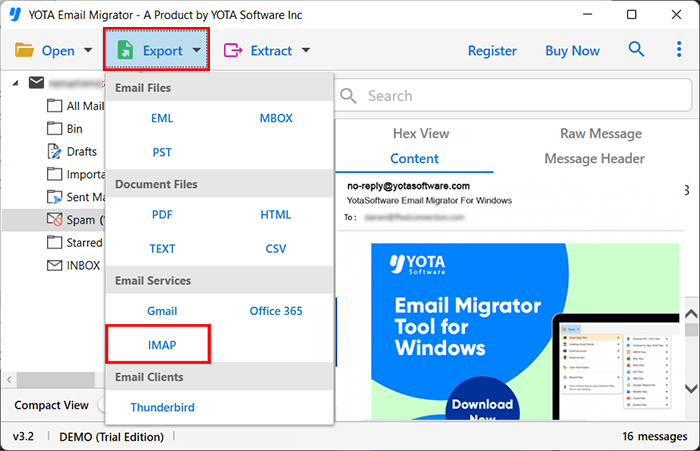
- Lastly, enter Zoho Mail login details and hit the Save button.

Done! You can easily export Hotmail emails to Zoho Mail with attachments.
Features of Hotmail to Zoho Migration tool
- This tool can help you to keep your emails safe throughout the process. All the meta properties of emails like sender, receiver, subject line, attachments, images, links, and folder hierarchy, etc. remains intact.
- With the help of this software, you can move emails specifically by date range, subject, or any keyword.
- It has a straightforward panel so that user even without any technical skills can operate it without any hassle.
- It also provide option to extract attachments from Hotmail. This can be useful for email marketing or contact management.
- This software lets you preview your emails along with attachments before migration process starts.
- Also, the tool is completely independent and you do not need any extra application or third-party software to import Hotmail emails to Zoho account.
- The tool comes with an advanced search option. You can quickly find and migrate specific emails or components from the entire Hotmail mailbox.
Conclusion
If you want to import emails from Hotmail to Zoho Mail, you can either use manual method or a professional tool. Although manual method is free but it has many limitations. However, the professional method is an easy and secure way to transfer your data. Try Email Migration tool at once and get 100% accurate results in few moments. It is the recommended by many It experts that can transfer Hotmail emails to Zoho with attachments.