These days, switching from GoDaddy to Bluehost can be a significant move, especially for businesses looking for better performance and enhanced email management. However, email migration is one of the biggest challenges during the migration. To ensure a error-free results, it’s important to use the right method to migrate GoDaddy emails to Bluehost while keeping all data intact.
It is important to note that GoDaddy hosting and GoDaddy webmail services, both are both different. Likewise, Bluehost web hosting and Bluehost email services are also different. When someone buys a Bluehost hosting package, in addition to it, they usually also have email services so they can send and receive emails. This guide will cover the simplest and most effective way to migrate GoDaddy emails to Bluehost account.
Direct Solution to Migrate GoDaddy emails to Bluehost Account
Since there is no manual method to import GoDaddy to Bluehost, we are suggesting to use a professional tool for migration. Yota Email Migration tool can move emails from GoDaddy to Bluehost in a secure and reliable manner. The software follows advanced algorithms to provide a hassle-free and quick results.
The software keeps the email data safe and secure during the process to prevent any possible data loss or corruption. It does not store any user credentials, thus, providing complete privacy and security. Furthermore, that tool keeps the format of the original email along with the specific folder hierarchy intact. With that, the users can access their emails in Bluehost just as they were in GoDaddy. The most valuable feature of this software is that it offers a free demo version for all its users so that they can evaluate the tool, before they buy it.
Steps to Migrate GoDaddy emails to Bluehost are as follows:
- Install and Run Yota GoDaddy Migration tool on your PC.
- Click on Open>> Email Accounts>> Add Accounts.

- Provide GoDaddy login credentials to upload the emails. Select the folders to export.

- Now, go to Export tab and select IMAP as saving option.
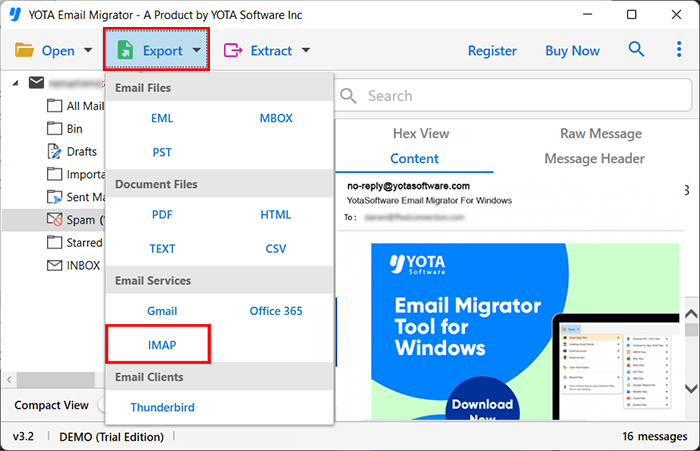
- Finally, enter the login details of Bluehost and hit the Save button.

Done! You can export emails from GoDaddy to Bluehost using the above few steps.
Features and Benefits of GoDaddy Migration Tool
Support Various Formats: This is an exceptional tool that allows to convert emails into different file formats, including PST, MBOX, EML, MSG, and HTML. You can move emails into different email clients without compatibility issues of any kind. This makes an easy way to backup GoDaddy emails.
Batch Email Migration: Users can transfer hundreds and thousands of emails together with the help of bulk migration option. Utilizing this option can increase the efficiency by saving time and efforts. It is especially helpful features for businesses or IT administrators who wants to export multiple emails in a single operation.
Advanced Filter Options: Users can transfer emails selectively based on different criteria like within date ranges, senders, recipients, or subject, file size, etc. Hence, it will minimize unnecessary data migration and ensure that only the required data will get transferred.
Direct Transfer to Email Services: The tool directly migrates emails from GoDaddy to different cloud and web email clients, such as GoDaddy to Gmail, Office 365, Thunderbird and Gmail. It saves users from manually converting emails.
Retains Email Structure: The software retains all contents of the emails in the same way, so it is easy for users to access emails in the similar structured format. Email headers, attachments, and metadata data, will be preserved so that nothing will lost or misplaced during the migration process.
Conclusion
So, today in this guide, we saw the best way to migrate GoDaddy emails to Bluehost account. For effortless email transfer, you must go for Yota Email Backup Tool. It’s simple, reliable, and cost-effective solution. This tool is going to help you migrate complete mailbox from GoDaddy to Bluehost account with all the embedded data in it. If you get stuck with this tool, do not hesitate to contact our support team.


