In today’s blog, we will discuss the easiest and most reliable way to import Outlook to Thunderbird profile along with all attachments. Here, you will get to know about two effective methods to import Outlook emails to Thunderbird.
Before discussing the solutions, let us know about Outlook and Thunderbird and why users need to transfer Outlook emails to Thunderbird account.
MS Outlook and Mozilla Thunderbird are both email applications used for sharing emails. Outlook is a desktop-based application that supports PST files and stores emails, tasks, address book, calendars, and attachments. Outlook is available for Windows and Mac operating systems. But it is a paid application.
Whereas Mozilla Thunderbird is a free and open-source email client that supports the MBOX file format. It is a free, open-source email client compatible with Linux, Windows, and Mac OS. For this reason, millions of users are looking solution for Outlook to Thunderbird migration with attachments. But both Outlook and Thunderbird support different file formats, and people are facing difficulty in migration.
Let’s have a look at the query that we are getting to perform the migration:
How to Import Outlook Email to Thunderbird? – 2 Methods
There are two approaches available that you can use to transfer emails from the MS Outlook account to Thunderbird.
- Manual Method (Free but difficult and risky)
- Direct Method (Recommended)
Free Method for Outlook to Thunderbird Migration
If you have a few files to import Outlook email to Thunderbird, then you can go for the manual way. See how you can do it easily.
- Click on the Start button on your PC and go to Default Programs.
- Then set Outlook as your default program.
- Next, run the Thunderbird application and go to the Dashboard.
- Click on the Import option under Import from Another Program.

- Now select Import from Outlook from the provided list and click Continue.

- This will take some time and will transfer Outlook emails to Thunderbird.
Limitations of the Manual way
- Need technical skills
- Complex and time-consuming method
- Risk of data corruption and data loss
Alternate Solution to Import Outlook Email to Thunderbird Directly
If you are looking for a direct way for Outlook to Thunderbird migration, download Yota Outlook Migrator on a Windows PC. This software allows you to transfer all emails from Outlook directly to the desired Thunderbird profile. It can transfer emails from multiple Outlook accounts one after another. Users can import Outlook emails to Thunderbird in bulk and in a selective manner as needed.
Furthermore, if you don’t have Outlook on the system and want to import PST to Thunderbird account, then this software will do it too. To do this, you can click Email Data Files and select the PST file to start the process. You can also export Outlook contacts to Thunderbird profile directly.
It is a reliable application that is a fast and secure tool to perform Outlook to Thunderbird migration. The software is operable on all versions of the Windows operating system, such as Windows 11, 10, 8, 7, and more.
The tool supports Outlook 2021, 2019, 2016, 2013, 2010, 2007, and below editions for the email migration process. Plus, it does not have any limitations regarding file size and number. That means you are free to migrate unlimited emails without any fear of a limitation bar.
In addition, if you want to transfer Outlook PST files to other file formats or email services, this software also works as a PST file converter tool for you. It lets you import PST to Gmail without Outlook, and many more accounts.
Steps to Import Outlook to Thunderbird Directly are as follows:
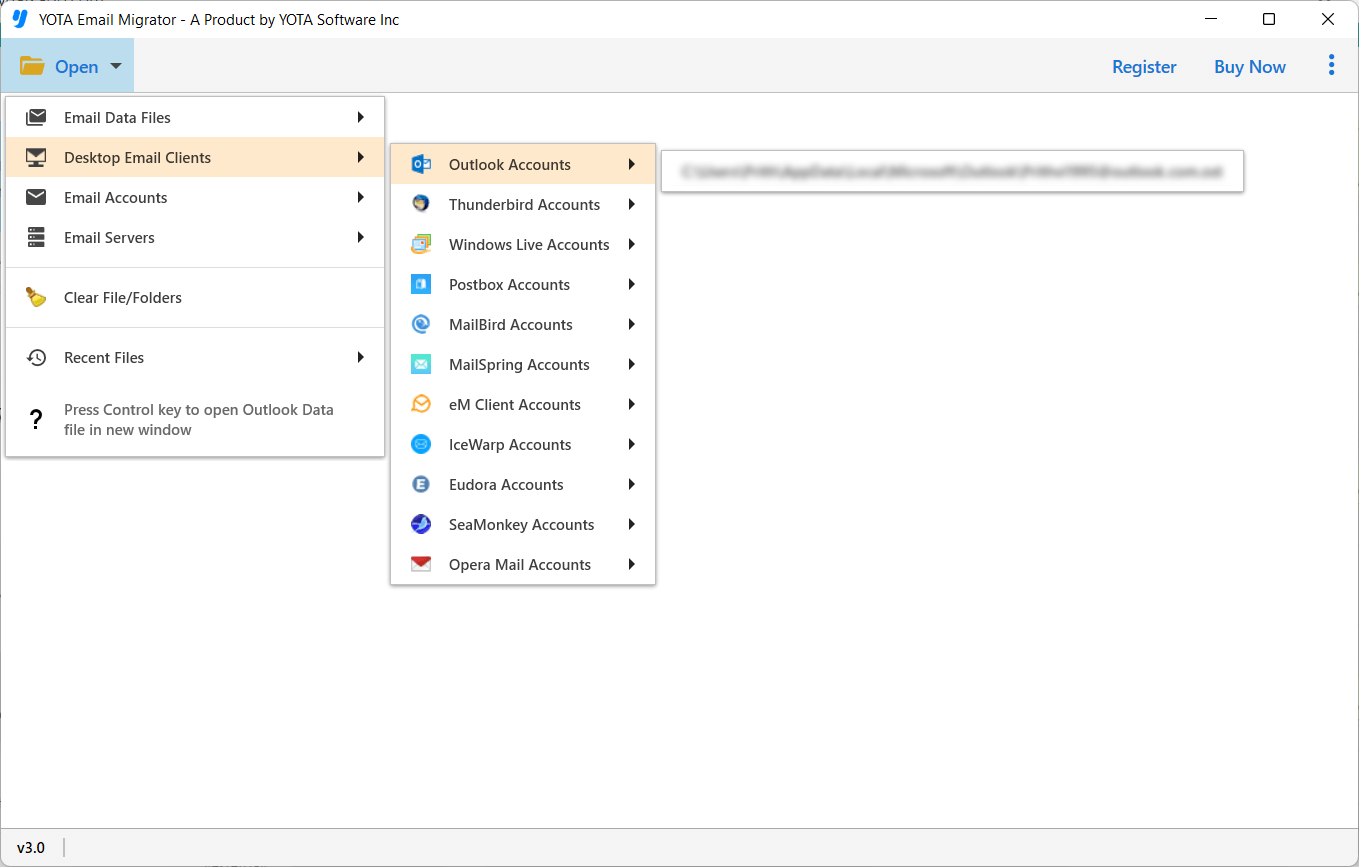
- Run the Outlook to Thunderbird migration tool and click Open.
- Then go to Desktop Email Clients and click on the configured Outlook profile.
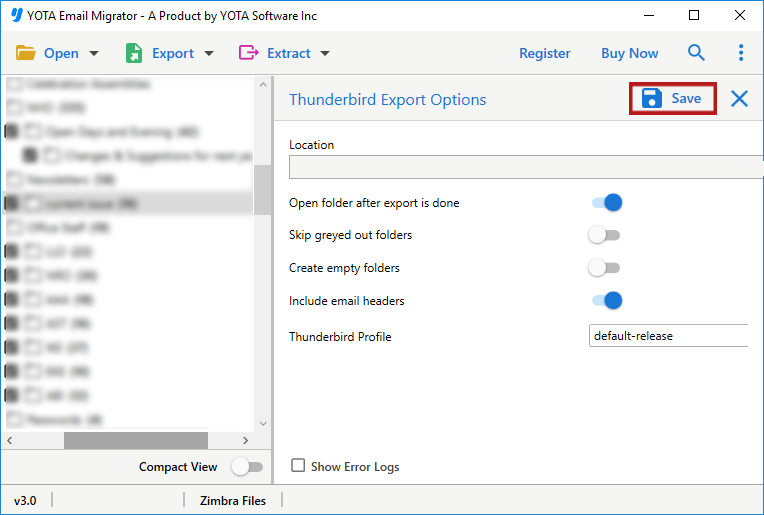
- Next, click on Export and select Thunderbird as the saving format.

- Choose Thunderbird Profile and click on the Save button.
That’s it.
Prominent Features of the Outlook to Thunderbird Migration Tool
This software is designed by experts who understand your needs and enables you to import Outlook email to Thunderbird. Due to its crystal-clear interface migration process becomes easy. Some features are listed below:
- It can migrate the entire folder containing emails, which includes Inbox, Outbox, Sent Items, Drafts, etc., to the desired format.
- Using this tool, one can easily import Outlook to Thunderbird without any restrictions. You can upload large emails effortlessly.
- If you are using this tool in order to import Outlook Mail to Thunderbird, then your data is migrated with 100% precision.
- Also, this tool is capable of maintaining the original structure, properties, and hierarchy intact without any modification to them.
- The Outlook to Thunderbird migration tool comes with a simple interface that makes the migration process extremely easy for non-technical users as well. It only requires following 3-4 easy steps to accomplish the task
Final Thoughts
In the above write-up, we have explained to you the complete solution to import Outlook email to Thunderbird with attachments. This is the simplest method you can follow to import Outlook to Thunderbird, as it’ll save your time and effort. Also, it’s a risk-free tool to move unlimited emails from Outlook. And, if you are a non-technical user, then the automated tool is best for you.
FAQs
Q 1. How can I import emails from Outlook to Thunderbird?
A. Here are the steps to import Outlook email to Thunderbird account:
- Launch Yota Outlook to Thunderbird Migration Tool and go to Open.
- Then select desktop clients, and then select the Outlook account.
- Select emails and click Export, then choose Thunderbird as a saving option.
- Choose the Thunderbird profile and hit the Save button.
Q 2. Is Thunderbird email better than Outlook?
A. Well, both applications are good and allow users to manage their email and tasks. For organizational use, it is better to use MS Outlook, which is a paid application. And for personal use, Thunderbird is the best free email application for you.
Q 3. Can I transfer Outlook emails to Thunderbird with attachments?
A. Yes, the suggested tool allows you to perform an Outlook to Thunderbird migration directly, along with all email attachments.