

Create VCF from Excel with Ease
Best Excel to VCF Converter
With the help of Excel to VCF Converter Wizard, one can convert all the contacts from Excel to VCF format and export all details from the spreadsheet with exact field mapping. Also, you will get the free preview of the files along with the rows and columns so that you can get an idea about the resultant files that you are going to export.
- 100% safe and reliable tool
- Supports various mobile platforms
- Supports many different Email Clients
See What's More Goodies in the Hood!
Simple Process, Unlimited Data Migration
CSV to vCard File Converter is the most proficient and easiest solution to convert CSV to VCF and then allows its users to import the output VCF files to Gmail, MS Outlook, Android Phones like like Samsung, Motorola, iPhones, iCloud contacts and what not. It supports to convert all types of Excel files that includes CSV, XLS, XLT, XLSM, XLSB, XLTX worksheet to vCard or VCF format. This converter tool comes with the smart and user-friendly interface to import contacts from Excel to vCard .
Different Saving Options according to the vCard versions; You can choose from vCard 2.1, 3.0, and 4.0 .
Capable to convert all types of CVS Spread sheets like Yahoo CSV, Google CSV, Outlook CSV, etc.
Generate a downloaded report in CSV format with important details like name, email ID, mobile number and so on while importing Excel Contacts to vCard.

Excel to VCF Converter, the highest rated on top review hubs.
Detailed Features of Excel to vCard Converter Tool
Convert CSV to vCard
CSV to vCard Converter wizard is a hassle-free solution to migrate Excel contacts to vCard format. In addition, it also supports all CSV supported applications like Linked in Connection CSV, Hotmail CSV, Yahoo CSV, Google CSV, Outlook CSV, Zoho Sheets, etc. No supportive email client installation is required while performing the conversion.
Preview with Exact Details
It generates a detailed preview of contact list with complete contacts details, i.e. Name, Phone number, Address, Email ID, Birthday, Gender, Nickname, Job Title, Department, etc. The CSV to vCard file converter performs the quick conversion with complete data accuracy while maintaining all vCard/VCF Contacts fields structure.
Save at User Specified Location
While importing CSV contacts to vCard format, the software gives you option to select any desired location to save your converted data. This is an amazing feature because if you are picking up a location to save converted files then you can access the files easily. Also, you can select any external storage device or create a new folder to save converted data easily.
Convert XLS & XLSX to vCard
With XLS to VCF converter, you can quickly convert multiple XLS and XLSX files to VCF or vCard format. You just have to add XLS files in the software panel and you can select as many as files you want. This converter allows the batch migration of XLS files to VCF format. There is no file size restriction associated with this ultimate wizard.
Import Empty Email Address
This Excel to vCard Converter tool provides one more interesting feature that is Import Empty Email Address. Sometimes, you have contacts without having email address. In such cases, this option is helpful. You can simply select the option and all the contacts with empty email address field will also be migrated without showing any error.
Single vCard file for All Contacts
Excel to VCF converter is designed for importing contacts from Spreadsheet to VCF format. It is a multifaceted product that provide advanced functions for the smooth conversion. The software provides an option to create a single vCard file after successful migration of contacts from CSV to vCard. By default, separate vCard files will be created for every contact.
Support all Android Platforms
The software allows to convert Excel to vCard so the user can export those converted files to any Android supported platform. Since vCard file is the standard format supported by any Android mobile device. So, the users who want to access the CSV contacts in mobile devices then they can use this best CSV to vCard converter without any doubt.
Migrate Contacts to iPhone/iCloud
Excel to VCF Converter wizard is a simple program that is developed to migrate contact file to iPhone or iCloud in very few steps. It is a very useful program if you have multiple multiple files and you want to export them into your iPhone because it easily converts CSV to vCard 3.0 or 4.0 which is supported by iCloud/iPhone.
Compatible with all Windows OS
The CSV to VCF Converter software support all versions of Windows Operating System including Windows 10, 8.1, 8, 7, and below version. It is also compatible with all Windows Server including Windows Server 2019, 2016, 2012, etc. with 32- and 64-bits versions. Also, the user interface of the software is so simple that anyone can use it with ease.
Free Download is Available
It provides free trial of Excel to VCF migration tool to evaluate the capability of the tool. Free CSV to vCard wizard allows to convert first 25 contacts from uploaded Excel file. The also allows to preview the data files which is beneficial for software evaluation before investing money. After getting satisfied with the demo, you can buy the full version of the tool.
Software Walkthrough
Watch videoSteps to convert Excel Contacts to vCard are as follows:
Step 1. Run the Excel to VCF Converter in your system.
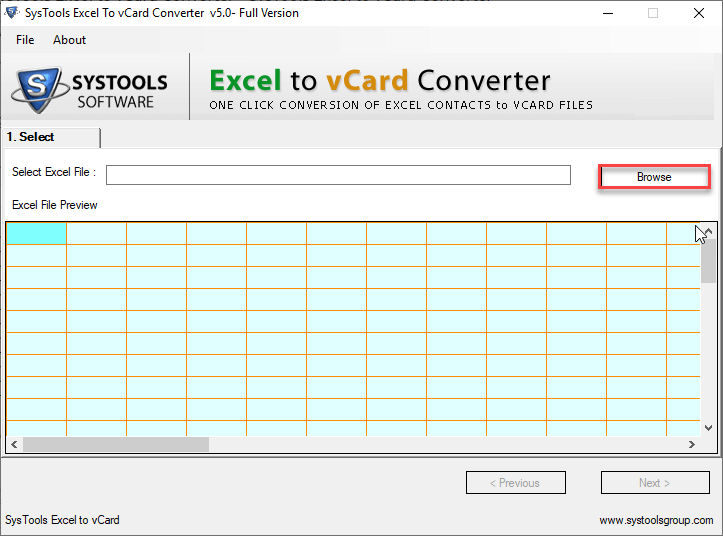
Step 2. Add Excel file using Browse option and Preview the files.
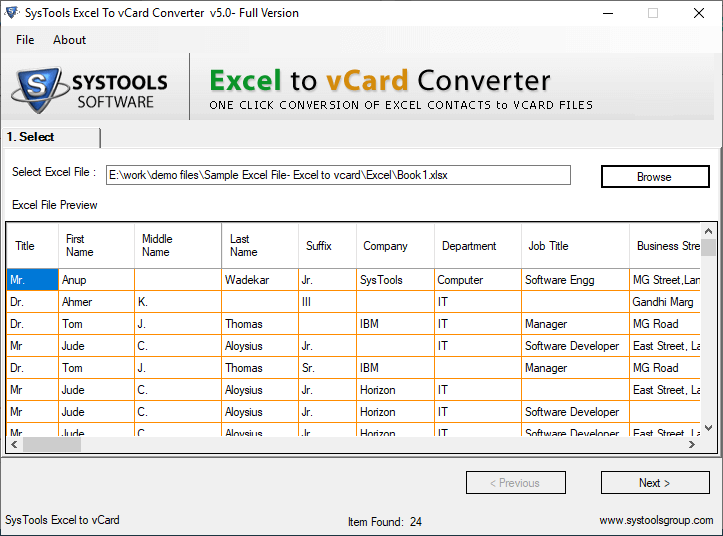
Step 3.Now, select & Map all Excel Fields with vCard Fields.

Step 4.Then select the vCard version, set the saving location and hit the Export button.

You're in good hands
With this CSV to vCard Wizard, now I can convert my CSV contacts files into vCard format and easily access those into my many other platforms. Really a great tool guys! Many Many thanks to the team for such an amazing utility.
One week ago, I was in need to convert CSV to VCF file format for my business purpose. After searching for a lot of tool, I came across this Excel to vCard Converter and found helpful to batch convert CSV files to vCard format. And now I am sorted and all thanks to this tool... Highlly recommended!!"
It is the best tool to export contacts from Excel to VCF format. I'm saying this from my past experience. I have used so many third party apps but only this tool is been able to solve my problem of migrating Excel contacts to vCard format that too in few easy steps.
Technical Specifications

System Requirements
Processor
Pentium Processors
Operating System
Windows 10, 8.1, 8, 7, Vista & XP
Memory
2 GB minimum (4 GB recommended)
Hard Disk
150 MB free space
About Product
Version
5.0
License
Single User
Edition
Personal, Business, Enterprise
Language Supported
English, Japanese, French, Spanish, Italian, etc.

TRY IT OUT FOR FREE
Prefer to Try
Before You Buy
FAQ
Steps to import contacts from Excel to vCard are as follows:
- Step 1. Download and Install Excel to VCF Converter on your PC.
- Step 2. Click on Browse button to add Excel files in the panel and preview them.
- Step 3. Now, you have to map the fields from Excel file and vCard contact file using Map option.
- Step 4. Then set the desired location to save the file and also choose the vCard version.
- Step 5. Finally hit the Export button to continue the process.
This is how you can easily convert Excel to vCard using this utility.
Yes this tool maintains the integrity of the data and will get the same file as in the original one. So, you will not lose any data after conversion of Excel files to VCF file format.
This CSV to vCard Converter is designed with the advanced algorithms to give precise results while working with large sized files. This tool is tested with 40,000+ contacts, so there would be no issue while migrating 6000 or 7000 contacts in a single go.
Yes, demo version of Excel to VCF converter is provided to the users to check the working of the tool before investing any money to buy the pro version of CSV to VCF converter wizard. The free Excel to vCard Converter allows to convert only first 25 contacts of uploaded Excel file.