In this age of digital era, emails play an important role for people and businesses. There are several email services available to the users for better features. That is why people want to migrate their emails. If you are also searching for a solution to Export Embarqmail to IMAP servers, then we have a solution. Follow this blog till the end and you will know how to transfer emails from Embarqmail to IMAP server.
About Embarqmail
Embarqmail is an email service that was originally associated with Embarq Corporation. But, it was later taken over by CenturyLink which is now known as Lumen Technologies. It provides users with web-based email access through which users can send, receive and manage their emails.
IMAP is an advanced email protocol that allows users to access their emails from multiple devices while saving emails in the mail server. Unlike POP3, which downloads and deletes emails from the server, IMAP syncs emails across devices in real time.
Reasons to Export Embarqmail to IMAP Server
- IMAP allows access to emails on multiple devices including desktops, laptops, tablets, and smartphones. Users can read and manage emails without losing important messages.
- Email data remains safe from accidental corruption due to failure in the local system.
- IMAP helps organize emails with folders and filters, making it possible to find and categorize important emails better.
Automated Tool to Migrate Embarqmail Emails to IMAP Account
Yota IMAP Migration tool provides an efficient and accurate solution to export Embarqmail to IMAP server with ease. Users can migrate bulk emails from Embarqmail to any IMAP supported email account without losing any data. With a well-organized user interface, it can be operated by even an new user with less technical knowledge.
Also, the software comes with advanced functionalities, like selective migration of emails, preview before migration, etc. Users can filter their emails based on dates, subjects or even senders before migrations. You can download the free demo to test the working process of the tool.
Steps to Export Embarqmail to IMAP Account are as follows:
- Download and Install Yota IMAP Migration tool.
- Click on Open>> Email Accounts>> Add Account option.

- Enter Embarqmail login credentials and select the emails to migrate.

- Go to Export tab and select IMAP as saving option.
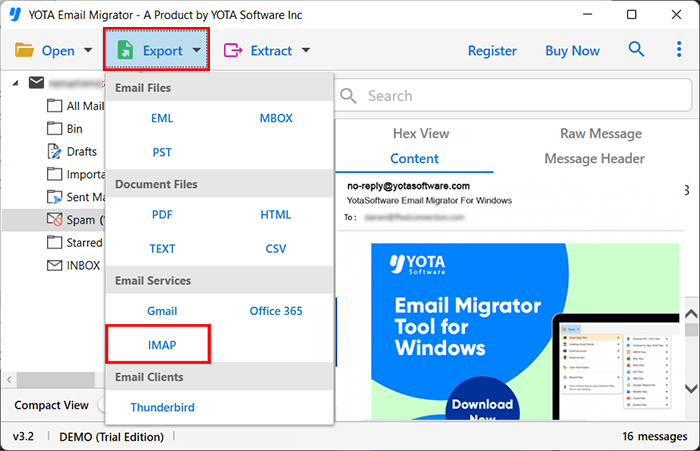
- Finally, enter the IMAP login details and hit the Save button.

Done! This is how you can easily transfer emails from Embarqmail to IMAP account with attachments.
Remarkable features of Yota Embarqmail Migration tool
- It is designed for users with a little expertise in migrating Embarqmail emails to IMAP server in a simple step-by-step approach.
- This tool makes batch email migration possible for users who want to transfer several emails and folders in one go, saving much time and efforts.
- It allows users to filter specific emails or folders for moving emails from Embarqmail to IMAP based upon date, subject, attachments, file size or sender.
- It is capable to maintain the complete folder hierarchy in which folders and subfolders exist throughout the migration process.
- This utility is compatible with all IMAP based email services such as Gmail, Yahoo, Hotmail, Zimbra, Zoho, Outlook, and so on.
- It has advanced algorithms to export Embarqmail to IMAP server quickly without slowing down the system.
- It is Windows compatible tool and is available to users on all Windows OS including Windows 11, 10, 8, 7, etc.
Conclusion
In the above blog, we have discussed the complete step-by-step solution to export Embarqmail to IMAP account with attachments. The tool we have recommended here is 100% accurate and provide the best results. However, it is suggested to try the DEMO version first. So that, you can get the idea about the working of the tool.