Are you having trouble with Gmail automatically sign out of my account without warning? Many users are familiar with this problem. It isn’t very pleasant when Gmail automatically logs you out of your account, even after you’ve successfully logged in. This problem can have many causes, which we’ll explain in this blog, along with simple solutions to fix this issue.
Gmail is the most widely used email service, which can lead to automatic logouts of accounts. If you are also one of the users who constantly face the problem of Gmail automatically signing you out of your account. This article will discuss why my Gmail account getting logged out automatically and how to fix this error. So, keep reading the blog.
Why Does My Gmail Automatically Sign Out of My Account?
There are various reasons behind getting signed out of my Gmail accounts. It is usually not a bug, but it is security setting features that are causing the issue. Some of the reasons, explained below:
- Browser Cookies are Disabled or Deleted: Gmail uses cookies to save your login session. If your browser allows automatic deletion of cookies, you will be logged out each time you close your browser if cookies are disabled.
- Using Multiple Google Accounts: If you use multiple Google accounts and frequently switch between them, an expired session can cause your Gmail account getting logged out automatically.
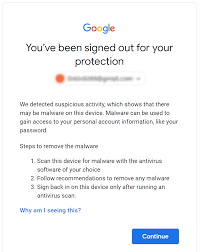
- Security Settings: If your Gmail account detects unusual activity, automatic signout may occur for security reasons when you log in from a new device or location.
- Antivirus or Browser Extensions: Some antivirus programs or browser extensions can interfere with the Gmail sign-in process. This can cause Gmail automatically sign out of my account.
- Outdated Browser or App: An old, outdated browser or Gmail app can cause problems with automatic signout. Always keep your software up to date to avoid Gmail sign-out issues.
- Manually Clear Cache and Cookies: Clearing your browser’s cache and cookies will automatically log you out of your Gmail account the next time you log in.
- Account Settings not set to “Stay signed in”: If your account settings are not set to “Stay signed in,” or the “Stay signed in” option is disabled, Gmail is causing the problem.
How to Fix Gmail Account Getting Logged Out Automatically Issue?
If you are frustrated with Gmail automatically sign out of my account without any warning. Don’t worry! We will guide you on some best tips to fix this issue. Here are some proven tips to help you stay signed in:
1. Use Gmail Regularly: If you haven’t used your Gmail account in a while, you may be automatically signed out of Gmail. To avoid this issue, check your Gmail account regularly.
2. Keep Your Browser Updated: Always use the latest browser version to avoid issues. Gmail works best with Google Chrome, so use it for a smooth and hassle-free experience.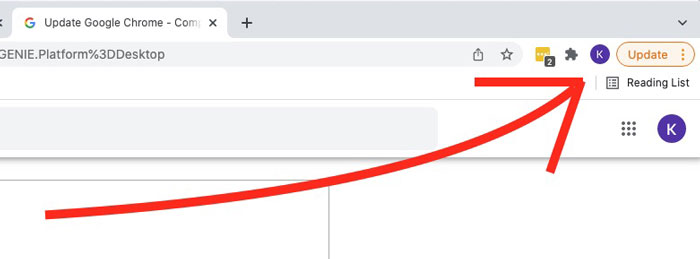
3. Clear Cache and Cookies Periodically: Old and corrupted caches and cookies can cause login issues. Clear your cache weekly or monthly to avoid your Gmail account getting logged out automatically.
- Go to your browser settings on your device.
- Select Privacy & Security >> Clear Browsing Data.
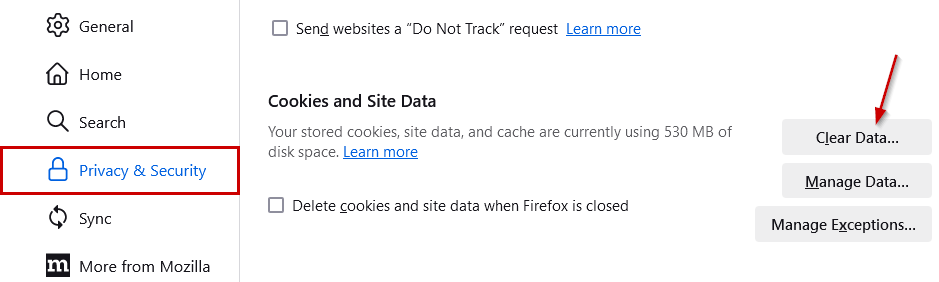
- Choose the Cookies and Cached Files, then click the option of Clear Data option.
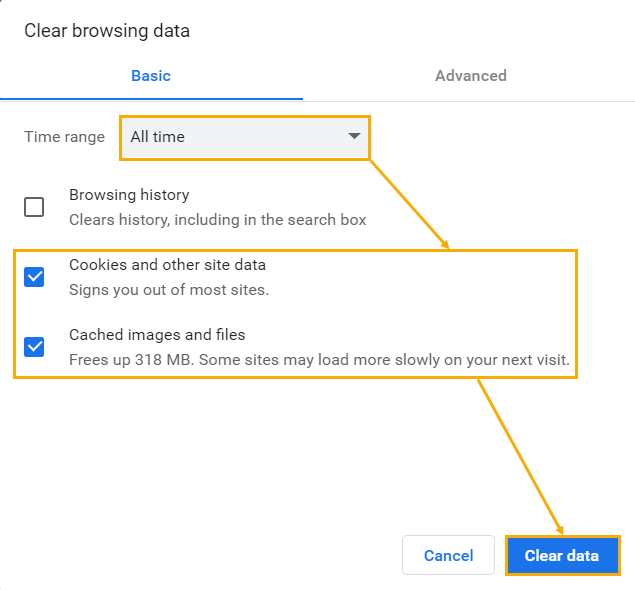
- After clearing, log back into Gmail and make sure to check the “Stay signed in” box.

4. Secure Your Account: You can use a strong password and enable two-factor authentication for increased security. Google may log you out if it detects suspicious activity, so always pay attention to alerts and review your account activity when they occur.
5. Maintain a Stable Internet Connection: Always check your internet connection. A poor connection can cause session crashes. Make sure your connection is reliable to avoid Gmail account getting logged out automatically.
Use Professional Tool to Avoid Losing Access to Your Gmail Emails
If your Gmail automatically sign out of my account without any warning, and you are worried about data loss. Then we suggest backing up your Gmail emails to your PC or hard drive. Using the Yota Gmail Backup Tool can be the best decision to secure Gmail data. This tool can be storing your Gmail emails various file formats. You can export Gmail to PST, PDF, MBOX, or EML.
Your Gmail data can be accessed offline. It’s a reliable tool for both personal and professional users who want to avoid hassle. This gives you complete control over your Gmail data without requiring an internet connection or server availability.
Additional Qualities of the tool
- Backup emails in bulk and save a lot of time and money.
- Option to directly import Gmail to Thunderbird profile
- It can preserve email formatting and original folder structure.
- You can migrate Gmail to Office 365, Yahoo Mail, and other platforms.
- Apply filters to the backup selected Gmail emails only.
- Backup emails from multiple Gmail accounts easily.
- Save and extract attachments from Gmail in just a few clicks.
- Save Gmail emails to your PC in various file formats.
- Try the free version of the email backup wizard before buying the full version.
- Choose from multiple file naming options for organized storage.
Summing Up
In the above post, we have provided you with the best solution and helped to understand why does my Gmail automatically sign out of my account. It can be frustrating, and it is good that most sign-out issues can be fixed easily. There can be many reasons for a Gmail account getting logged out automatically issue such as due to the browser settings, cache or cookies, or security alerts.
Keeping your browser up-to-date and maintaining a good internet connection can help resolve this issue. Additionally, backing up your emails can prevent unexpected unsubscribes and keep your Gmail secure and accessible at all times.