Summary: Are you looking for an effortless way to transfer email from Sympatico to Gmail? Then you are on the right track. In this blog, we will discuss the best and most direct solution to transfer Bell email to Gmail account.
In today’s digital world, email communication has become an integral part of our personal and professional usage. Users are switching from one account to another seeking better features and benefits. And one such query that we are receiving these days is “How to transfer Sympatico email to Gmail account”. This blog discusses the best method to transfer emails from Bell to Gmail account with a direct solution.
Why Transfer Email from Sympatico to Gmail?
Sympatico is one of the largest telecommunications companies in Canada. It offers a range of features, including a customizable inbox, spam filtering, and the ability to manage multiple email accounts in one place. It is the most reliable and secure email service provider in the market. However, when it comes to managing the data of a larger team or organization, Sympatico webmail has its limitations. That is why so many users are looking to import Sympatico emails to Gmail or G Suite account.
Here you will get the answers to these queries, which we receive daily:
- How do I transfer my Bell Sympatico email to Gmail?
- How do I add my Bell email to Gmail?
- How can I migrate Sympatico to Gmail?
- How to do Bell Sympatico to Gmail migration?
Migrating your data from one email service to another can be very challenging, but with the right tools and steps, you can accomplish the task easily. In this blog, we will be discussing the manual solution for the Sympatico to Gmail migration process. We will also introduce you to the fastest solution to move your emails.
Manual Steps to Export Sympatico Emails to Gmail
- Log in to your Gmail account.
- Click the gear icon and select “See all settings.”

- Go to the “Accounts and Import” tab.

- Click on “Import mail and contacts.”

- Enter your Sympatico email address and click “Continue.”

- Enter your Sympatico email password and follow the prompts.
- Choose what to import (emails, contacts) and click “Start import.”

Limitations of Manual Method
- It can take hours if you have large number of emails to export.
- You can’t filter or sort which emails to import.
- Manual settings need a lot of technical knowledge.
Instant Solution to Transfer Sympatico Email to Gmail
If you are planning to migrate multiple emails from Sympatico webmail to Gmail account, then Yota Email Migration Tool must be the best option. This reliable software comes with so many advanced features to transfer email from Sympatico to Gmail account as per the user’s needs. It has been designed by experts for all types of users and its self-navigational panel lets you export Sympatico emails to Gmail in few clicks only.
Another advantage of using this tool is that you can easily import Sympatico email to Gmail in bulk. You don’t have to spend hours selecting emails individually and migrating them one by one. Also, you will not lose any data throughout the migration process. The software also allows you to transfer Bell email to Outlook using the PST file.
Let’s see how this Sympatico to Gmail Migration tool works.
Steps to Transfer Email from Sympatico to Gmail Directly are:
- Start with downloading and Installing IMAP to Gmail Migration tool on your PC.
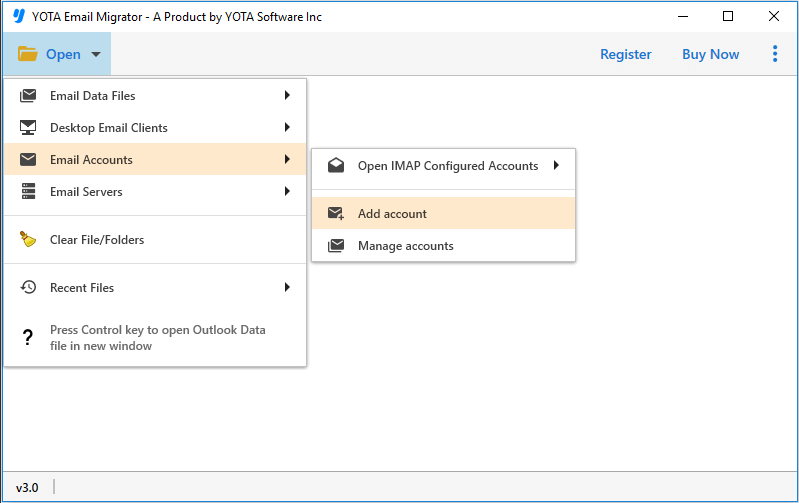
- Click on the Open tab and select Email Accounts>> Add Accounts from the screen.
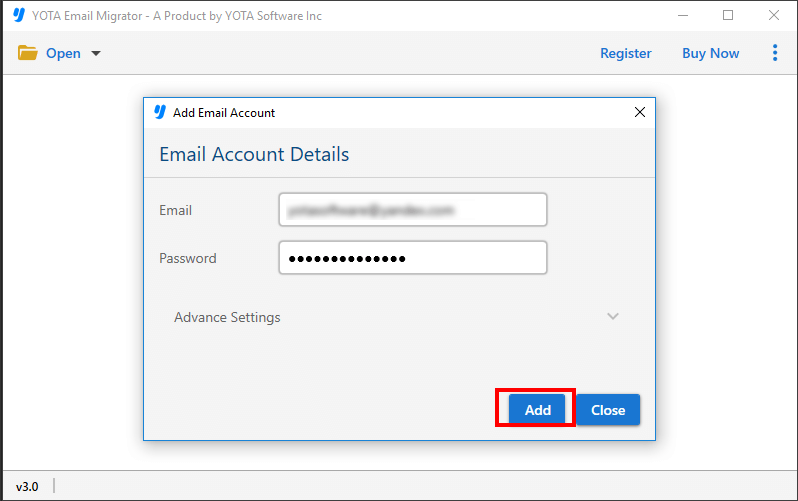
- Next, enter the login credentials of Sympatico webmail and add the files to the panel.
- After previewing the files, click on the Export tab and choose Gmail from the list of saving options.

- Finally, enter the Gmail login details and hit the Save button.

IMAP Settings for Sympatico Webmail
- IMAP Server Address: bell.net
- IMAP Server Port: 993
- User Name: Your full email address.
- Password: Your Sympatico.ca password.
- IMAP Server Security: SSL / TLS
Why Choose Sympatico to Gmail Migration Tool?
- Safe and Secured: When it comes to transfer email from Sympatico to Gmail mailbox, it is very important to choose a reliable and trustworthy solution. It does not save your login details in its database, so you can be sure that your emails are safe. The tool also lets you backup Bell emails to computer.
- User-Friendly Tool: This tool is designed with user-friendly interface which makes the entire process easier for all types of users. So you don’t need technical skills to operate the tool. You just have to follow 3-4 simple steps to transfer Bell email to Gmail mailbox.
- Export Emails with Attachments: This is the best email converter wizard that offers so many valuable features. One of them is its ability to transfer email from Sympatico to Gmail with attachments. In fact, this software migrates the entire mailbox items such as emails, contacts, calendar entries, tasks, attachments, and other files without any hassle.
- Unlimited Migration: The Sympatico to Gmail Migration tool imposes no limitations on file size when migrating from one location to another. That means that you can migrate all your emails, regardless of their size with ease. The tool can handle even the largest files with no issues. Moreover, it does not take much time to create email backup in bulk. This can save a lot of time and effort.
Conclusion
So, now we have provided a comprehensive guide to transfer email from Sympatico to Gmail account using the automated solution. By utilizing this tool, you can easily get accurate results without any complications or restrictions on file size.
We have given all the steps to add Sympatico email to Gmail or G Suit account. But still, if you encounter some issues while using the tool, you can contact our support team. They are always available to help you resolve any technical difficulties you may face during the bell email to Gmail migration process.
So, don’t hesitate any longer. Download the tool and simplify your Sympatico to Gmail migration process today!


