best msg to pst converter

Yota MSG to PST Converter

  • Dual option: convert single as well as multiple MSG files
  • Convert MSG to PST file along with all email attachments
  • Provide option to export selective messages to PST file
  • Convert MSG files to PST without Outlook installation
  • Full preview of all email messages with all attached info
  • Best MSG to PST converter for bulk email conversions
  • Fully operable on Windows 11, 10, 8, and earlier versions
  • Advanced option to create a individual PST file for each folder
  • Import MSG into Outlook 2021 and other versions via PST
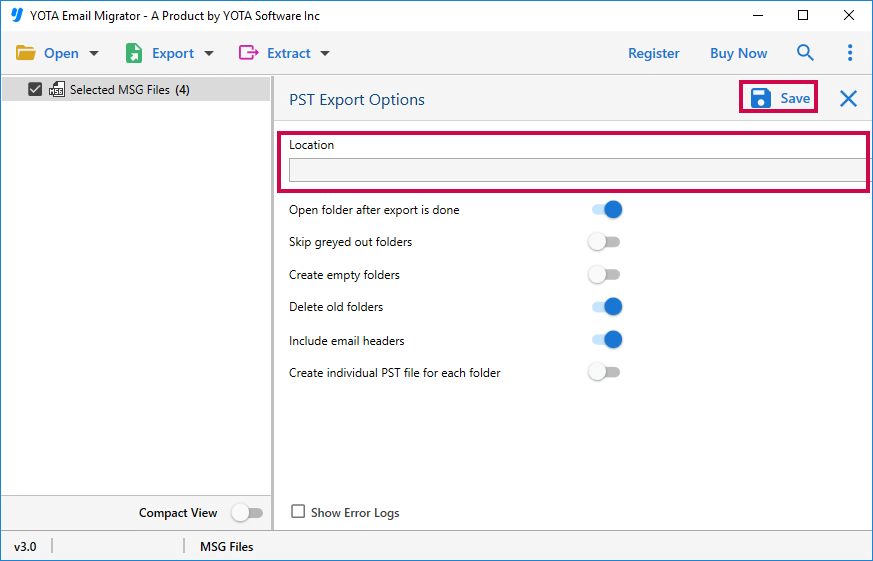
  • Able to save resultant file in desired folder for easy access
*Download free version of MSG to PST Converter tool and export 10 emails per folder.

Product Walkthrough

Screenshots & Video

Product Screenshots

Product Video

msg to pst converter play
watch video

how to convert

MSG to PST Without Outlook

Why Choose Yota MSG to PST Converter?

This is a hassle free solution to convert MSG files to PST file with attachments. It is enriched with advanced options like automatic detection of MSG files and it also facilitates to save the resultant file at the selected folder on your computer. This Outlook message to PST file converter is fully featured tool that does not required any other application to convert multiple MSG files to PST. One can easily merge MSG files into PST with 100% accuracy.

Unlimited File Conversion

The MSG to PST Converter tool is a highly advanced utility which has a power to export as many MSG files without losing a single data information. Moreover, you are free to convert multiple MSG files to PST format in just a single attempt.

Keep Data Intact

It preserves all your data in its original format even after converting MSG to PST. Important email details such as To, From, Subject, Attachments remain intact. The tool also keeps the folder structure intact, so you can easily access the converted PST file.

24/7 Support

This is the best way to convert MSG to PST without Outlook application. It has a full-time customer support service and the user can ask their questions or concerns about the products. The support team is always available for you via live chat or email.

Prominent Features of MSG to PST Converter Tool

Here are the some outstanding features of this software:

best msg to pst converter

Convert MSG to PST Securely

The MSG Converter for Windows is totally secure and free from viruses. It let you convert MSG files to PST file format along with all attached information. It does not even change a single information during whole conversion.

convert msg to pst in bulk

Maintains the Folder Hierarchy

During the process, the MSG to PST Converter tool will retain the folder structure of a complete database, without any changes or loss of files. This software is designed in a way that it preserves the hierarchy of folders after the conversion of PST file. It also maintained the structure of the attachment as it is after conversion.

msg to pst converter

Custom Name Settings

It provides the option of renaming the output files based on various parameters like subject, sender, time or date. Using this advanced feature you can save the converted MSG files at your desired location with your own customized file name. This will help you a lot while searching for a specific file.

export msg to pst

Outlook Installation Not Compulsory

MSG to PST converter lets you convert MSG files to PST format whether Outlook is installed or not. Outlook installation is not mandatory to perform the conversion of files. All you need is MSG data files and you can perform merge MSG files into PST without any problem.

export msg to pst

Search and Filters Emails

The tool provides an advanced feature to search a file using filter option. This software is equipped with different searching parameters that include Subject, From, To, Sent Date, Received Date & Modification Date. Using this option you can filter out a specific email and convert MSG to PST file easily.

free msg to pst converter

Conversion in Batch Mode

This is flexible tool to convert multiple MSG files to PST format by selecting "Add Files" or "Add Folders" option respectively. It creates a single PST file whether you export single or multiple MSG files. It is recommended to use "Add Folders" option to merge MSG files into PST file.

The Best Customer Experience

Do you want to know why so many businesses like working with us?
Here’s what they have to say about it.

star rating

4.8 Overall Satisfaction Rating! Based on 1269 Reviews

Let's Try!
Download the Best MSG to PST Converter Now

Seamlessly Convert MSG Files to PST Without Outlook

Common Questions Asked by User
How to convert MSG to PST without Outlook?

Steps to convert MSG files to PST without Outlook are as follows:

  1. Install MSG to PST converter and click Open.
  2. Go to Email Data files and select MSG files.
  3. Click on Export and select PST as file saving format.
  4. Choose the desired location and click on the Save button.

This is how the software will convert multiple MSG files to PST format.

Is this software support Windows 11?
Yes, this MSG to PST Converter works with any version of Windows, including latest 11, 10, etc.
Can I merge MSG files to PST file?
Yes, it provides an option to merge multiple MSG files into a single PST without losing any kind of information.
I want my data format intact even after conversion. How can your software help me?
This powerful MSG to PST converter software is designed in such a manner that it can convert MSG files to PST format by maintaining the data integrity. Means it will not change the data format and also it ensures no data loss.
Can I export MSG files of Outlook 2021?
Yes, with this software, one can seamlessly convert MSG files to PST from the latest Outlook 2021 version and all the prior versions.
How can I convert multiple MSG files to PST at once?
With the help of this tool, you can convert any number of MSG files to PST file format directly. It offers two options to add MSG namely selected files or selected folders. If you select folder, the software will export all data stored in the folder in a single attempt.