Overview: In today’s world emails play an important role in business communication. With the advance technology, users are switching from one email service to other for better features and options. If you are also one of them who is looking to migrate emails from Mail.ru to Gmail account, then this is the right blog for you. This comprehensive guide provides you the detailed steps and insights to export Mail.ru emails to Gmail account along with attachments. At first, migrating emails from one account to other seems very difficult but with right approach and tool, it becomes very easy. Here, we will take help of Yota Email Migration tool for Mail.ru to Gmail migration process.
There could be various reasons why you might want to migrate Mail.ru emails to Gmail. It could be due to a change in your email provider, better features offered by Gmail, or the need to consolidate multiple email accounts into a single account. Whatever the reason is, it is very easy to migrate emails from Mail.ru account to Gmail mailbox in hassle-free way.
Similar Blogs:
Direct Solution to Migrate Emails from Mail.ru to Gmail
Yota IMAP Migration Tool is highly recommended utility to migrate emails from Mail.ru to Gmail or G Suite account. It offers a seamless and hassle-free process that lets you export complete mailbox items including emails, contacts, attachments, tasks, etc. with ease.
With its user-friendly interface and robust features, this software is designed to fulfil all your needs. It has bulk conversion option that enables you to convert Mail.ru emails to Gmail while preserving the integrity of the data throughout the process. Apart from that, it has intuitive graphical user interface that makes it incredibly easy to navigate and use. All you need to follow some simple steps to transfer multiple emails from Mail.ru mailbox to Google Mail account without unnecessary complications.
For your convenience, this IMAP to Gmail Migration tool provides a free trial version that allows you to explore its functionalities and become familiar with its working process before purchasing the tool. Using trial version, you can migrate few emails from Mail.ru to Gmail account and gives you an opportunity to evaluate the tool without spending your money. After that you can buy the software for unlimited benefits.
How to Migrate Email from Mail.ru to Gmail Account? – Quick Steps
- Download and Install Yota Mail.ru Migration tool on your PC.
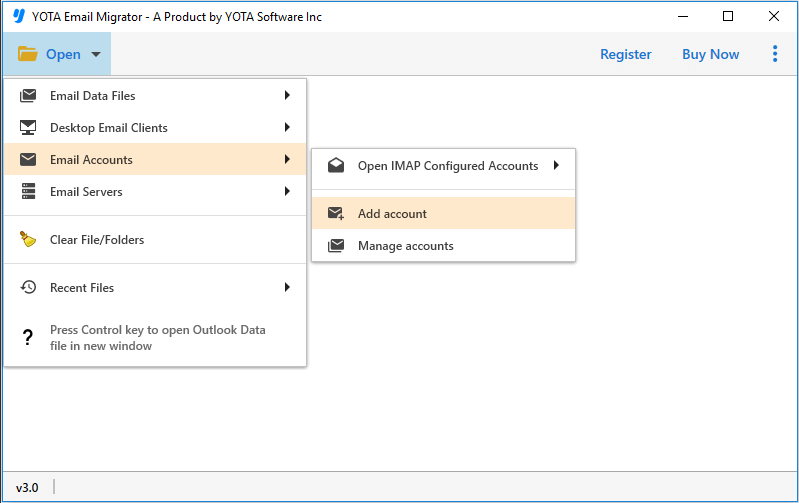
- Click on Open>> Email Accounts>> Add Account option.
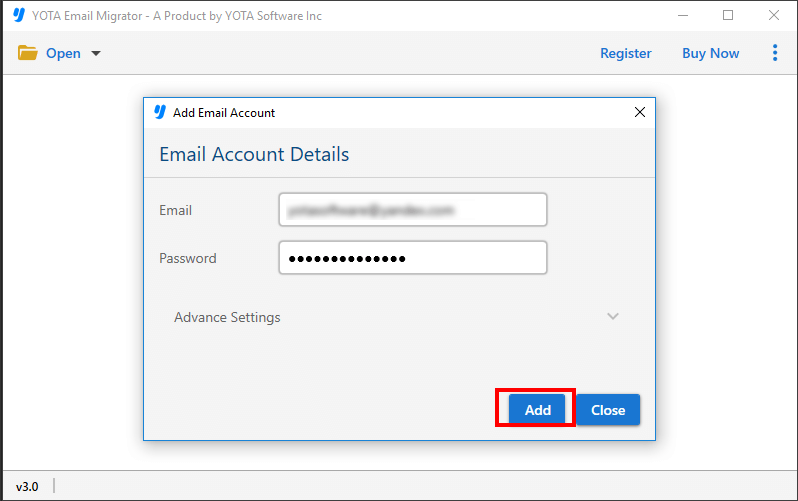
- Next, enter Mail.ru Login details and preview the files.
- Then, click on Export tab and select Gmail as saving option.

- Lastly, enter the account details of Gmail account and hit the Save button to import Mail.ru to Gmail.

Some Frequently Asked Questions
Can I migrate all my Mail.ru emails to Gmail at once?
Yes, using the this tool, you can migrate emails from Mail.ru to Gmail in one go. It simplifies the process and ensures a smooth transition.
Can I migrate other data besides emails, such as contacts and calendar events?
Yes, you can utilize this Email Backup Software to export emails, contacts and calendar events from Mail.ru to Gmail account without any extra plugin.
Is Yota Mail.ru Backup tool compatible with all Windows OS?
Yes, the this Mail.ru to Gmail Converter tool is compatible with all latest and older Windows operating systems. You can use it on your Windows 11, 10, 8, 7 PC without any issues.
Conclusion
In conclusion, moving Mail.ru emails to Gmail is a straightforward process when you have the right tools and guidance. By following the step-by-step instructions provided in this guide and utilizing the Yota IMAP Migration tool, you can seamlessly migrate emails from Mail.ru to Gmail mailbox with attachments. Download the software today and unlock the full potential of your email experience!