yota google takeout converter

Google Takeout Converter

Fast and reliable tool to export Google Takeout data file in various formats without installing any external program. Free Download the trial version on any version of Windows.

  • Export Google Takeout to PST, EML, CSV, and other formats
  • Convert a large number of Takeout files without data loss
  • Transfer Takeout files directly to over 200 email accounts
  • Export selected data from the Takeout folder securely
  • Helps to open Google Takeout files data in several platforms
  • Maintain data integrity with all metadata during conversion
  • Option to choose your desired location for the output file
  • No file size limitations to bulk convert Google Takeout files
  • Successfully compatible with MS Windows 11, 10, 8, and 7
*Download Trial Version of Google Takeout Converter and Export 10 Items Per Folder Free
Product Walkthrough

Screenshots & Video

Product Screenshots

Product Video

google takeout converter play
watch video

how to extract

Data from Google Takeout to Multiple Formats

Why Choose Yota Google Takeout Converter Wizard?

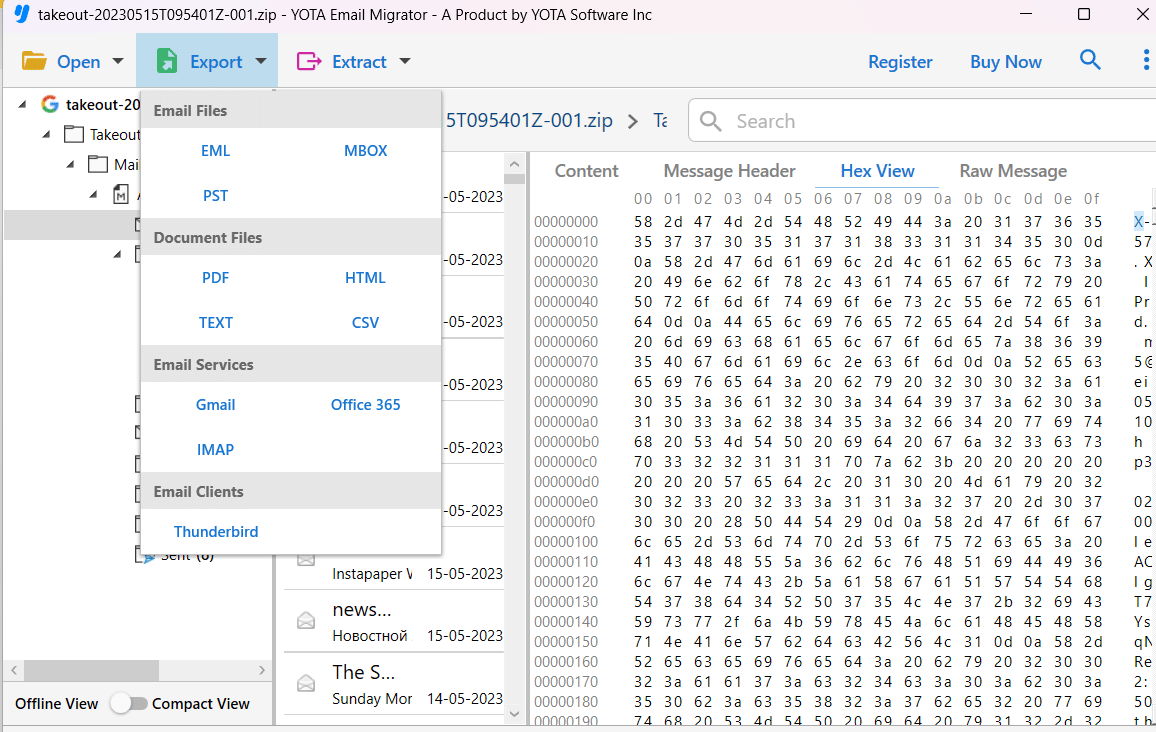
Google Takeout is a free service for exporting data from Google apps like Gmail. It provides a ZIP file containing the downloaded data. After extracting the file, you will get an .mbox file. To export Google Takeout data to other formats, the Yota Google Takeout Converter is the ideal solution. It allows you to convert the data directly from the ZIP file without having to extract it first. The software converts Google Takeout files to formats such as PDF, MBOX, EML, CSV, PST, and more. You can save the exported file to your desired location on your system. Thanks to its user-friendly interface, the software is easy to use even for less tech-savvy users. Furthermore, it enables the transfer of emails from Google Takeout to various email services. With this, you can also extract attachments from Google Takeout on your computer.

Fully Standalone

You can easily convert your Google Takeout data files to your desired format without needing to install any additional applications on your system. You only need to download and install this software for extracting Takeout data.

No Loss

Google Takeout Converter uses an advanced algorithm that ensures no important information is lost during the conversion. The folder and subfolder structure is preserved. This software also makes no changes to the email formatting.

Multiple Saving Options

This is a fantastic tool that helps you transfer all your data from Google Takeout. It allows you to convert Google Takeout files into various formats such as EML, PST, PDF, MBOX, etc. You can also transfer your Google Takeout data to any IMAP-compatible email service.

Prime Features of Google Takeout Data Converter

Here are the some outstanding features of this wizard.

google takeout converter free

Support Various Formats

Yota Google Takeout Converter is an ultimate tool to export Google Takeout data files in many different formats. You can save Takeout files to CSV, HTML, and many other formats. It helps you to move your entire data like emails, contacts, calendars, tasks, notes, and more to your desired format. The software provides you the best solution for exporting all your emails without missing a single detail.

takeout to cloud

Transfer Data to Cloud

The software not only supports various file formats but can also transfer Google Takeout files to numerous web-based email servuce providers. You can import Google Takeout to Gmail, Zimbra Cloud, Hotmail, Microsoft 365, Zoho Mail, and other IMAP email accounts. All you need for the migration is your account credentials. The software is completely secure and does not store any personal data.

simple interface

Modern and Easy Interface

Yota Google Takeout Converter is built with simple and self explanatory wizard that does not require any other installation to perform the task. This software has been designed by experts by keeping all types of users and hence can be used by both new as well as experienced users with ease. You don't require any complex configurational settings to convert Takeout mailbox items.

maintain folder structure

Preserve the Folder Hierarchy

This is a perfect tool that can be used to export emails and contacts from Google Takeout folder to your desired target location with high speed and accuracy. The best part of the software is that it securely maintains the folder hierarchy, so there will be no modification in the original folder hierarchy of the email folders. There is no worry about data loss.

filter option

Advanced Filter Facility

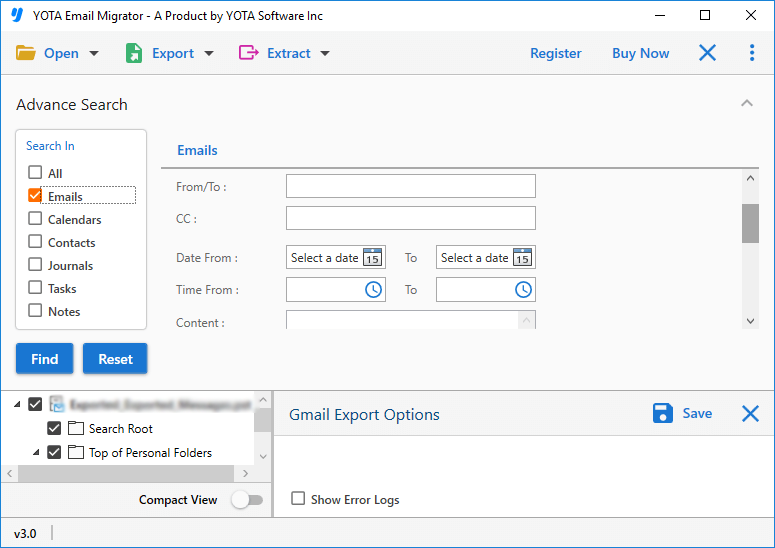
The tool not only transfers emails from all folders but also allows you to move only specific emails from Google Takeout ZIP file. It offers a filter option that allows users to filter their emails by Date Range, Time, Content, To, From, CC, etc. In addition, users can search emails by typing the specific keyword in the search box to transfer only selective emails

Additional Benefits of Google Takeout Converter Wizard

Bulk Conversion

Google Takeout data converter has a bulk mode option that allows users to move multiple emails, contacts, and other data from Google Takeout zip file in a single attempt. All you have to do is select the folders that contain emails and other data.

Different Preview Modes

Once you add the Google Takeout ZIP file to the panel, the Google Takeout converter tool will show you a quick preview of the complete data. Users can view Google Takeout files in different modes such as content, raw message, hex view, and raw message.

Retain Email Formatting

With this software, no single information is changed or lost during the conversion. It keeps all meta properties and email formatting (subject, to, cc, date, time, attachments, hyperlinks, etc.) exactly as they were before conversion. This is one of the useful feature of this wizard that make it more powerful.

Save Files Locally

It allows you to export Google Takeout files and save the resulting data in the desired path. The Google Takeout converter wizard provides a useful option to browse your system for a location where you want to save the resultant files. This allows users to seamlessly access their emails after conversion.

Full Customer Support

If you have any questions or problems with Google Takeout Data Converter installation, payment, etc., you can contact the customer support team. They are available 24/7 and will give you a quick response to your concern.

Windows Compatibility

The best thing about this software is that it can run successfully on any version of the Windows OS. Users can download it on Windows 11, 10, 8, and 7. In addition, it can be installed in multiple languages like English, German, Japanese, and others.

The Best Customer Experience

Do you want to know why so many businesses like working with us?
Here’s what they have to say about it.

star rating

4.9 Overall Satisfaction Rating! Based on 1518 Reviews

Let's Try!
Download the Best Google Takeout Converter

Experience the effortless process to extract data from Google Takeout files.

Looking For Help?

Common Questions Asked by User
How do I export Google Takeout file?

Steps to export data from Google Takeout file into multiple formats:

  1. Launch Yota Google Takeout Converter Tool.
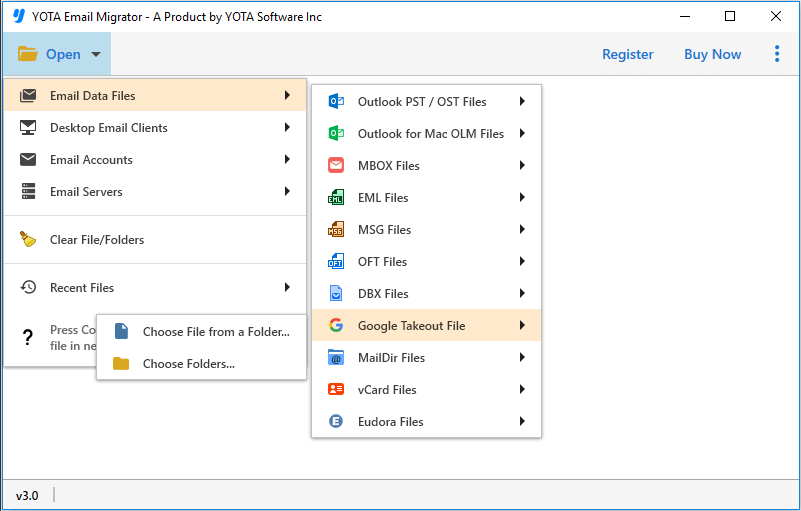
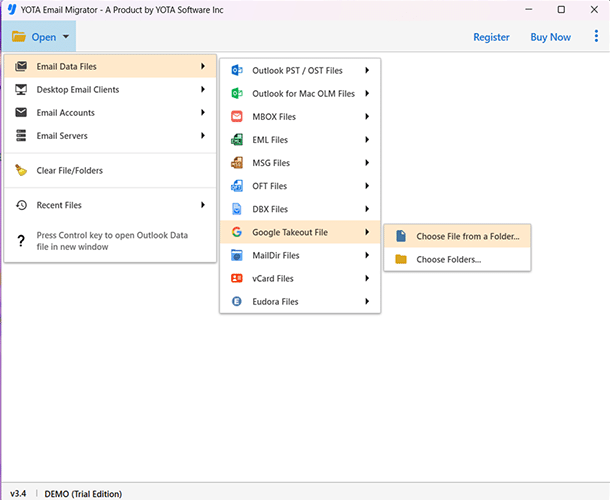
  2. Click Open, Email Data Files and choose Google Takeout files.
  3. Add and preview Zip file data along with attachments.
  4. Click on Export and select the desired saving option.
  5. Browse location to store the output and click Save.

This is how you can convert Google Takeout file into different formats with all attachments.

Can I preview the files before making conversion?
Yes, this utility has in-built preview feature that lets you view the files with all important information prior to make any change to the original folder.
Does it support latest Windows 11 operating system?
Yes, the software supports all Windows operating system including the latest Windows 11, 10, 8.1, 8, 7, etc.
Do I need to worry about data loss while using Google Takeout Converter Wizard?
No, the tool has been integrated with powerful engines that do not modify or alter any detail during conversion. It maintains the meta properties like to, cc, bcc, subject, date & time, throughout the Google Takeout conversion process.
Can I export 100 Takeout files into PDF format using this tool?
Yes, you can export Google Takeout files in bulk with no file size restriction with this reliable wizard.
Is Google Takeout Converter free?
You can download the trial version of this Yota Google takeout converter for free. With it, you can convert the first 10 emails for free. To export more, you can buy the full version directly from the software interface.
How do I read Google Takeout data?
Google Takeout Converter is designed to read and convert Google Takeout file data in multiple file formats and webmail accounts without any data loss.