imap migration tool

Yota IMAP Migration Tool

The best IMAP to IMAP migration tool to migrate emails from IMAP account to another IMAP-supported email accounts and email clients.

  • Ability to migrate IMAP emails to multiple email applications
  • Directly migrate IMAP to Gmail, Microsoft 365, Outlook.com, etc.
  • Preserve folders and sub-folders structure during migration
  • Can extract email addresses and phone numbers from the mailbox
  • Preview all emails from the mailbox before IMAP migration
  • No restrictions for migrating large-sized IMAP account emails
  • Enables batch IMAP migration without losing important data
  • Compatible with all versions of the Windows Operating System
*Download trial version of IMAP Migrator and transfer 10 items per folder for free

Select the Email Client of your Choice

microsoft 365

Microsoft 365

exchange server

Exchange Server

google workspace

Google Workspace

outlook

Microsoft Outlook

workmail

Work Mail

gmail

Gmail

gmx

GMX

webmail

Webmail

SEE ALL SOLUTIONS

Product Walkthrough

Screenshots & Video

Product Screenshots

Product Video

best imap migration tool play
watch video

how to migrate

Emails from IMAP to IMAP Account

Why Choose Yota IMAP Migration Tool?

If you need to move your emails from IMAP account to any other email services like Yahoo, Outlook.com, and more, this IMAP Migrator is the best solution. It is very handy to use and can migrate emails to various email servers and cloud-based email services. You can also say that it is the best IMAP to IMAP Migration Tool that lets you transfer your emails from one account to another. It is a comprehensive solution that can migrate all of your email data from IMAP account, including emails, contacts, notes, tasks, journals, calendars, and attachments without any restriction.

Unlimited Migration

The best IMAP migration tool is programmed well and lets users to migrate unlimited emails from IMAP accounts without any interruption and data loss issues. You can also transfer emails from multiple IMAP accounts one by one using only login credentials. Moreover, it provides an option to perform IMAP to IMAP migration.

101% Fast and Secure

Our cutting-edge technology ensures that your email transfer is completed quickly without risking your valuable information during the process. Plus, user-friendly interface makes it easy for anyone to handle. Also, our self-navigational panel provide complete support at every step. So why wait? Try the best IMAP migrator today!

Millions of Satisfied Users

Ready to migrate your emails to a new service? Look no further than our comprehensive IMAP to IMAP Migration tool! This powerful software is capable to import IMAP emails to any mail server or provider. With over millions satisfied users, this tool is being preferred by many professionals accross the world. It is tried and tested tool.

Prime Features of the Best IMAP Migration Tool

Let's look at some highlighted features of this IMAP Migrator

yota imap migrator

Support Various IMAP Servers

This Email Migrator tool has been designed to support over 200 IMAP server clients. This way users can import their emails to the desired location, no matter which email client they are using. It supports all popular email services like Yahoo Mail, or any other IMAP server client like Earthlink, Outlook.com, IONOS, AOL mail, Zoho mail, Yahoo Mail, and more. With such a great compatibility of IMAP account, you can be confident that it will work with your mailbox data and provide you with a smooth IMAP to IMAP migration experience.

best imap migration tool

Highly Compatible

No matter what version of Windows you're using, the best IMAP migration tool is fully compatible with all editions. Whether you have Windows 11, 10, 8, 7, or an earlier version, you can easily use this tool to migrate emails from IMAP server to sthe desired location without any concerns about compatibility. Also, it can be installed on 32 & 64-bit machines seamlessly.

yota imap migration

Selective Migration

IMAP to IMAP migration tool offers wide range of Filter options that allows users to migrate IMAP emails. Now, this feature is very helpful for those who don't want to transfer their entire mailbox data. They can easily select the required filter including date range, name, subject, to, from, bcc, cc, and more to convert only the needed emails. It can save a lot of time also because you can easily filter out irrelevant emails and only export the ones that are important to you.

best imap migrator for windows

Bulk Migration

This versatile IMAP Migrator has been equipped with so many advanced features and one of them is its Batch Migration feature. You can migrate multiple IMAP emails in a single process without selecting individual emails over and over again. Instead, you can choose one or multiple folders that contains hundreds and thoudsands of emails and add them into the software panel for migration. This not only saves time but also makes sure that all emails are migrated accurately.

best imap migration software

Preserve Meta Properties

The software is integrated with a top-notch technology that reatins the data integrity of emails while migrating IMAP emails to other email accounts. This means that all mailbox data, including emails, contacts and attachments is migrated with its original formatting and metadata intact. Out top-most prioroity is to keep your data safe that is why our experts have designed this free IMAP Migration Tool in such a way that you will get the accurate results after complete migration.

 imap migrator for windows

Email Preview Option

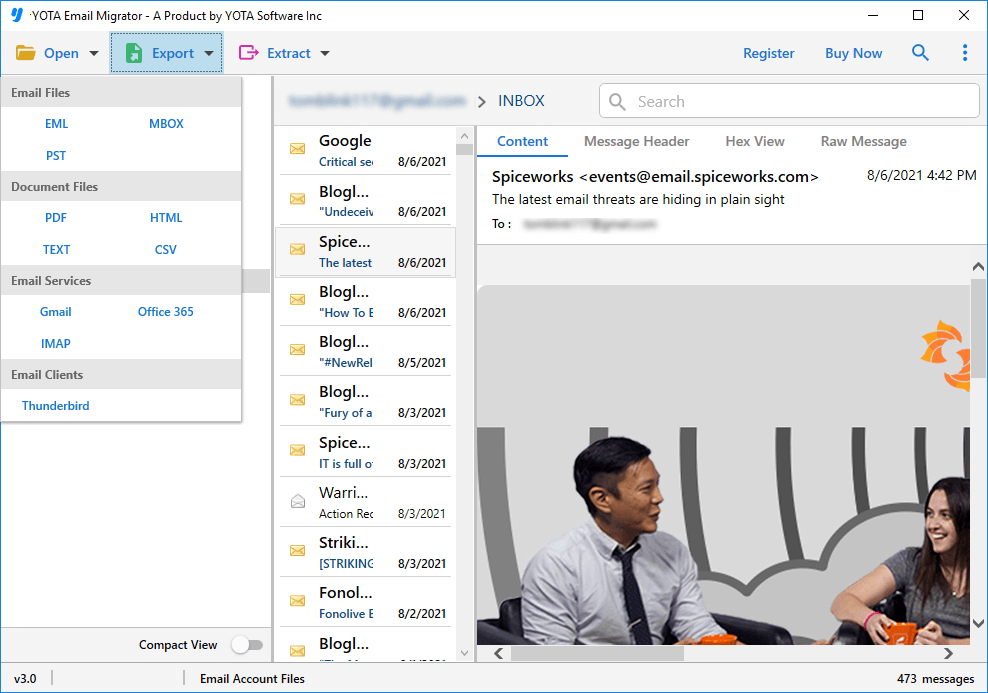
When using this tool to import emails from IMAP account to other platforms, you'll be able to preview all your emails before starting the migration process. This IMAP migrator will display all the information regarding to the emails with all im portant information. You can also view attachments from the same window. Also, this tool lets you assess each and every emails so that you can seelct the emails that you want to convert.

best imap migration tool

Maintain Folder Hierachy

The best IMAP migration tool also maintains the hierarchy of your folders and subfolders while migrating IMAP emails to the desired service. This software is fast and easy to use, allowing even novices to migrate their IMAP emails effortlessly without the help of a technical expert.

Outstanding Key Features of IMAP Migrator

Perform IMAP to IMAP Migration

The best IMAP migration tool permits you to transfer IMAP emails to another IMAP-supported account or service. You can migrate emails from IMAP to Yahoo, Amazon Workmail, Stofa Mail, Roundcube, Rackspace Webmail, Bluemail, Cox Mail, Runbox, TalkTalk, Yandex Mail, Rediffmail, and many more accounts directly.

No Information Leakage

The Yota IMAP Migrator is known for its accurate results. No account information is stored or shared during the migration, so you don't have to worry about sharing account information. Additionally, it provides an advanced option to view the progress report and status of live migration on the screen.

Free Trial

The best IMAP migration tool also offers its users a demo version. This allows you to migrate the first 10 emails from each folder for free. The goal of the demo version is to test the software's functionality and features before investing. To migrate unlimited emails, you can easily purchase the licenese key via email or chat.

Customer Support

If you ever stuck with our solution, have no fear! We offer full time dedicated customer support to help you with any issues at the time of migration. Our knowledgeable team is always ready to help you out. Whether you prefer email or chat support, we've got you covered and make your experience as effortless as possible!

Check Report and Status

The IMAP to IMAP migration tool displays the report and status of the live IMAP migration process. You can see how many emails have been migrated and how much time remains for the migration to complete. Overall, this feature helps you simply check the status of your IMAP provider.

Migrate Emails from Multiple Accounts

This IMAP migrator is a complete solution for migrating your IMAP emails. It allows you to transfer emails from multiple IMAP accounts one by one. Simply enter the email ID and app password of your accounts to begin the migration.

Additional Features of the Best IMAP to IMAP Migration Tool

preview option

Various Preview Options

Introducing the best IMAP migration tool for Windows that's powerful, comprehensive, and user-friendly all at once! And to make things even better, this software offers a detailed preview feature that lets you have a sneak peek of your emails before importing them.

Available View Options are...
  • Content View
  • Properties View
  • Message Header
  • Hex View
  • Raw Message
extract attachment

Extract Attachments

It's the perfect solution for those who need to extract attachments from IMAP emails. With its user-friendly and intuitive interface, you can easily extract attachments without any hassle.

extract phone numbers

Extract Contact Numbers

Looking for a tool that can extract phone numbers from emails accurately and efficiently? With its high-precision algorithms, this IMAP migrator tool can extract thousands of mobile numbers with ease

extract email address

Extract Email Addresses

This software also allows users to extract email addresses from multiple IMAP accounts. With the ability to export email addresses from large or unlimited mailboxes simultaneously, it can save your time and effort.

extract photos

Associated Email and Phone Numbers

This tool is capable of exporting phone numbers from a large number of emails, regardless of the number of contacts present in each email. So, no matter how many contacts you have, this software can easily eport them all.

The Best Customer Experience

Do you want to know why so many businesses like working with us?
Here’s what they have to say about it.

star rating

4.8 Overall Satisfaction Rating! Based on 1272 Reviews

✒ Share your Feedback

Let's Try!

Download the Best IMAP Migration Tool Now

Migrating Your IMAP Emails to the Desired IMAP Service in a Few Steps

Looking For Help?

Common Questions Asked by User

How do I migrate IMAP emails to other service?

Steps to migrate emails from IMAP to another service or account are as follows:

  1. Install the Yota IMAP Migration Tool on your PC.
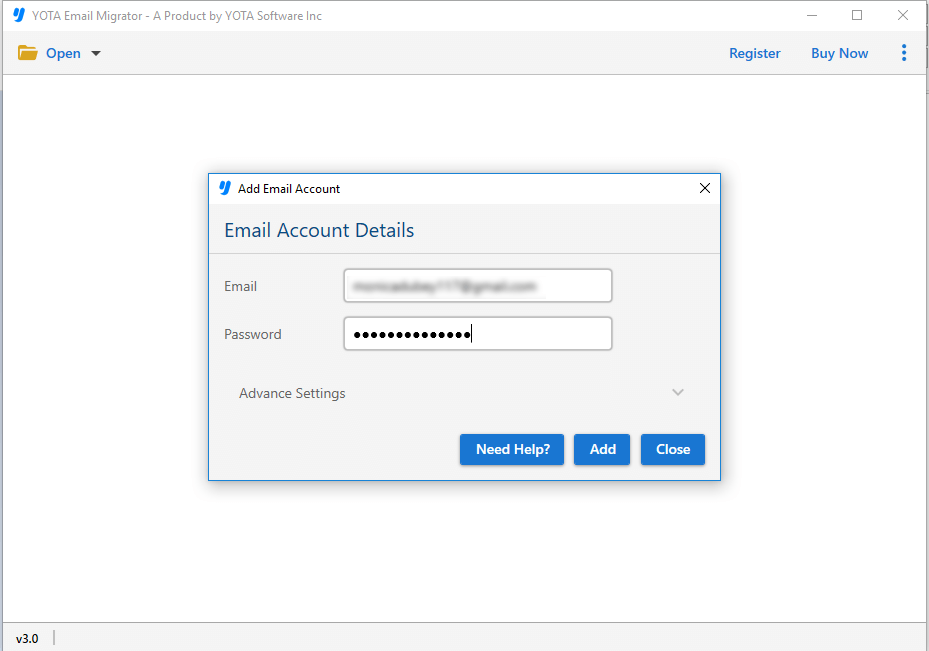
  2. Go to Open, click Email Accounts and select Add Account.
  3. Enter the Email Address and App Password of IMAP Account.
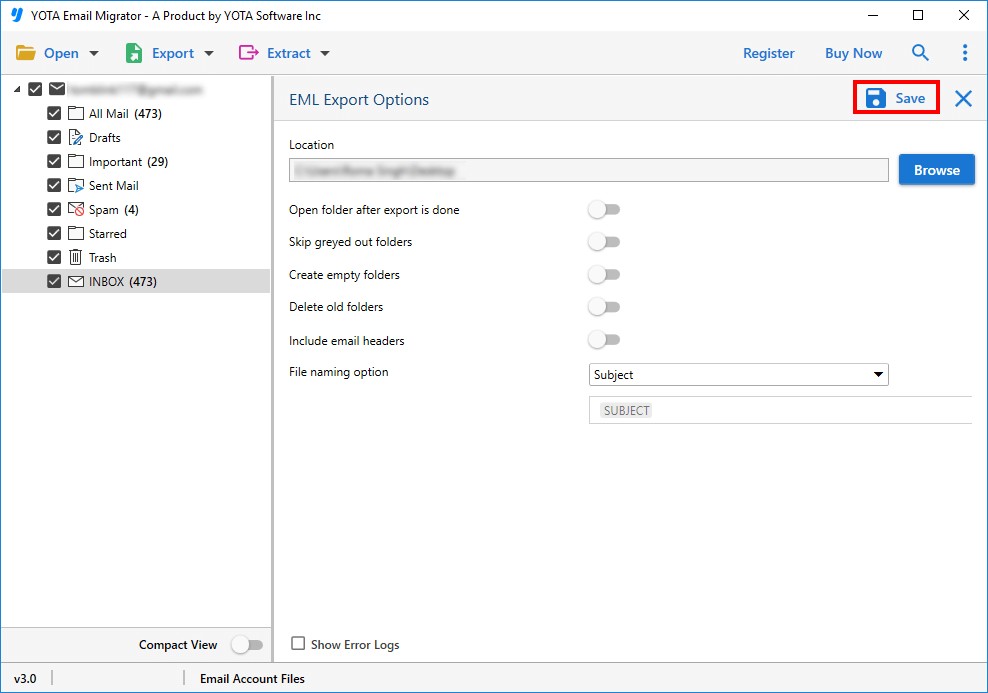
  4. Click on Export and select a desired saving options from the list.
  5. Enter the login credentials of other account and click Save.
Can I transfer emails from one IMAP account to another?
Yes, this IMAP to IMAP migration tool allows you to migrate your IMAP emails to another IMAP provider in a direct way using only login credentials.
Does this software keeps the emails same as the original even after migration?
Yes, this software is designed to migrate IMAP emails to other email accounts with intact data integrity. The folder structure and mets details of the emails remains the same throughout the process.
Is this IMAP migrator capable to migrate multiple IMAP emails at once?
Yes, this tool is capable of migrating multiple emails at once. It can handle a large number of emails and perform the migration process simultaneously, thus saving a considerable amount of time and effort for the user.
What is the best IMAP migration tool?
Yota offers the best IMAP migration tool to quickly migrate emails from IMAP account to another IMAP email services.
What is IMAP used for?
IMAP allows you to access your email anywhere, from any device. When you use IMAP to read email messages, you don't actually download them to your computer. Instead, read it via your email service.